Show your coding agent the database schema before it changes code
By Flavio
Updated
Map your app's tables and fields once with Architecture Dissector, so your coding agent reads the schema before editing and spots when a migration made it stale.
You ask a coding agent to add a feature, and it writes a query against a column that doesn’t exist. Or it adds a tags field to recipes when there’s already a recipe_tags table. The agent didn’t look at the schema first, because nothing told it where the schema was or that it mattered.
Reading migrations on every task is slow, and the agent often reads only the first one. What you want is a short, current description of every table and field, in one place, that the agent reads before it touches the code.
Architecture Dissector keeps that description. An agent maps what your app stores, table by table and field by field, and saves it with the blueprint command. Any agent can then print it with blueprint show --data --json, and blueprint status says when a new migration made it stale.
At the end you’ll have the schema mapped, every agent reading it first, and a way to see how it changed between releases.
What you need
Architecture Dissector runs on macOS 14 or later, on Apple silicon and Intel Macs. After buying it, download the app zip from your Polar receipt, unzip it, and drag Architecture Dissector to your Applications folder. The receipt also has the full MIT source code of the same version.
You need a coding agent that can run shell commands. The agent skill that comes with the app links itself for Claude Code, Cursor and Codex.
Your project has to be a git repository. Architecture Dissector records a hash of every file when the map is saved, and blueprint status needs git to compare against it.
Open Architecture Dissector once, then use two items in its application menu:
- Install Command Line Tool… links
blueprintinto/usr/local/bin. - Install Agent Skill… copies a skill to
~/.agents/skills/blueprintand links it for those three agents.
The preflight check is one command in Terminal:
blueprint --versionblueprint 1.3.1If you get “command not found”, run the install item again. The skill also tells agents the full path, /Applications/Architecture Dissector.app/Contents/Helpers/blueprint, for when blueprint isn’t on the PATH.
The project, paths and commit hashes below come from a real run on a small made-up app called recipe-box. The names are examples.
Have your agent map the tables once
Architecture Dissector doesn’t parse your code or connect to your database. An agent reads the migrations and models, writes what it finds as JSON, and saves it. That’s the whole mechanism, and it’s why the map can cover SQLite, Postgres, Convex collections or a state.json file the same way. Without this first map there’s nothing for the next agent to read, and blueprint show --data has nothing to print. Start with a project whose schema you know well, so you can check the result against what you remember.
Example 1: mapping recipe-box from scratch. The app has a SQLite file and one migration with two tables:
cat migrations/0001_init.sqlCREATE TABLE recipes (
id INTEGER PRIMARY KEY,
title TEXT NOT NULL,
slug TEXT NOT NULL UNIQUE,
servings INTEGER NOT NULL DEFAULT 2,
created_at TEXT NOT NULL
);
CREATE TABLE ingredients (
id INTEGER PRIMARY KEY,
recipe_id INTEGER NOT NULL REFERENCES recipes(id) ON DELETE CASCADE,
name TEXT NOT NULL,
quantity REAL,
unit TEXT
);First, track the folder. You can drop it on the app’s window, or run this inside it:
cd /Users/flavio/dev/recipe-box
blueprint add
Tracking recipe-box as recipe-box, from /Users/flavio/dev/recipe-box.
Next, map its architecture: run blueprint guide and follow it.Tracking only reads the folder. Maps and versions go in ~/Library/Application Support/Blueprint, never in your project.
Then open your agent in the project and paste the prompt from the app’s README, with the data spelled out:
Add this app to Architecture Dissector and map it, including its workflows and stored data. Run `blueprint guide` and follow it.The guide asks for one entity per kind of record, with its fields in the order the code defines them. Each field gets its type as the code writes it, "key": true on the one that identifies a record, and ref pointing to the entity a foreign key refers to. This is the part of the JSON for ingredients:
{
  "id": "ingredient",
  "name": "ingredients",
  "store": "db",
  "summary": "One row per ingredient line of a recipe",
  "details": ["Deleted with its recipe (ON DELETE CASCADE)"],
  "paths": ["migrations/0001_init.sql"],
  "fields": [
    { "name": "id", "type": "INTEGER", "key": true },
    { "name": "recipe_id", "type": "INTEGER", "ref": "recipe" },
    { "name": "name", "type": "TEXT" },
    { "name": "quantity", "type": "REAL" },
    { "name": "unit", "type": "TEXT" }
  ]
}
The agent saves it with blueprint set:
blueprint set --file /tmp/recipe-box.jsonwarning: There are no flows. Map every workflow of the app, from users, the owner, agents and the app itself: run blueprint guide to see how.
warning: There are no explainers. Add 2 to 6 short videos about parts of the app: run blueprint guide to see how.
Saved the architecture of Recipe Box: 4 components in 2 groups, 3 connections, 3 overview blocks, 2 entities.Warnings are saved anyway. Here I asked only for the components and the data, so the missing flows and explainers are expected.
Read the schema the way your agent will
The map is only useful if it’s quick to read and says something the migrations don’t. blueprint show --data prints only what the app stores: each store, then every entity with its fields, keys, references and the files that define it. It also carries the notes the agent wrote, like “deleted with its recipe”, which you’d otherwise find only by reading the REFERENCES clause. A human reads the text version. An agent reads --json, which has the same content in a shape it can parse without guessing where one table ends.
blueprint show --dataRecipe Box
2 entities in 1 store
DATA IN RECIPE DATABASE (database, SQLite)
recipes (recipe)
One row per saved recipe
- slug is unique and used in the URL
id: INTEGER key
title: TEXT
slug: TEXT unique, used in the URL
servings: INTEGER defaults to 2
created_at: TEXT
migrations/0001_init.sql
ingredients (ingredient)
One row per ingredient line of a recipe
- Deleted with its recipe (ON DELETE CASCADE)
id: INTEGER key
recipe_id: INTEGER → recipes
name: TEXT
quantity: REAL
unit: TEXT
migrations/0001_init.sqlThe arrow on recipe_id is the ref: it points to the recipes entity. In the app, the Data view (⇧⌘D) draws the same thing, with each store as a box, each table as a card, and a line from every field that points to another table.
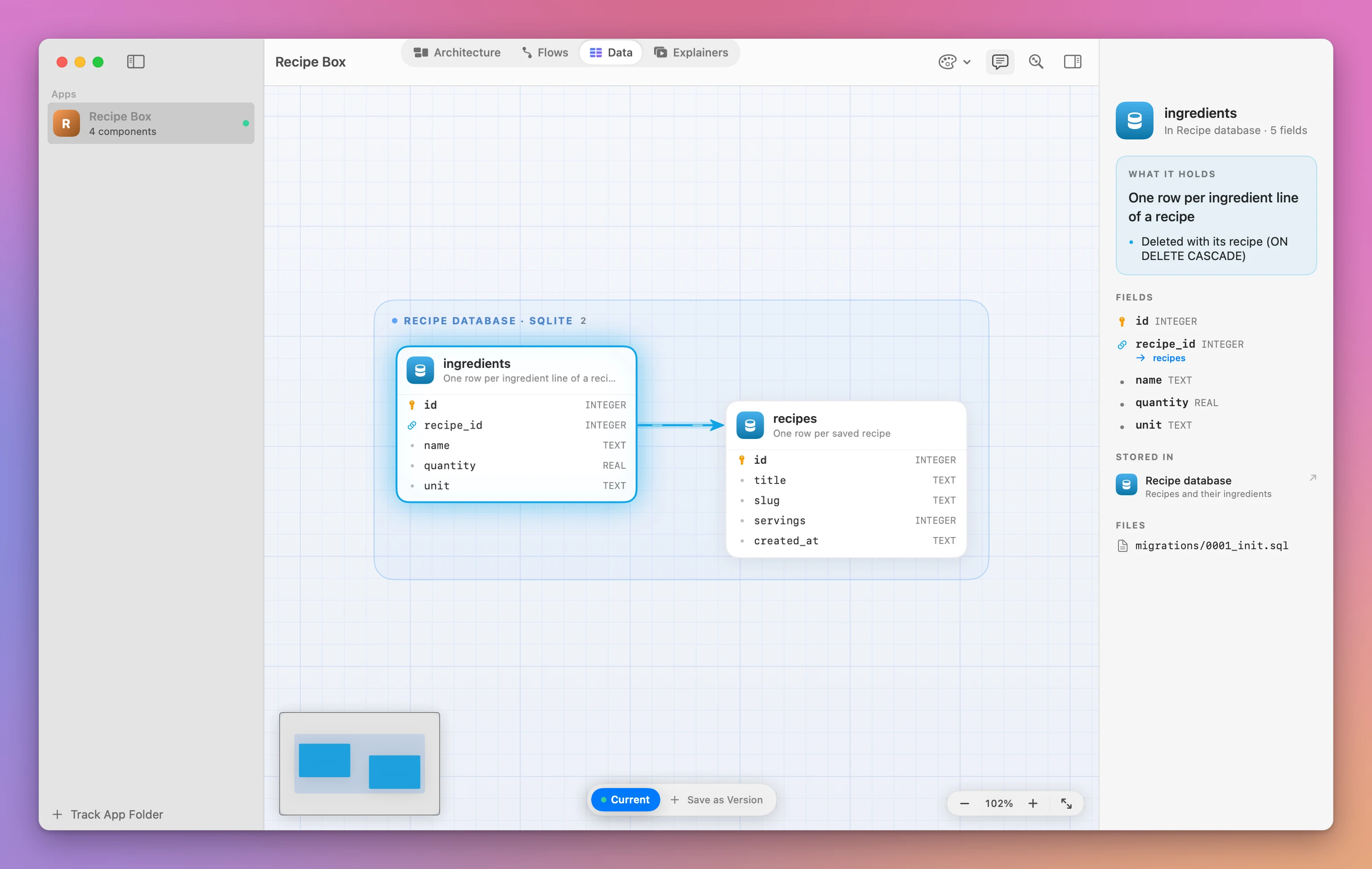
If you’d rather click than read the text, this is recipe-box in the Data view with ingredients selected. The panel on the right has the same fields, the reference to recipes and the note about the cascade:
The JSON version starts with the entities and ends with the stores that hold them:
blueprint show --data --json{
"entities" : [
{
"details" : [
"slug is unique and used in the URL"
],
"summary" : "One row per saved recipe",
"store" : "db",
"fields" : [
{
"key" : true,
"name" : "id",
"type" : "INTEGER"
},
{
"name" : "title",
"type" : "TEXT"
}
],
"id" : "recipe",
"name" : "recipes",
"paths" : [
"migrations/0001_init.sql"
]
}
],
"version" : "current",
"name" : "Recipe Box"
}I cut the output to one entity and two fields here. The full output lists every field, the ingredients entity, and a stores array with the database component’s name, kind, tech and paths.
Commands that take an app accept its id, its name or its folder. Inside the project folder you can leave it out. Outside, pass it: blueprint show recipe-box --data.
Tell every agent to read it first
A map nobody reads changes nothing. The agent that starts tomorrow’s task has never heard of Architecture Dissector, unless something in the project tells it. The skill you installed helps: its description tells agents to look up a tracked app’s tables and fields before changing its code. But a skill loads only when the agent decides it applies. A line in the project’s AGENTS.md or CLAUDE.md is read at the start of every session, so it’s the dependable place. Without it, you’re back to hoping the agent opens the right migration.
The README has the snippet to paste:
## Architecture Dissector

This app is mapped in Architecture Dissector. Before changing it, read the map with `blueprint show --json`, or `blueprint show --data --json` for what it stores. After changing its structure, workflows or stored data, run `blueprint status`, update the map as `blueprint guide` explains, and save it with `blueprint set`.
That covers both directions: read the schema before the change, and write it back after. The skill adds one more step I like: run blueprint status first, because if files changed since the save, the map may be behind the code.
Catch a migration the map doesn’t know about
A schema map goes stale the moment someone adds a migration and forgets to update it. Then the agent trusts a description that’s wrong, which is worse than reading nothing. Architecture Dissector guards against that with the file hashes it saved. blueprint status compares the files now with the ones the map described, and groups the changes by component. Because the agent listed migrations in the database component’s paths, a new migration shows up under the database, by name. Docs and images don’t count, and uncommitted changes show up too.
Example 2: a migration adds tags and a cook time. Next, recipe-box gets a second migration:
cat migrations/0002_tags.sqlALTER TABLE recipes ADD COLUMN cook_minutes INTEGER;
CREATE TABLE recipe_tags (
recipe_id INTEGER NOT NULL REFERENCES recipes(id) ON DELETE CASCADE,
tag TEXT NOT NULL,
PRIMARY KEY (recipe_id, tag)
);After the commit, the map knows something moved:
blueprint statusRecipe Box: 1 file changed since the architecture was saved just now at 1586a96, 1 commit ago.
Components with changed files:
Recipe database (db)
migrations/0002_tags.sql
If these changes affect the architecture, update it: blueprint show --json > /tmp/recipe-box.json,
edit the file, then blueprint set --file /tmp/recipe-box.json. If they don't, save it again
unchanged so Architecture Dissector knows it's current.blueprint list shows the same thing for every tracked project at once, in the STATUS column:
blueprint listID NAME COMPONENTS DATA VERSIONS STATUS MISSING
recipe-box Recipe Box 4 2 1 1 file changed flows, explainersThe status tells you which files changed, not what changed in the schema. Reading the migration and updating the entities is the agent’s job.
Update the map and see what changed in the schema
Updating the map is the same loop the guide describes for any change: print the current JSON, edit it, save it. The important rule is about ids. Architecture Dissector compares entities by id and fields by name, so a migration shows up as fields added, removed or changed. If the agent renames an entity id, the comparison sees one table removed and a new one added, and the history of that table is lost. Saving a version before the change gives you something to compare against. Here I saved 1.0.0 right after the first map, with blueprint snapshot --version 1.0.0.
The agent exports the map, adds cook_minutes to recipes, and adds a recipe_tags entity:
blueprint show --json > /tmp/recipe-box.jsonExample 3: a reference that points to a table name. The first attempt at recipe_tags used "ref": "recipes", the table name, instead of the entity id recipe. The save stops:
blueprint set --file /tmp/recipe-box.jsonwarning: There are no flows. Map every workflow of the app, from users, the owner, agents and the app itself: run blueprint guide to see how.
warning: There are no explainers. Add 2 to 6 short videos about parts of the app: run blueprint guide to see how.
error: Field recipe_id of entity recipe-tag points to recipes, which isn't an entity.
blueprint: Nothing saved, because of the error above.Nothing was written, so the old map is still there. The fix is to set ref to the entity’s id, not its name. After that, the same command saves it and summarizes the change:
Saved the architecture of Recipe Box: 4 components in 2 groups, 3 connections, 3 overview blocks, 3 entities.
Since the last save: data: 1 added, 1 changed.
Without --from, blueprint diff compares the newest saved version with the current map:
blueprint diffRecipe Box: 1.0.0 → current
data: 1 added, 1 changed
Data
+ recipe_tags (recipe-tag)
One row per tag on a recipe
~ recipes (recipe)
Added field cook_minutes
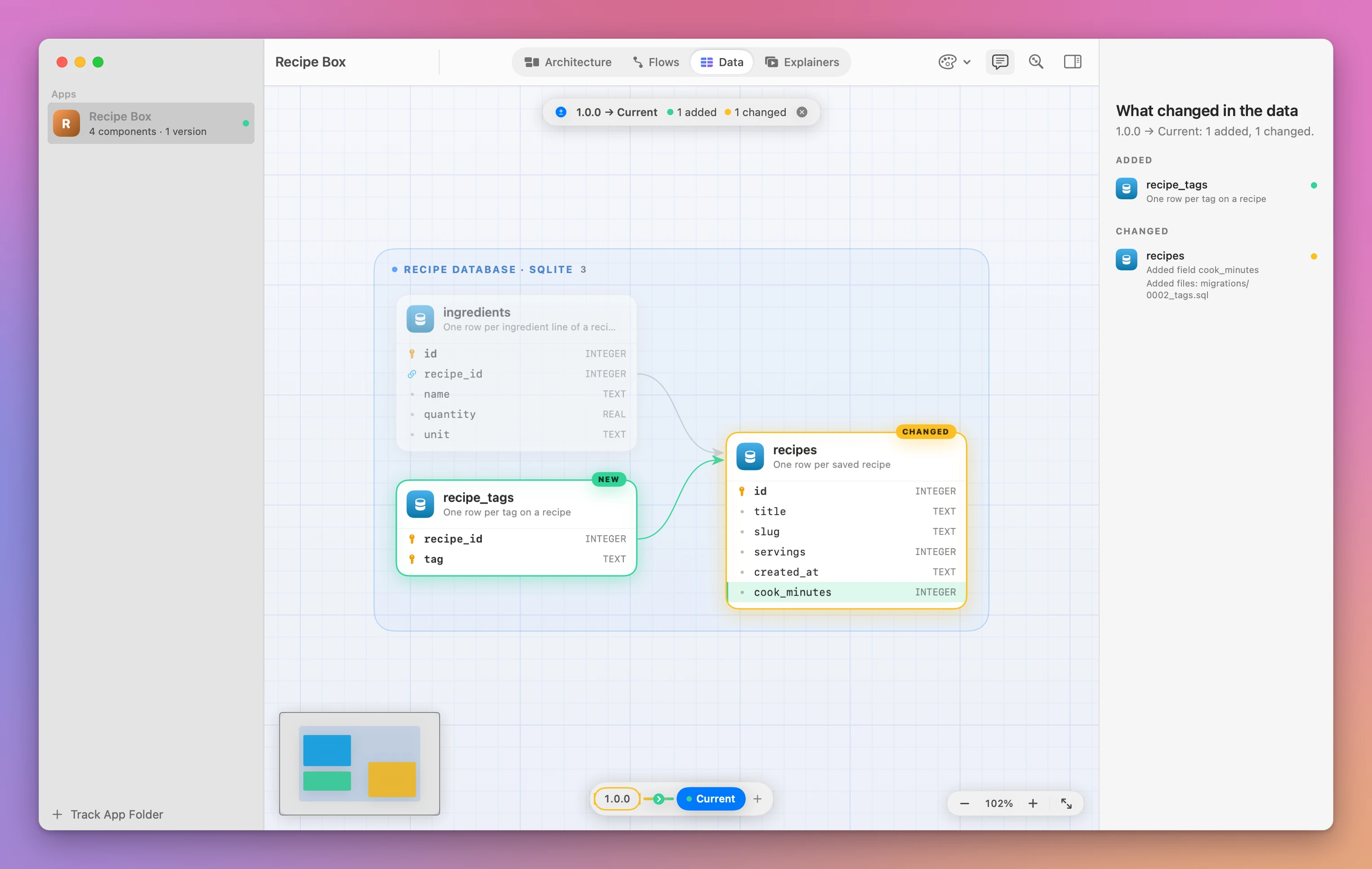
Added files: migrations/0002_tags.sqlThat’s a migration summary you can hand to a reviewer, or to the next agent with blueprint diff --json. In the app, comparing two versions on the timeline shows the schema change field by field. Click the arrow between 1.0.0 and Current on the timeline under the diagram, and the Data view marks recipe_tags as new and recipes as changed, with the cook_minutes row highlighted:
Running blueprint set a second time with the same file is harmless. It saves again and ends with Nothing changed since the last save. That’s also how you tell the app the map is current after a change that didn’t touch the schema.
When the release ships, save the version so the next diff starts from it:
blueprint snapshot --version 1.1.0Without --version, it uses the git tag on the current commit, without its v.
Find the projects whose data isn’t mapped
Once one project has its schema mapped, the others start to feel like a gap. An agent that works across five repos reads a schema in one and guesses in the rest. blueprint list --missing data lists only the tracked apps that store something but have no entities in their map. That’s a ready-made to-do list, and the command even prints the steps an agent should follow for each one. Handing it over is one sentence, because the guide has a section for exactly this.
blueprint list --missing dataID NAME COMPONENTS DATA VERSIONS STATUS MISSING
invoice-kit Invoice Kit 4 0 0 up to date flows, data, explainers
To add it, go to each app's folder, run blueprint show --json > /tmp/<app>.json, add the data as
blueprint guide describes, and save it with blueprint set --file /tmp/<app>.json.When every tracked app has its data, it prints Every tracked app has its data. instead.
The prompt is short:
Fill in the data that's missing in Architecture Dissector. Run blueprint list --missing data and follow blueprint guide.The agent works through each app, keeps the ids already there, and runs the list again until it’s empty.
To stop tracking a project, blueprint remove moves its map and every saved version to the Trash. Your project folder stays as it is, but the versions go with the map, so restore them from the Trash if you change your mind.
If something looks wrong
- If
blueprint setprintserror: Field … points to …, which isn't an entity., therefuses a table name or a misspelled id. Set it to theidof the entity, and run it again. Nothing was saved. - If any
blueprintcommand saysThis folder isn't inside an app Architecture Dissector tracks. Add it with: blueprint add ., you’re outside the project folder.cdinto it, or pass the app id. - If
blueprint show --dataprints no entities, orblueprint listshowsdatain MISSING, the agent mapped the components but not the storage. Ask it to add the data, as in the last section. - If
blueprint statuslists a migration under the database right after the agent saved, the map was saved before the migration was written. Have the agent update the entities and save again. - If
blueprint snapshotsaysrecipe-box already has version 1.0.0. Use --force to replace it., pick a new version name.--forcereplaces the saved version, so the old copy is gone. - If a version comparison shows a table as removed and a new one added when you only renamed it, the agent changed the entity id. Restore the old id in the JSON and save again.
- If
blueprintisn’t found, choose Install Command Line Tool… again, or call/Applications/Architecture Dissector.app/Contents/Helpers/blueprintdirectly. - If
blueprint statussays the folder “isn’t a git repository, so Architecture Dissector can’t tell what changed since”, the map is saved, but it can’t tell when the code moves on. Rungit init, commit, and have the agent save the map again.
Get Architecture Dissector
Explore your apps through architecture diagrams, workflows, data maps and version comparisons. Includes the Mac app, blueprint CLI and full MIT source.
See Architecture Dissector → · Read the docs · $20. See the app page for tax details, with full source code.
Want me to talk about your product? You can sponsor this site.