
An app by Flavio
Transcript Quote Finder
Choose a folder of interview transcripts and paste the producer's paper edit. Transcript Quote Finder finds each quote even when it's worded a little differently, shows the file, the speaker and the start and end time, plays it from the video beside the transcript, and saves a pull list as CSV, PDF or EDL.
Buy Transcript Quote Finder · $19One-time purchase. Plus tax where it applies.
macOS 14 or later · Apple silicon and Intel
Latest version 1.0.2, released November 22, 2026
The producer sends the paper edit: fifteen lines from four interviews, in the order of the story. “Maria: the rent doubled in one year.” “Use the bit where Maria says the bakery almost closed, that was the winter of 2019.” “Tom: you set your clock by the smell.”
The transcripts are in a folder. Now you open each one, press Command-F, and type a few words of the first quote. If the producer wrote “2019” and the transcript says “twenty nineteen”, or Maria said “um, it almost closed”, Find says nothing. You try other words. Then the next file. Fifteen quotes in four files is sixty searches, and you still have to work out the time from the subtitle around the line.
Transcript Quote Finder reads all the transcripts at once. Paste the whole paper edit and every quote gets the file, the speaker, the start and end time, and how closely it matches, even when the words aren’t the same. Click one to check it and play it. Then save the pull list.
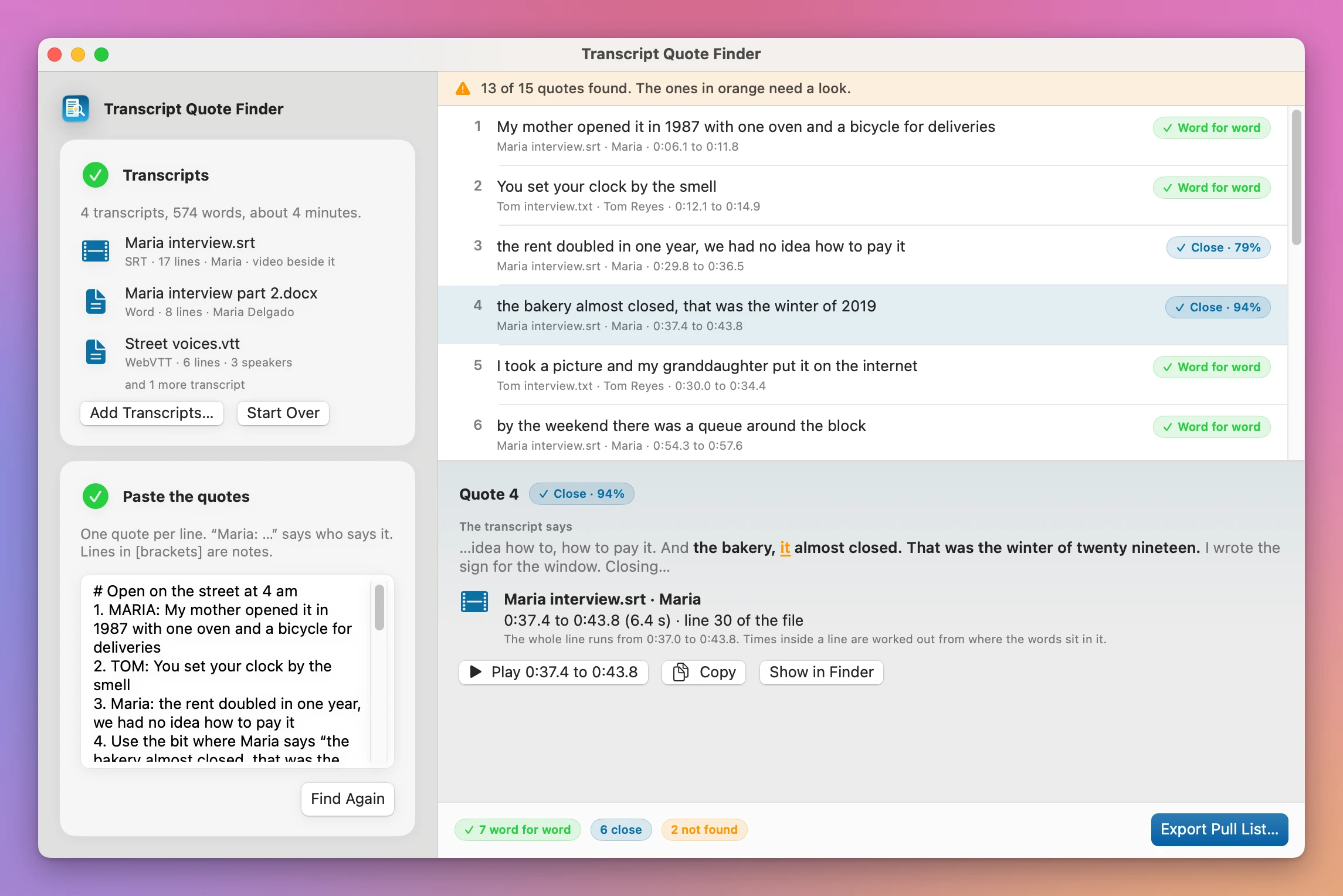
Watch a 30-second demo of Transcript Quote Finder:
Who it’s for
- Documentary editors and assistant editors. The paper edit has 30 lines from eight hours of interviews, transcribed by a service. Half the lines are paraphrased from memory. You need each one’s file and time before you can start the assembly.
- YouTubers who interview guests. You wrote the script from your notes: “the bit about the first oven”, “when she says she nearly quit”. The auto-generated transcript is there, and you want the exact moment without scrubbing a ninety-minute call.
- Podcast video editors. The host sends a list of moments for social clips. Each one needs a start and an end in the episode recording.
- Producers and journalists. Before the script goes out, you check that every quote was really said, in those words, by the person it’s credited to. The app tells you when the paper edit names one person and the transcript says another.
- Editors handing over to another editor. A pull list with files, speakers and timecodes, as a spreadsheet and a PDF, saves the next person a day of searching.
From a paper edit to a pull list
- Click Choose Transcripts… and pick the folder with the transcripts, or drag it onto the window.
- Paste the quotes, one per line. Start a line with a name and a colon to say who says it:
Maria: the rent doubled in one year. - Click Find Quotes.
- Click each quote to check it. The words that differ are underlined. Click Play to hear it, when the video is beside the transcript.
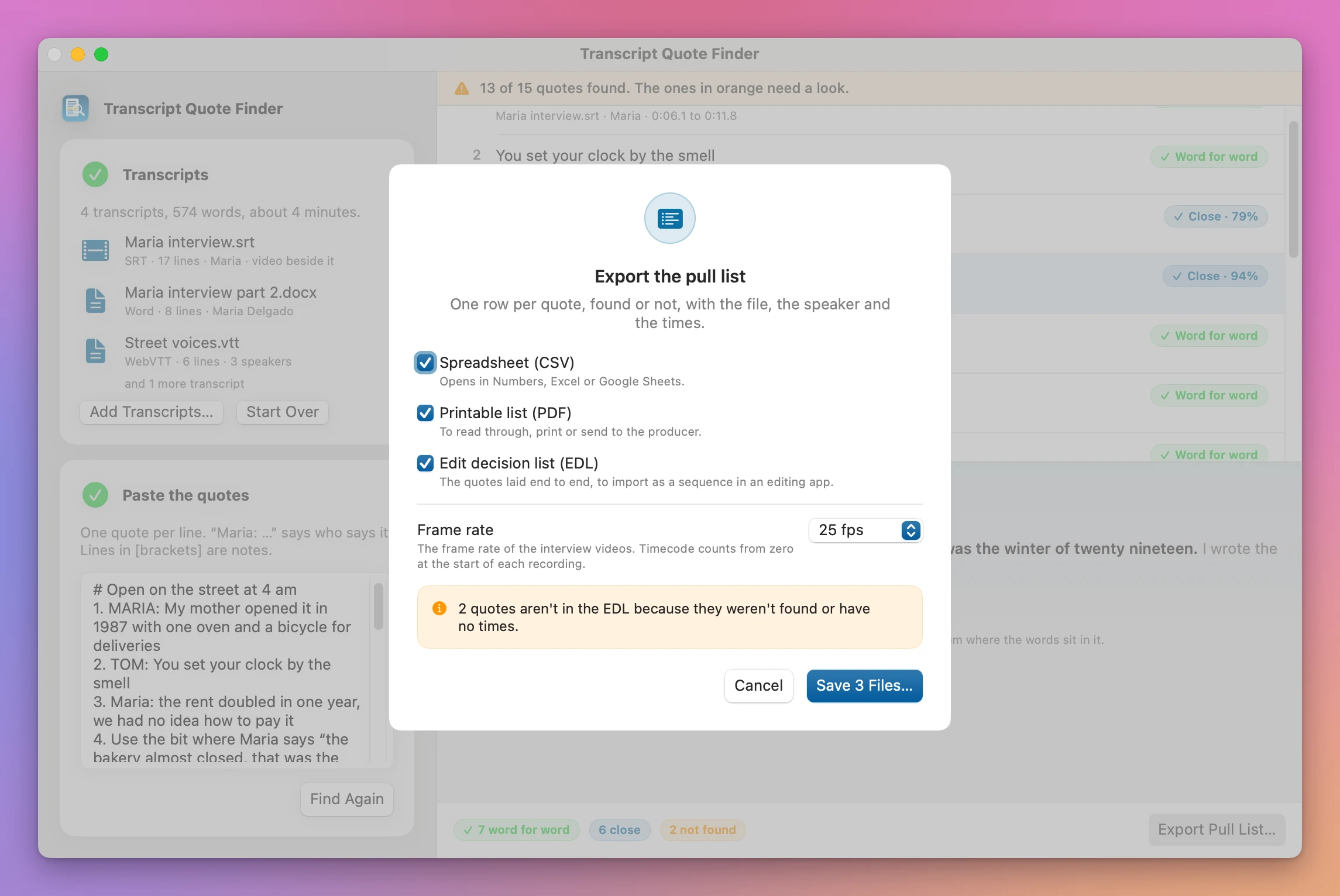
- Click Export Pull List…, pick the files you want and the frame rate, and choose a folder.
What you get
Quotes found the way people quote
People rarely quote word for word. The app ignores what doesn’t change the meaning: capitals, punctuation, accents, “um” and “uh”, a repeated word like “I I think”, and numbers written as words or digits, so “2019” finds “twenty nineteen” and “1987” finds “nineteen eighty-seven”. Small spelling differences like “neighbour” and “neighbor” count as the same word.
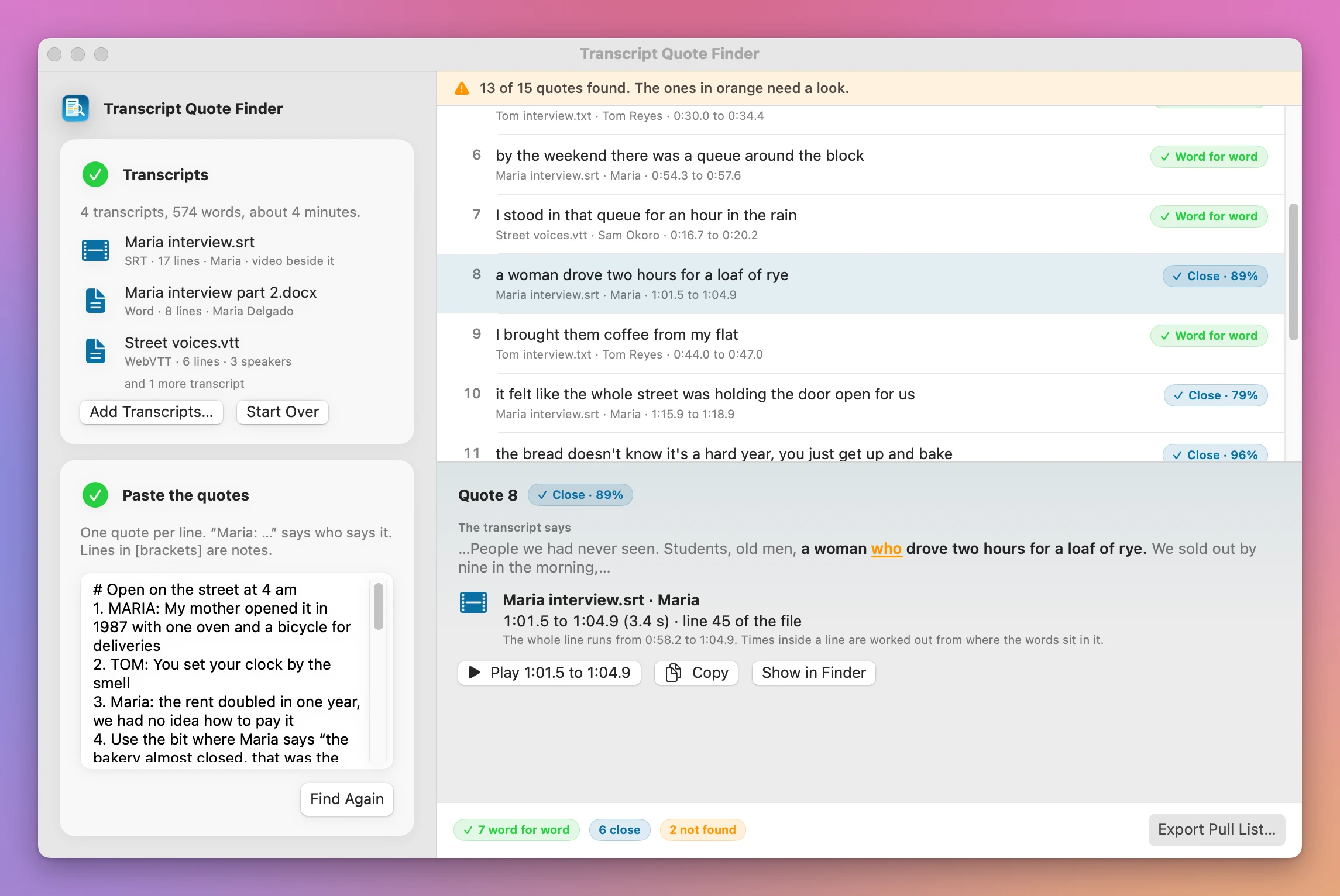
Each quote gets a pill. Word for word means every word, in order. Close and Partly come with a percentage, so you know which to check first. Not found shows the closest line, if there’s one, so you can see whether the paper edit’s wording drifted too far.
The file, the speaker and the time
Every quote shows its file, its speaker and its start and end, like 0:37.4 to 0:43.8. The speaker comes from the transcript: a name before a colon, a name with a time on its own line, or a voice tag in a WebVTT file. Times inside a line are worked out from where the words sit in the line, so they’re close but not frame-exact. The whole line’s times are shown too.
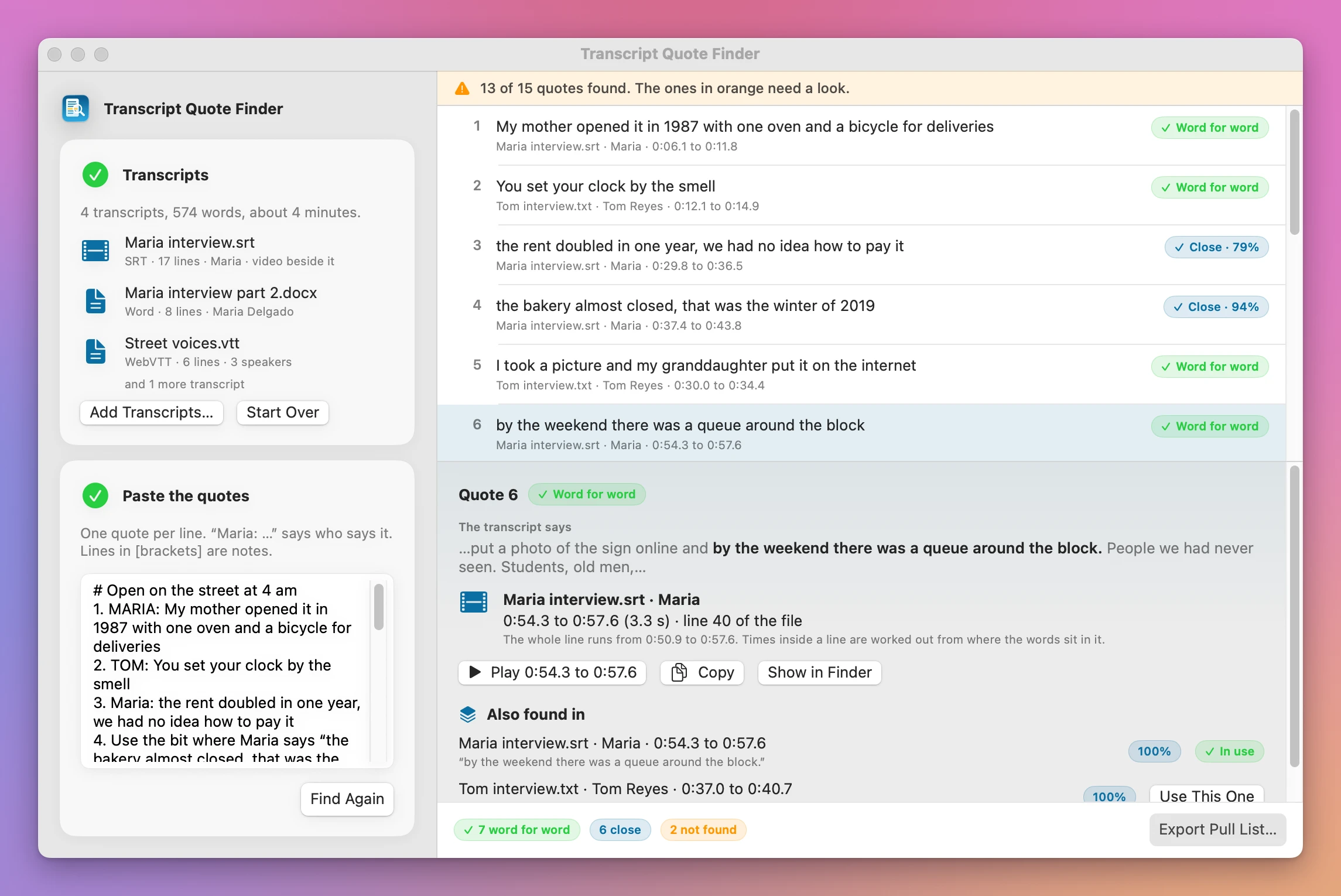
If the same words are in two interviews, both are listed under Also found in, and Use This One picks the other. If the paper edit says Maria and the transcript says Tom, an orange note tells you.
Play the quote from the video
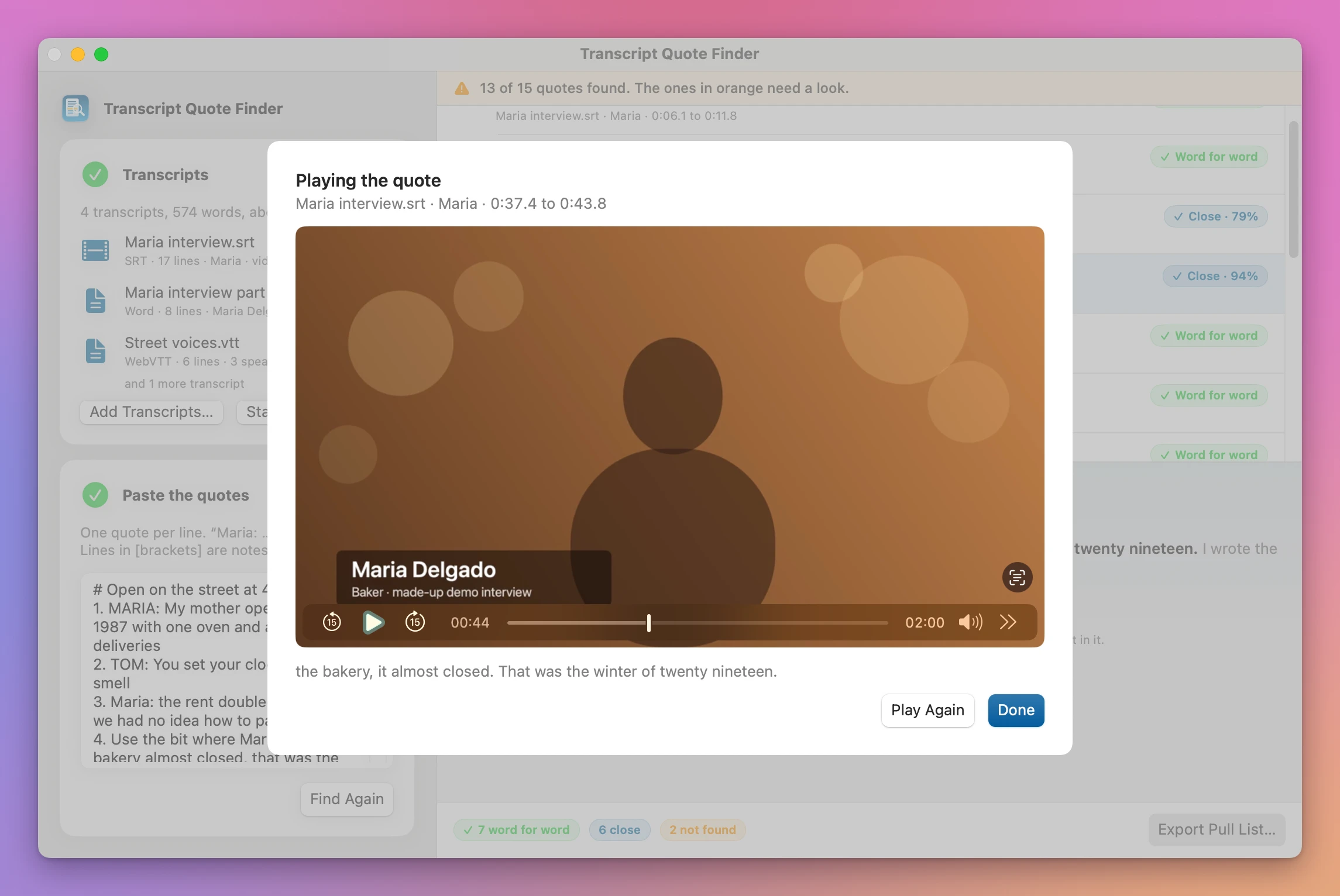
When the video has the same name as the transcript and sits beside it (Maria interview.srt and Maria interview.mov), Play opens it at the quote, plays from a moment before to a moment after, and stops. MOV, MP4 and M4V files your Mac can play.
A pull list as a spreadsheet, a PDF and an EDL
Export Pull List… saves up to three files into a folder you pick:
- a spreadsheet (CSV) with one row per quote, found or not: the result, the confidence, the file, the speaker, start and end as minutes and seconds and as timecode, the length, the line in the file, what the transcript says and the video’s name
- a printable list (PDF) to read through or send to the producer
- an edit decision list (EDL) with the quotes laid end to end, to import as a sequence in an editing app that reads CMX 3600 EDLs, once the clips are linked to your media
Pick the frame rate of the interviews: 23.976, 24, 25, 29.97 or 30. A name that’s taken gets a number, so nothing is ever replaced.
The transcripts you already have
It reads SRT and WebVTT files, text transcripts in the shapes transcription services and editing apps export (a speaker and a time on a line, a time range then the speaker, a time at the start of each line, or no times at all), and Word documents. Folders inside the folder are read too. If the paper edit itself is saved in the same folder, the app notices it has your quotes word for word and leaves it out of the search.
Why not do it by hand
Every Mac can search inside a transcript. TextEdit, Pages and Word have Find, and Preview finds text in a PDF. Each searches one file, for the exact characters you type. A comma, an “um”, “it” in the middle of the sentence or a number written as a word, and Find says no match. With four transcripts and fifteen quotes it’s sixty searches, and a paraphrased quote is never found. When you do find it, you scroll up to the nearest timestamp and work out the time.
Some editing apps can transcribe a clip and search its transcript. That works one clip at a time inside your project, with the media imported and transcribed in that app, and it looks for the words you type. None takes a producer’s paper edit and finds every line in one go.
| Find in TextEdit or Word | An editing app’s transcript search | Transcript Quote Finder | |
|---|---|---|---|
| Cost | Free | Part of the editing app | $19 once |
| Searches every transcript at once | No, one file | One clip at a time | Yes |
| A whole paper edit in one go | No | No | Yes |
| Finds a quote worded differently | No | Exact words | Yes, with a percentage |
| Ignores “um”, punctuation, 2019 vs twenty nineteen | No | Depends on the app | Yes |
| Gives the start and end time | You read the nearest timestamp | Yes | Yes |
| Speaker | You scroll up | If the app detected it | Yes |
| Plays the quote | No | Yes | Yes, from the video beside it |
| Pull list as CSV, PDF and EDL | You type it | Depends on the app | Yes |
| Needs the media imported | No | Yes | No |
What it doesn’t do
- It doesn’t transcribe audio. It needs the transcripts.
- It reads SRT, WebVTT, text and Word files. It doesn’t read PDFs, .rtf or the JSON some services export.
- Times inside a line are estimated from where the words sit in the line, not measured from the audio.
- The EDL uses non-drop-frame timecode that counts from zero at the start of each recording. If your camera files start at another timecode, the source times are off by that amount.
- It never changes the transcripts, and it doesn’t edit them.
- It doesn’t translate, and it compares words, not meanings: a quote rewritten in other words won’t be found.
Questions
Does it upload my transcripts?
No. Everything happens on your Mac. The app connects to the internet only to check for updates.
Does it change my files?
No. The transcripts and the videos are only read. The pull list is new files in a folder you pick, under names that are free there.
What do my transcripts need?
Words, and ideally times and speaker names. With times, every quote gets a start and an end. Without them, a quote is given by its line in the file. Without speaker names, the quotes are still found.
How long can the interviews be?
Hours. The tests search 108,000 words, about ten hours of talking, for twenty quotes in a few seconds.
Does it work with my editing app?
The CSV opens in any spreadsheet app and the PDF anywhere. The EDL is a standard CMX 3600 file, which most editing apps can import. Transcript Quote Finder isn’t made by, affiliated with or endorsed by Apple, Adobe, Blackmagic Design, Microsoft or any transcription service.
What does it need?
A Mac with macOS 14 Sonoma or later, Apple silicon or Intel.
Buy Transcript Quote Finder
$19 plus tax where it applies, paid once. You get the Mac app, signed and notarized by Apple, and it updates itself when a new version comes out.