
An app by Flavio
Subtitle Checker
Open a video and its SRT or WebVTT file. Subtitle Checker flags every overlap, every line too long for the screen and every subtitle too fast to read, jumps the video to each one, and saves a corrected copy with a summary. Your original is never changed.
Buy Subtitle Checker · $19One-time purchase. Plus tax where it applies.
macOS 14 or later · Apple silicon and Intel
Latest version 1.0.2, released November 22, 2026
You finished the edit, exported the video, and the subtitle file is ready to go up with it. It has 75 subtitles for ten minutes of talking. Somewhere in there, one subtitle stays on screen 0.6 seconds after the next one starts, and another flashes by at 32 characters a second because you shortened its time while fixing a typo.
You can find both by watching the whole video with the subtitles on. That’s ten minutes at least, and a 0.6-second overlap looks like a flicker you won’t notice. Or you open the file in TextEdit and subtract timecodes by hand, 75 times.
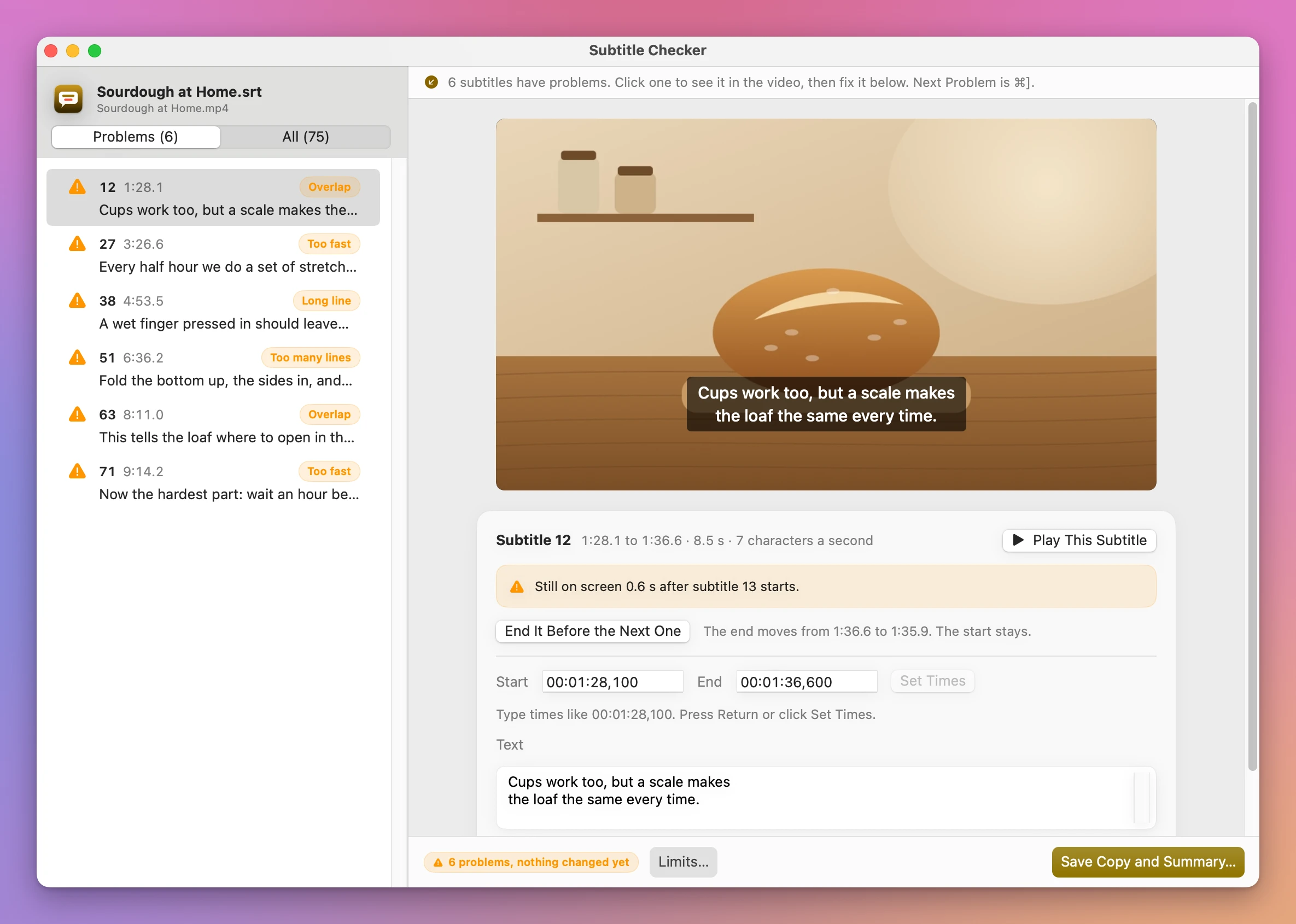
Subtitle Checker measures every subtitle the moment the file opens and lists only the ones with a problem. Click one, the video jumps to it, and a button under it fixes it. Then save a corrected copy, with a summary of what was checked and what changed.
Who it’s for
- YouTubers who fix their own captions. You download the automatic captions, clean them up in a text editor, and upload the SRT again. After an hour of edits, some times no longer line up, and the upload page doesn’t tell you which ones.
- Freelance editors delivering to a client. The spec sheet says 42 characters a line, 2 lines, 17 characters a second. The summary file lists every limit, every change and every problem left, so you can send it with the delivery.
- Course creators who burn captions into their lessons. Once the captions are part of the picture, a mistake means exporting the video again. Checking the file first takes a minute.
- Translators. The Spanish version of a line is a third longer than the English one, in the same time on screen. Reading speed tells you which lines got too fast.
- Schools and nonprofits making videos accessible. A volunteer typed the captions by hand. Subtitle Checker catches the overlaps and the three-line subtitles before they go on the website.
From a subtitle file to a checked copy
- Click Choose a Video and Its Subtitles… and pick the
.srtor.vttfile and the video. Hold Command to pick both, or drag both onto the window. The video is optional. - The list shows every subtitle with a problem, with a pill that says what: Overlap, Too fast, Long line, Too many lines.
- Click one. The video jumps to it and shows the subtitle the way a player would. Play This Subtitle plays just that one and stops at its end.
- Read what’s wrong, in a sentence with the numbers, then click the fix under it. Each fix says what it will change before you click. Or type new times or new words yourself.
- Next Problem (⌘]) goes to the next one.
- Click Save Copy and Summary… and pick a folder.
What you get
Every subtitle measured against your limits
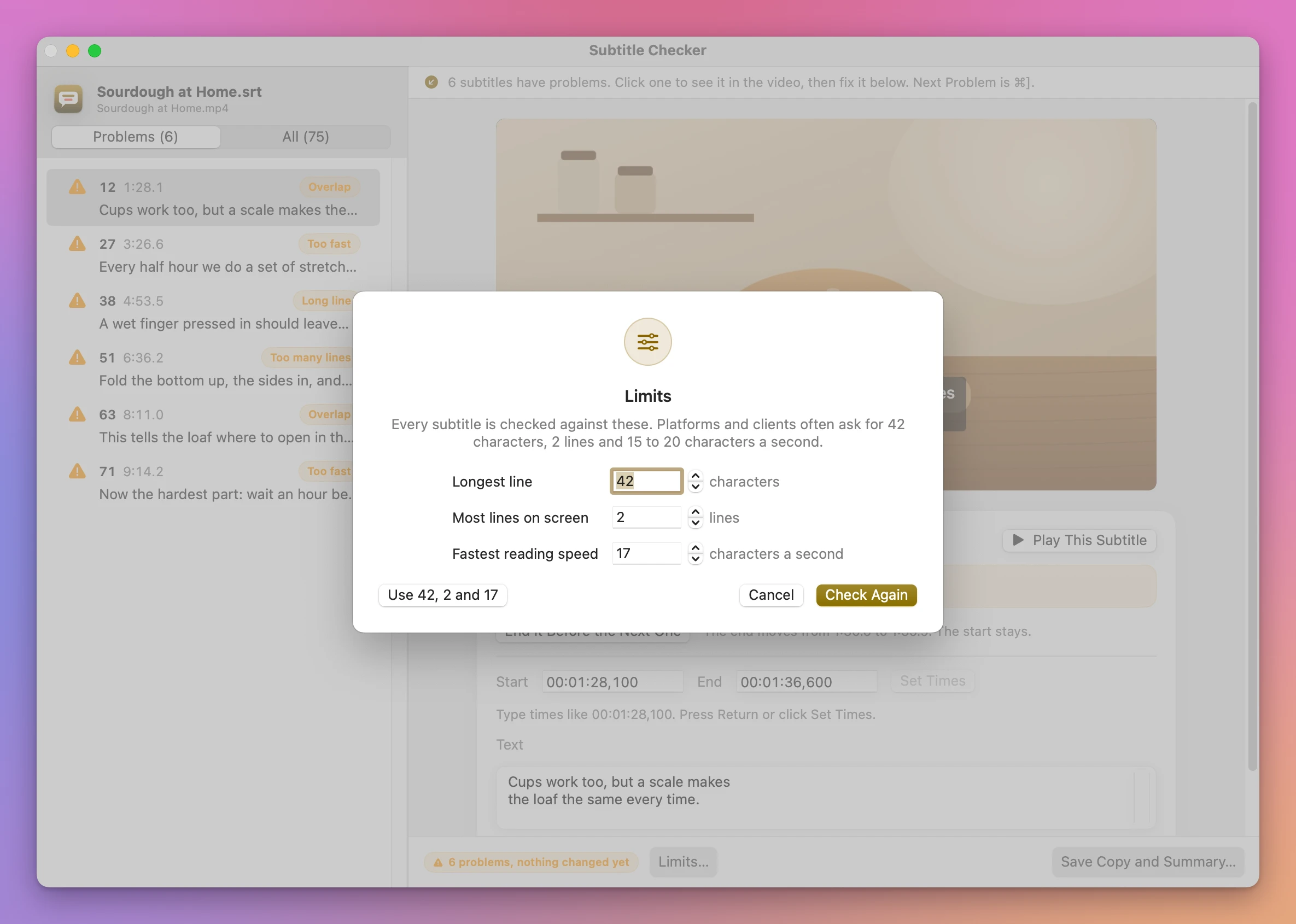
Subtitle Checker flags a subtitle that:
- is still on screen when the next one starts (an overlap), with how long, like 0.6 s;
- has a line longer than your limit, 42 characters to start with;
- has more lines than your limit, 2 to start with;
- goes by faster than your reading speed, 17 characters a second to start with;
- starts before the one above it in the file, ends before it starts, has no text, or starts after the video ends.
Italic tags and position codes don’t count as characters, so <i> and {\an8} don’t make a line look longer than it is.
Click Limits… to change the three numbers. Style guides and client specs usually ask for something between 15 and 20 characters a second, so set what yours asks for. The app remembers it.
Fixes that change one thing
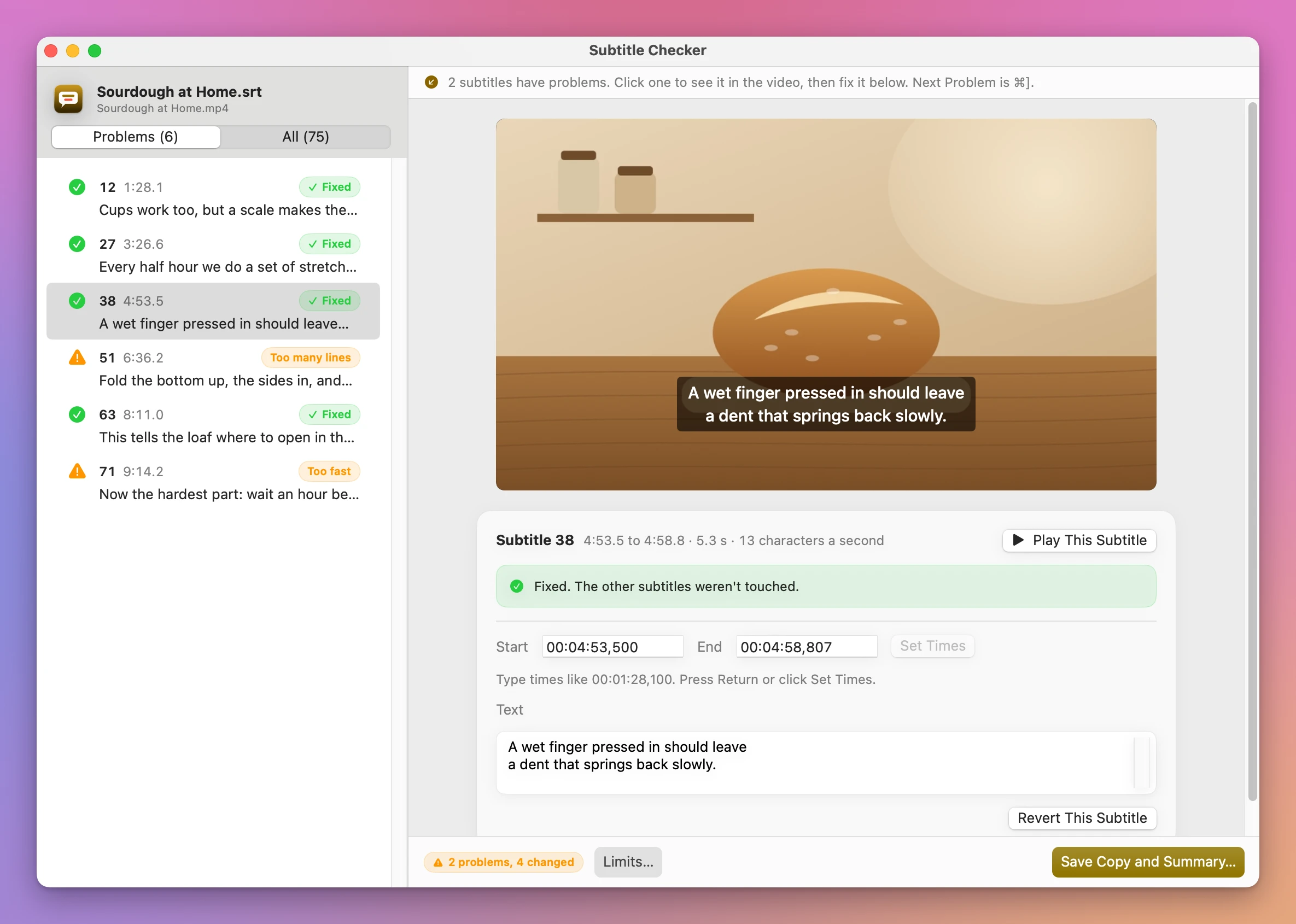
There are three buttons, and each one changes as little as it can.
- End It Before the Next One moves only the end of an overlapping subtitle, to just before the next one starts.
- Rewrap the Lines spreads the words over lines that fit, about the same length, breaking after a comma or a full stop when it can. It leaves lines that start with a dash alone, because they’re two people speaking.
- Keep It On Screen Longer moves the end later, until it can be read at your speed, but never into the next subtitle or past the end of the video. If there’s no room, it says to shorten the text.
You can also type new times in Start and End, or edit the text. A fixed subtitle stays in the list with a green Fixed pill, and Revert This Subtitle puts it back the way the file had it.
A corrected copy that keeps what you didn’t touch
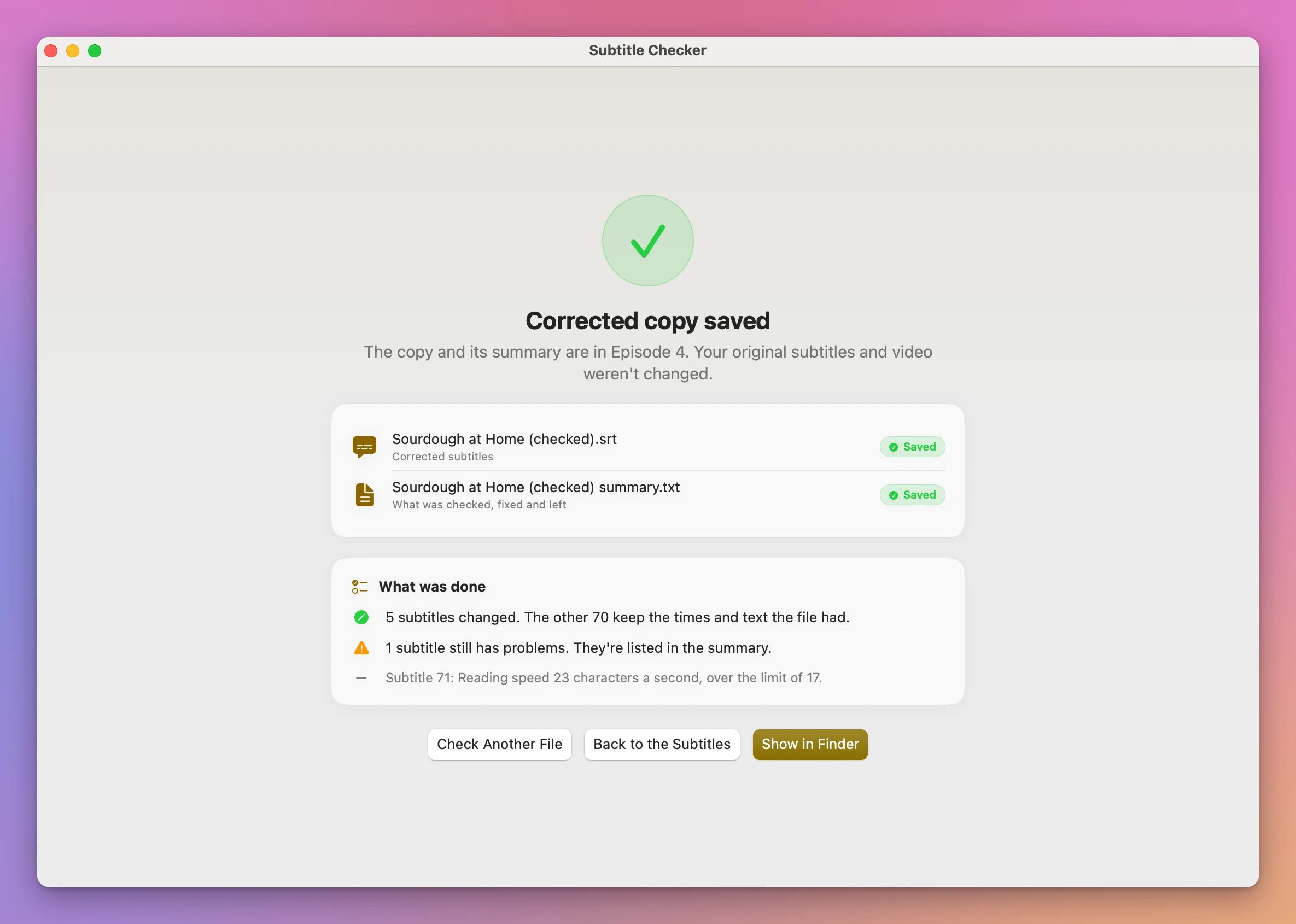
Saving writes two new files in the folder you pick: the corrected subtitles, named like Sourdough at Home (checked).srt, and Sourdough at Home (checked) summary.txt. If those names are taken, the new ones get a number. Nothing is written over.
The copy is the same format as the file you opened. A subtitle you didn’t change keeps its times exactly as the file wrote them. WebVTT headers, notes, styles and cue settings stay, and so do the file’s line endings.
The summary is plain text. It lists the limits, how many subtitles had problems when opened, every change with the old and new times or text, and every problem you left.
Files with the usual mistakes
Subtitle files come out of a lot of tools, and many aren’t tidy. Subtitle Checker reads SRT and WebVTT with a byte order mark, with Windows line endings, with a dot where SRT wants a comma, with a missing blank line between two subtitles, and in older Windows text encodings.
Why not do it by hand
QuickTime Player doesn’t load a separate .srt file, so on a Mac out of the box you check subtitles in TextEdit. Each one has a start and an end. To find an overlap you compare every end with the next start. To find a line that’s too fast, you count its characters and divide by its time on screen. It’s simple arithmetic, 75 times for ten minutes of video, and about 1,500 times for a feature film.
Free video players can show a subtitle file over the video, so you can watch it all and look. That takes as long as the video, and your eye won’t catch a 0.3-second overlap or a line at 21 characters a second.
Full subtitle editors check timing too, and if you subtitle for a living you probably have one. They’re made for writing subtitles from scratch, with waveforms, styles and dozens of settings. Subtitle Checker is for the last step: is this file OK, and if not, fix the few places that aren’t.
| TextEdit | Watching in a player | Subtitle editor | Subtitle Checker | |
|---|---|---|---|---|
| Cost | Free | Free | Free or paid | $19 once |
| Finds overlaps | You compare every time | Only if you see them | Yes | Yes, with by how much |
| Reading speed | You count and divide | By feel | Yes | Yes, with your limit |
| Shows only the problems | No | No | Usually | Yes |
| Jumps the video to a subtitle | No | You scrub | Yes | Click the row |
| One-click fixes | No | No | Many, for the whole file | Three, one subtitle at a time |
| Leaves untouched times as they were | Yes | Nothing changes | Depends on the editor | Yes |
| Summary to send with the file | No | No | Rarely | Yes |
| Learning curve | None | None | Hours | Minutes |
What it doesn’t do
- It doesn’t make subtitles from speech, translate them or check spelling.
- It reads and writes SRT and WebVTT only. It doesn’t read .ass, .ssa, .scc or .stl. Most subtitle tools can export SRT.
- It doesn’t burn subtitles into the video or change the video.
- It doesn’t shift or stretch the timing of the whole file. Fixes are one subtitle at a time.
- It doesn’t edit styles, colors or positions. They’re kept as the file had them.
- It doesn’t check that a subtitle matches what’s said. You still watch the ones it flags.
Questions
Does it change my files?
No. Your subtitle file and your video are only read. The corrected copy and the summary are new files with new names.
Does it upload anything?
No. Everything happens on your Mac. The app connects to the internet only to check for updates.
Do I need the video?
No. Without it you get the same checks and fixes. With it, the app also flags subtitles that start after the video ends, and you can see each subtitle where it plays. It plays MP4, MOV and M4V videos that your Mac can play.
What limits should I use?
The ones in your client’s or platform’s spec. 42 characters a line and 2 lines are common. For reading speed, 17 characters a second is a middle ground: many adult-audience guides allow up to 20, and children’s content asks for less.
What it needs
Subtitle Checker runs on macOS 14 Sonoma or later, on Apple silicon and Intel Macs.
Buy Subtitle Checker
$19 plus tax where it applies, paid once.
Download the app from the order page or your Creem receipt, unzip it and move it to Applications. I sign the app with my Apple Developer ID, and Apple notarizes the download.
The app checks for updates once a day. When a new version is ready, click Install and Relaunch. To check anytime, choose Subtitle Checker → Check for Updates….
Subtitle Checker is an independent app. It’s not made by, affiliated with or endorsed by Apple, YouTube, Vimeo or any subtitle tool maker.