
An app by Flavio
Sponsor Proof Sheet
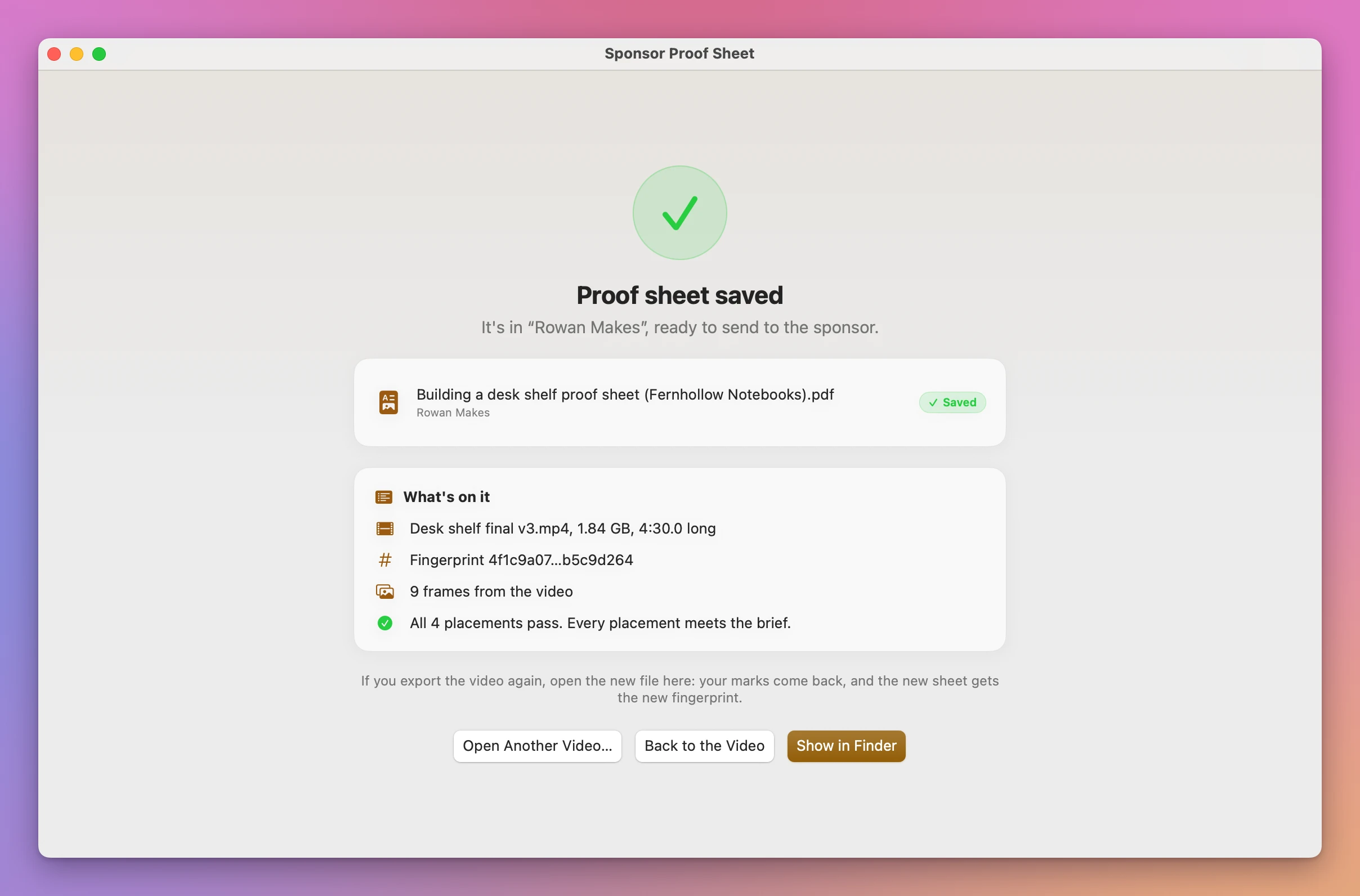
Open your final export, paste the sponsor's brief and mark where the read, the logo and the link are. Sponsor Proof Sheet checks each one against the brief and saves a PDF with the times, three frames of each and the file's fingerprint.
Buy Sponsor Proof Sheet · $19One-time purchase. Plus tax where it applies.
macOS 14 or later · Apple silicon and Intel
Latest version 1.0.2, released November 22, 2026
The video is exported and the upload is scheduled for Thursday. Then the sponsor’s agency writes: “Before you publish, can you confirm the read is at least 60 seconds and starts in the first three minutes, the logo is on screen for 5 seconds, and the link is on the end card?”
You can do it by hand. Open the export in QuickTime Player, scrub to the read, write down where it starts and ends, subtract, take a screenshot, do the same for the logo and the end card, and paste it all into an email. That’s half an hour, and when they ask “is this the same file you’ll upload?” you have nothing to show them.
Sponsor Proof Sheet does the bookkeeping. You paste the brief, play the video to each placement and click Mark Start and Mark End. It checks every placement against the brief’s words, and saves a one-page PDF with the times, the length, three frames of each placement and the file’s fingerprint, a code that changes if a single byte of the file does.
Watch a 30-second demo of Sponsor Proof Sheet:
Who it’s for
- YouTubers with a sponsored segment. The contract says “a 60-second integrated read in the first three minutes”, and the brand’s agency approves the video before it goes public. The sheet answers their checklist line by line, with the frames.
- Podcasters who publish video episodes. The network wants to know where the host read and the logo bumper sit in each episode. One sheet per episode, in the same layout every time.
- Freelance editors. You cut a creator’s sponsored video and hand over the final file with a proof sheet, so nobody argues later about which export was approved: the fingerprint on the sheet matches one file only.
- Creator managers. A dozen brand deals a month, each with its own brief. The sheet looks the same for all of them, and the marks are saved per video, so a late re-export takes minutes.
- Small brands and agencies. You commissioned the video and want to approve the placements from a PDF before it’s published, without scrubbing through a 12-minute file.
From the final export to the proof sheet
- Click Choose the Final Video… and pick the export, or drag it onto the window. It opens .mov, .mp4 and .m4v files. The app reads its size, length and picture, and works out its fingerprint while you go on.
- Type the Sponsor, the Video title and your Channel or show.
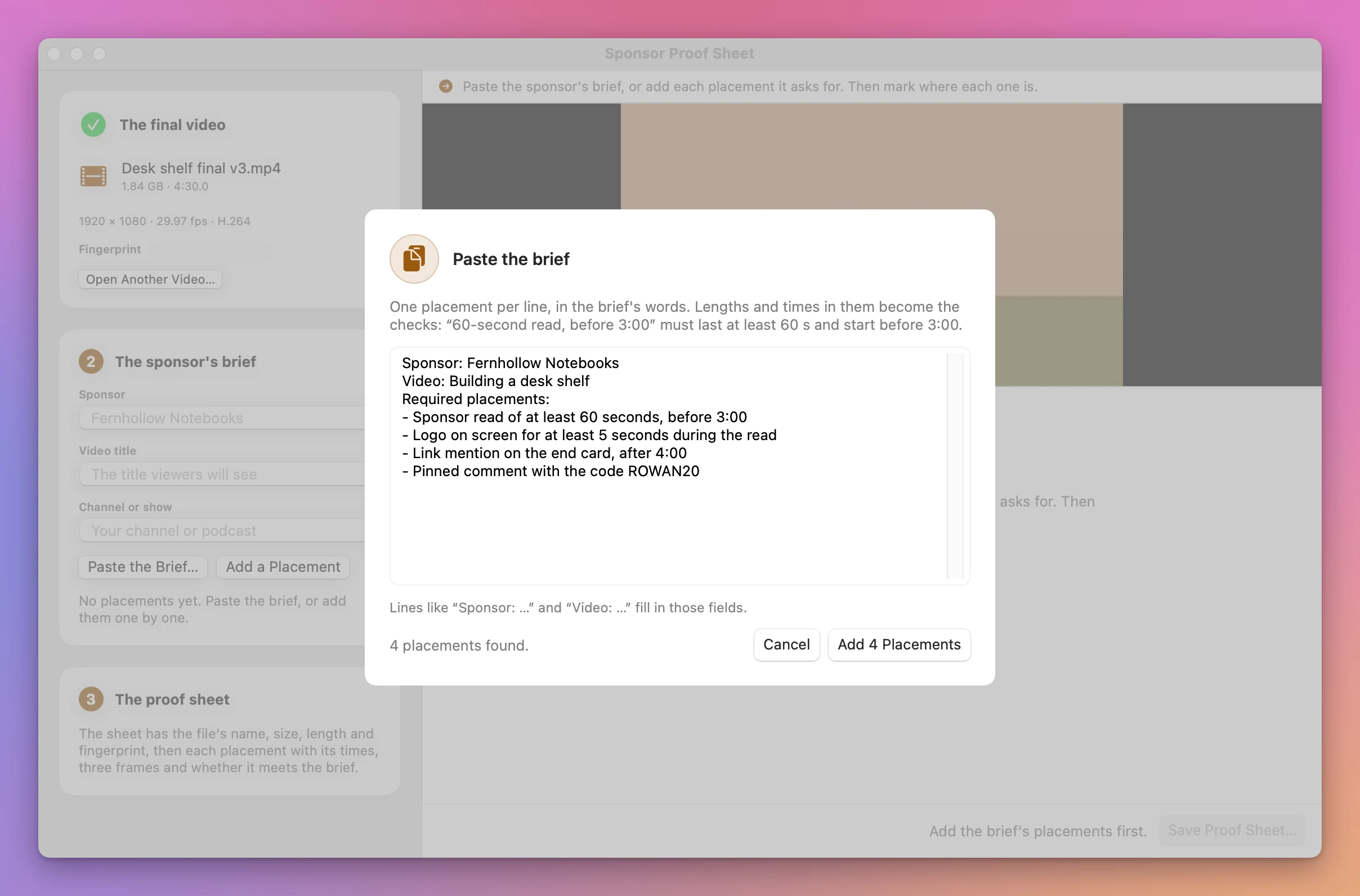
- Click Paste the Brief… and paste the placements from the sponsor’s email, one per line. “Sponsor read of at least 60 seconds, before 3:00” becomes a placement that must last 60 seconds and start before 3:00. Lines like “Sponsor: …” and “Video: …” fill in those fields. Click Add 4 Placements.
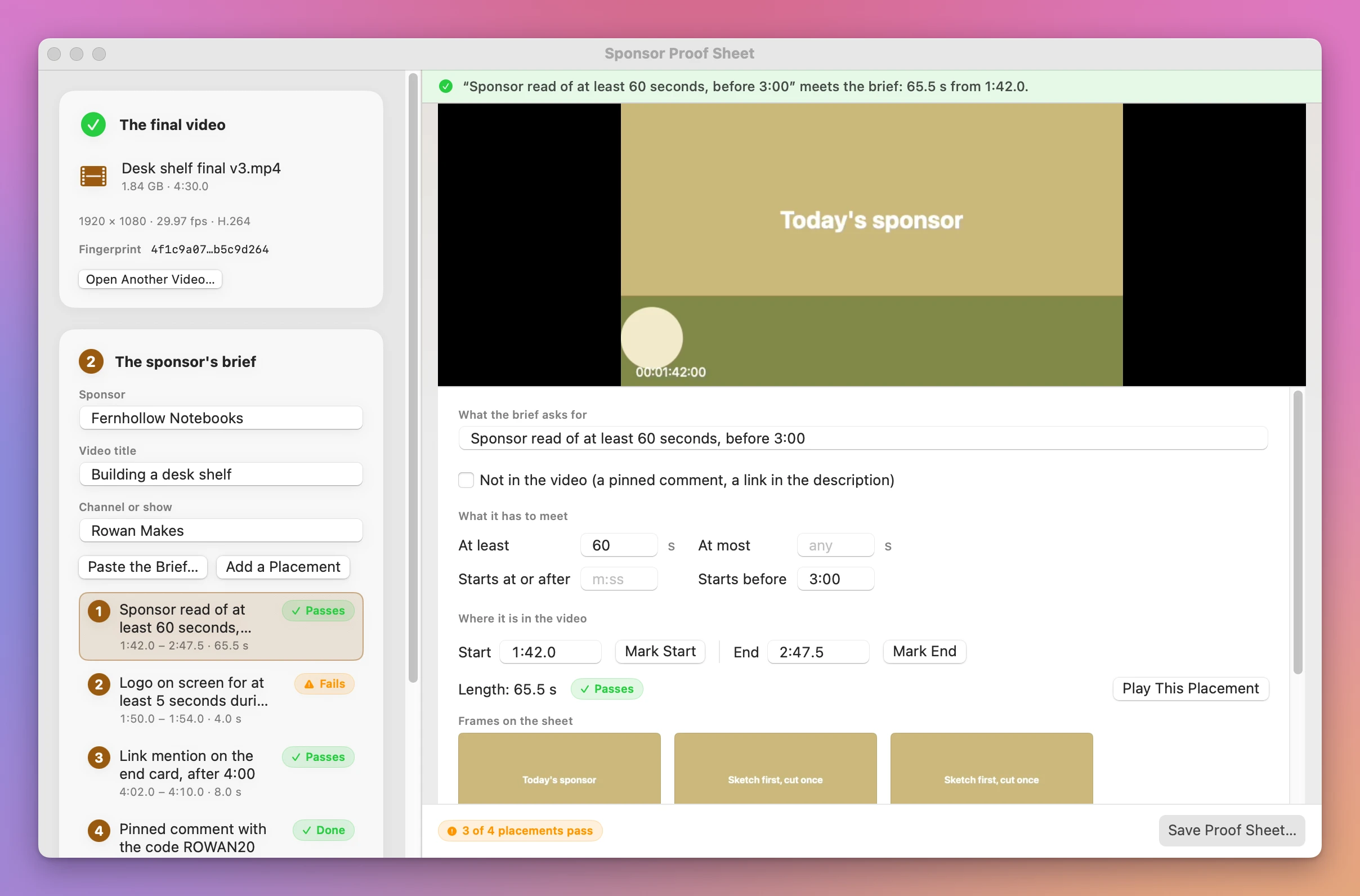
- Click the first placement. Play the video to where it starts and click Mark Start, then to where it ends and click Mark End. Or type the times, like
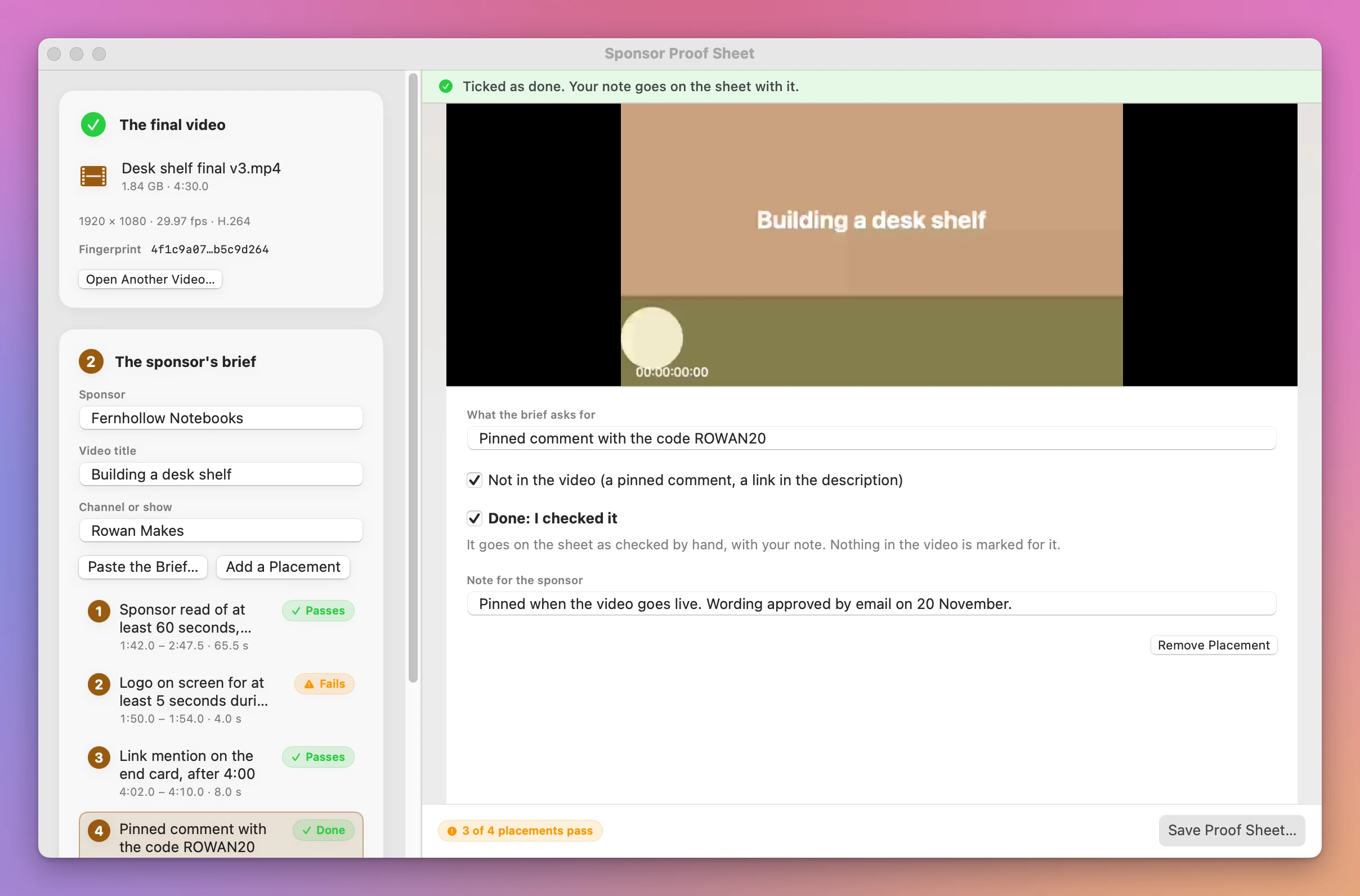
1:42.5or00:01:42:15. - For something that isn’t in the video, like the pinned comment, tick Not in the video and Done: I checked it, and say how in the note.
- Click Save Proof Sheet….
What you get
Each placement checked against the brief
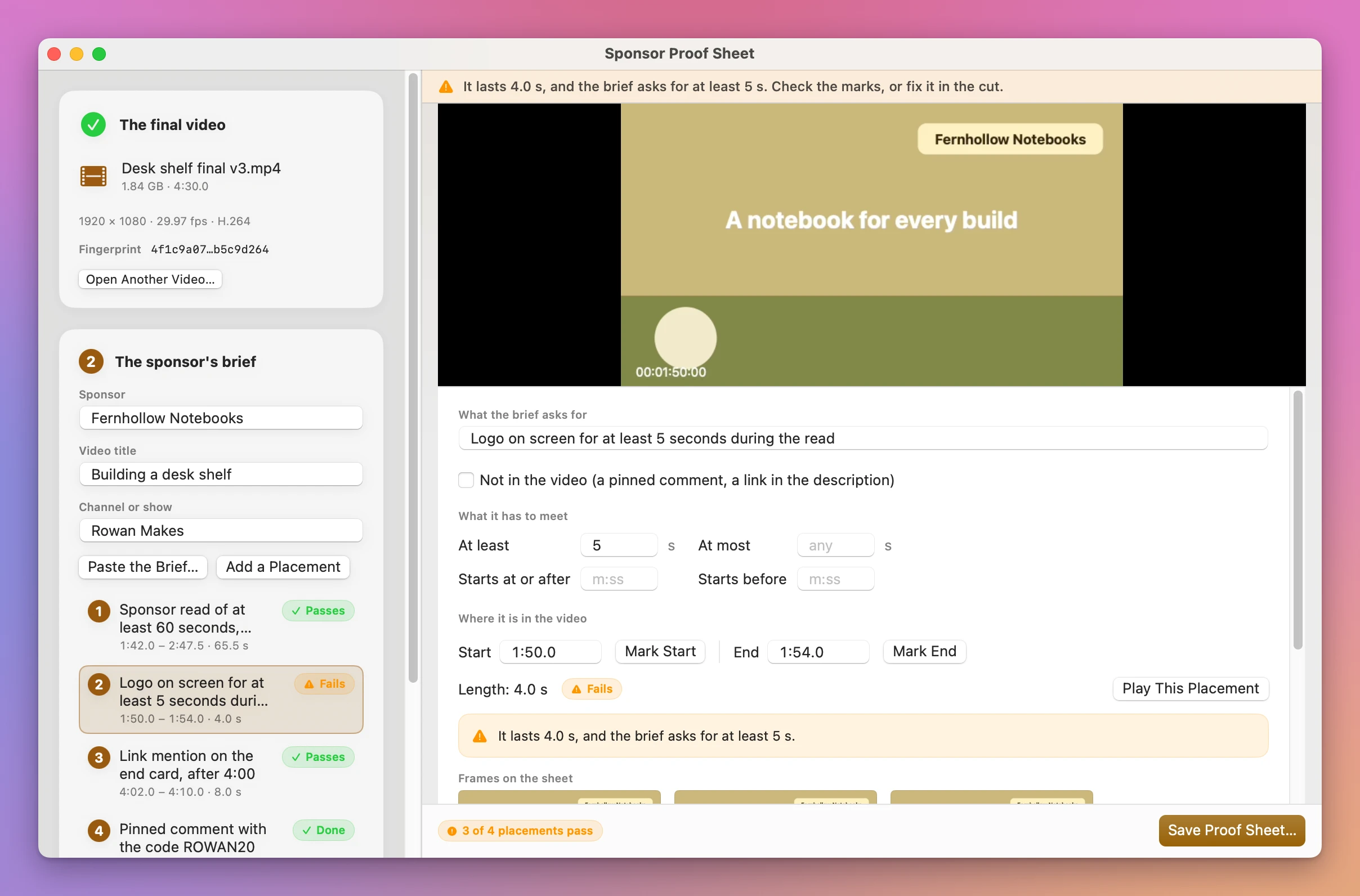
The rules come from the brief’s own words, and you can change them under What it has to meet: At least and At most so many seconds, Starts at or after and Starts before a point in the video.
A placement Passes when it’s marked and meets every rule. When it doesn’t, it says why in a sentence with the numbers: “It lasts 4.0 s, and the brief asks for at least 5 s.” Then you know whether to mark it again or fix the cut.
Frames and timecodes the sponsor can approve
Every marked placement gets three frames on the sheet: its first frame, the middle one and its last, each with its time and its timecode (hours, minutes, seconds and frames, the way editing apps show them). Play This Placement plays just that stretch and stops at its end, so you can check it before you save.
The file’s fingerprint
The sheet lists the file’s name, its size to the byte, its length, picture size, frame rate and when it was last changed, and its SHA-256 fingerprint. The fingerprint is worked out from every byte of the file. Export again and change one frame, and the fingerprint changes too, so the sheet points at one exact file.
Things that aren’t in the video
A brief often asks for a pinned comment, a discount code in the description or a link above the fold. Tick Not in the video, then Done: I checked it once you have, and write how in the note. The sheet lists it as “Done, checked by hand”, with your note.
Your marks, kept
The brief and the marks are saved as you work. Open the same video next week and they’re back. Open a new export of it and they come back too, with a note to play each placement once more, since the cut may have moved.
Why not do it by hand
QuickTime Player plays the video and shows where you are on the scrubber. It has no markers, so you write each time down yourself, subtract to get the length, and take screenshots with ⌘⇧4. The Finder’s Get Info shows the file’s size and length. Nothing on a Mac shows a file’s fingerprint without typing commands.
Your editing app has markers and can export a still. The markers live in the project, though, not in the exported file, and nothing there checks them against a sponsor’s brief or writes a sheet the agency can read.
There are online services that scan published videos for logos, made for agencies tracking hundreds of creators. They work after the video is public. Sponsor Proof Sheet works on the file on your Mac, before you publish, and uploads nothing.
| QuickTime Player and notes | Your editing app | Sponsor Proof Sheet | |
|---|---|---|---|
| Cost | Free | You already have it | $19 once |
| Marks where a placement starts and ends | You write the times down | Markers in the project | Mark Start and Mark End, saved with the video |
| Length of each placement | You subtract | You subtract | Worked out |
| Checks it against the brief | By eye | By eye | Passes or Fails, with the reason |
| Frames of each placement | One screenshot at a time | One still at a time | Three per placement, on the sheet |
| Proves which file it was | No | No | Size to the byte and SHA-256 fingerprint |
| Something to send the sponsor | An email you write | No | A one-page PDF |
| Works on the final export | Yes | No, on the project | Yes |
What it doesn’t do
- It doesn’t find the placements by itself. There’s no speech or logo recognition: you mark each one.
- It doesn’t look at the video once it’s on YouTube or a podcast app, and it doesn’t check the pinned comment or description. Those are ticked by hand, and the sheet says so.
- It doesn’t edit, trim or export the video. The video is only read.
- It doesn’t send the sheet. It saves a PDF, and you email it.
- It opens .mov, .mp4 and .m4v videos your Mac can play. MKV and WebM files don’t open.
Questions
Does it change my video?
No. The video is only read. The proof sheet is a new PDF in the folder you pick, and it’s never saved over the video.
Does it upload anything?
No. The video, the brief and the sheet stay on your Mac. The app connects to the internet only to check for updates.
How does the sponsor check the fingerprint?
The fingerprint is a SHA-256 checksum, a standard that checksum tools on any computer can work out. The same file always gives the same 64 characters, so they compare theirs with the one on the sheet.
My export is 40 GB. Is that a problem?
No. The fingerprint is worked out while you mark the placements, with a percentage under the file’s name. A big file on a slow drive takes longer, and Save Proof Sheet… waits until it’s done.
What it needs
Sponsor Proof Sheet runs on macOS 14 Sonoma or later, on Apple silicon and Intel Macs.
Buy Sponsor Proof Sheet
$19 plus tax where it applies, paid once.
Download the app from the order page or your Creem receipt, unzip it and move it to Applications. I sign the app with my Apple Developer ID, and Apple notarizes the download.
The app checks for updates once a day. When a new version is ready, click Install and Relaunch. To check anytime, choose Sponsor Proof Sheet → Check for Updates….
Sponsor Proof Sheet is an independent app. It’s not made by, affiliated with or endorsed by Apple, Google, YouTube, Adobe or Blackmagic Design. The sponsors and channels in the screenshots are made up.