
An app by Flavio
Secrets Free
Scan a project and its Git history for API keys, tokens, credentials files and identity leaks. A native Mac app and CLI that work locally.
Buy Secrets Free · $20One-time purchase. Tax included. Full source code.
macOS 14 or later · Apple silicon and Intel
Secrets Free checks a project before an API key, token or credentials file reaches a remote repository.
Pick a folder in the Mac app and get a readable list of findings. Run the secretsfree command in a pre-push hook, CI job or coding-agent workflow. Both use the same scanner.
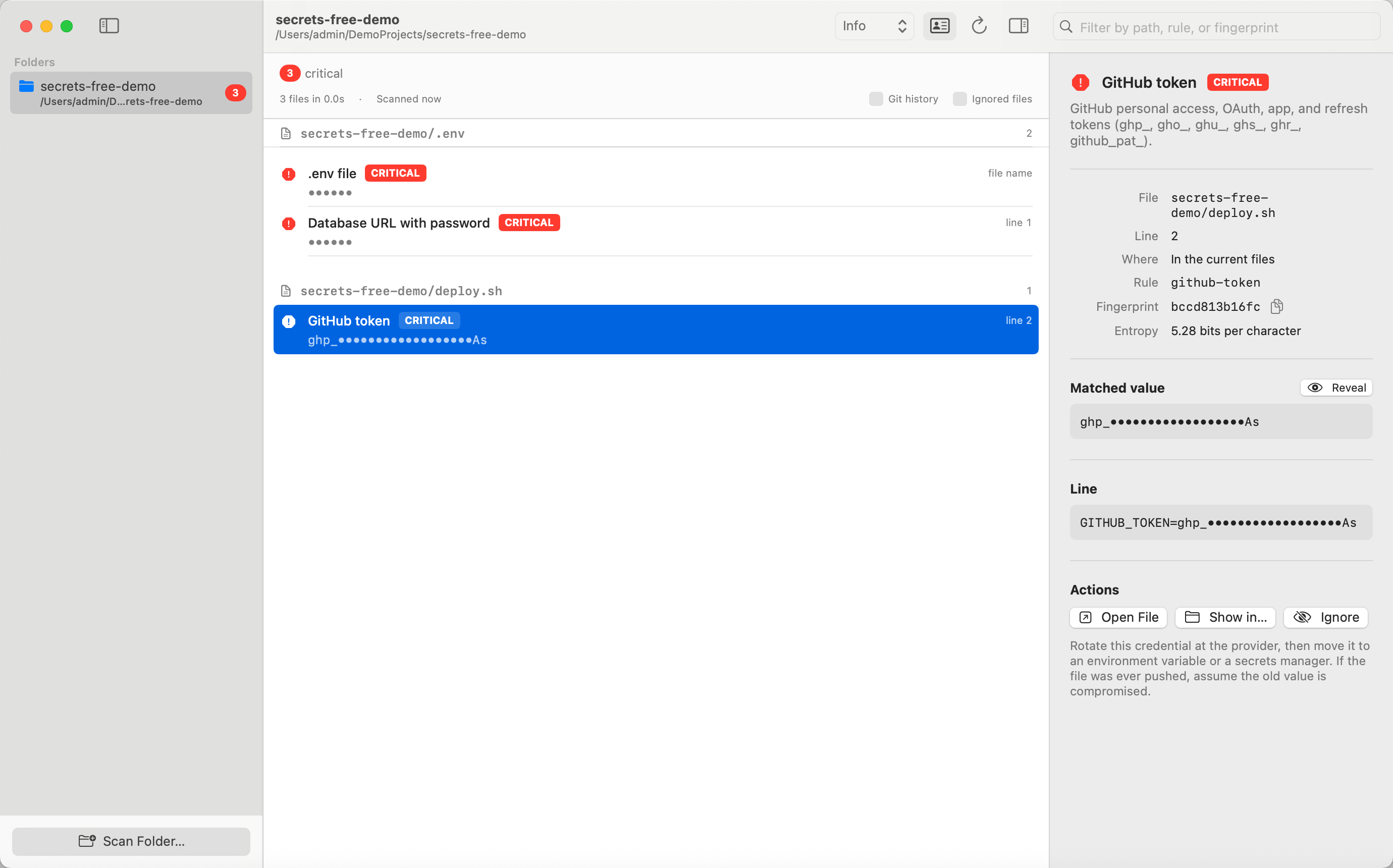
Shown with fictional data. Secrets stay redacted until you choose to reveal one in a live scan.
Scan what a push would publish
Inside a Git repository, the normal scan reads tracked and untracked files and skips ignored files. You can include ignored files when you need a wider local audit.
Turn on Git history to inspect every commit on every branch. A secret removed from the current tree can still matter if it remains in a commit someone can fetch.
The scanner has 69 rules for provider tokens, connection strings, private keys, JWTs, passwords, credential files and identity leaks. Provider-specific rules cover services such as GitHub, AWS, Stripe, OpenAI, Cloudflare, Polar, Supabase and DigitalOcean. The Identity option controls checks for email addresses, home paths, private IPs and account IDs.
Keep the secret out of the report
Findings show a masked value, fingerprint and redacted context. Saved app reports contain redacted values. The full value can only be revealed from a live scan when you explicitly ask for it.
Secrets Free runs on your Mac. It does not upload the project, the finding or the report to me. There is no account and no hosted scanning service.
Use it from Terminal and coding agents
The CLI prints text for people and JSON for scripts. It exits with a documented status so a hook can stop a push when it finds a high- or critical-severity result.
secretsfree scan
secretsfree scan --history
secretsfree scan --history --fail-on medium --json > secrets.json
Exit code 0 means the configured threshold was clear, 1 means a finding reached it, 2 is a usage error and 3 is a scan failure. --fail-on never keeps the command successful when another tool will decide what to do with the JSON.
Allowlist the exceptions you reviewed
Ignore one known-safe value by fingerprint, a rule, or a path glob. Secrets Free writes those choices to .secretsfree.json, which is designed to be committed with the project.
secretsfree ignore 3f9c2a1d8e7b
secretsfree ignore --rule email-address
secretsfree ignore --glob 'fixtures/**'
For a single source line, add secretsfree:ignore as a comment. Allowlisting is deliberate and visible, so the next person can see why a fixture or example remains in the repository.
Know the boundary
Secrets Free scans local folders. It does not clone a remote repository. Git must be installed for repository-aware scans and history.
Pattern matching can produce a false positive. Review a finding before removing or allowlisting it. The placeholder filter already skips common sample values, and generic rules avoid lock-file integrity hashes.
What you get
The $20 one-time purchase includes the signed and Apple-notarized universal Mac app, the companion CLI and the full MIT-licensed source code. It runs on macOS 14 or later, on Apple silicon and Intel Macs.
After paying through Polar, connect your GitHub account and accept the invitation to the private repository. Download the ready-to-run app from its Releases page, or inspect, change and build the source yourself. A GitHub account is required for delivery.
Updates are downloaded manually from the repository. There is no subscription and no separate service bill.