
An app by Flavio
Position Size Calculator
Type your account, how much you'll risk and where your stop is, and get the size for stocks, futures, forex or crypto, rounded the way your broker takes it. A menu bar calculator on your Mac, one keystroke away with Option-Command-P.
Buy Position Size Calculator · $19One-time purchase. Plus tax where it applies.
macOS 14 or later · Apple silicon and Intel
Latest version 1.0.1, released November 22, 2026
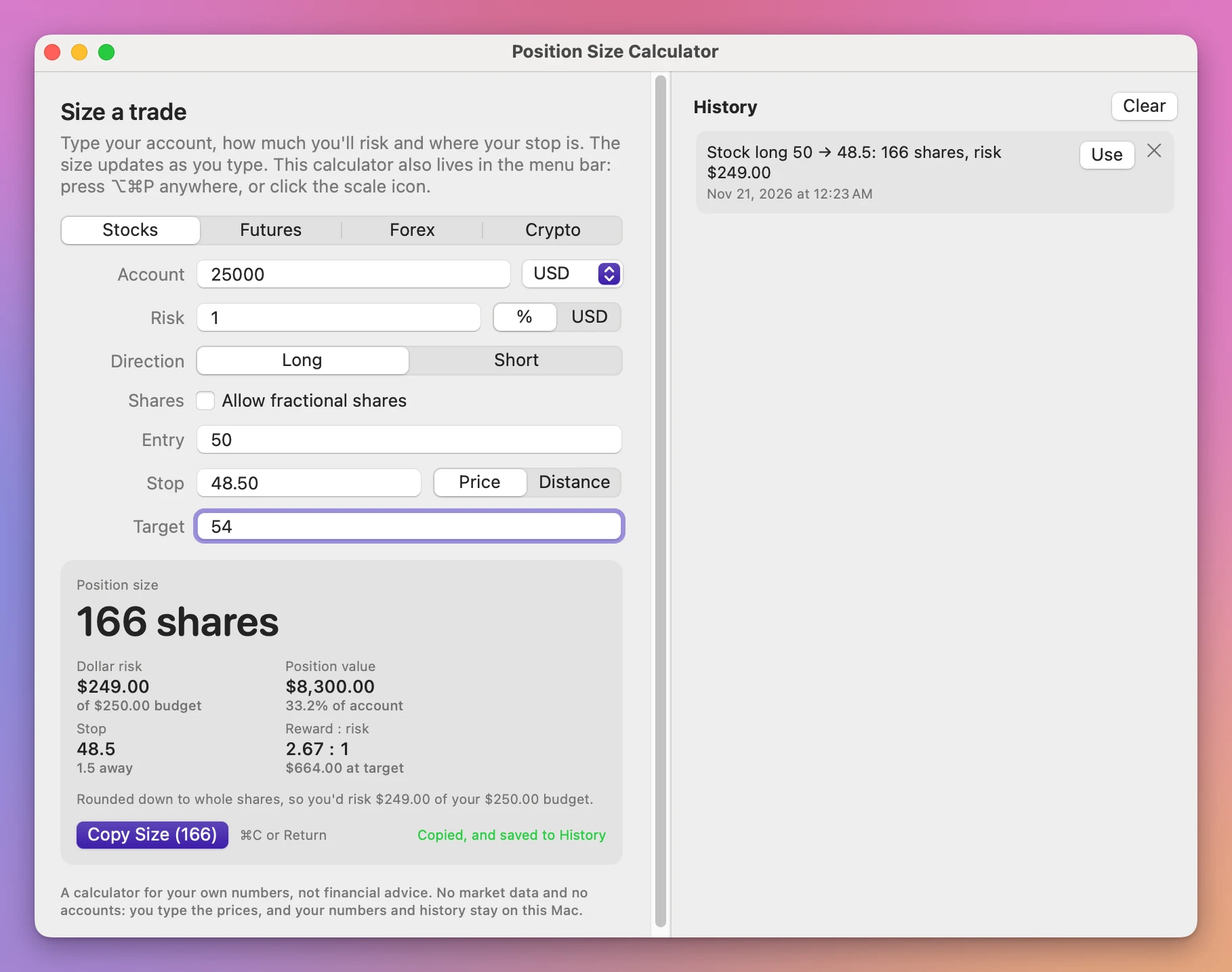
You have a stock at 50 on the chart and a stop at 48.50. Your rule is to risk a fixed slice of the account, for example 1% of $25,000. How many shares is that?
It’s $250 divided by $1.50, so 166.67, so 166 shares. You can do it on the Calculator app in ten seconds. Then the next trade is an ES futures contract with a 10-point stop, and you need the tick value, the number of ticks, and what happens when one contract is already more than your budget. Then a EUR/GBP trade on a dollar account, with pips and lots and a conversion rate.
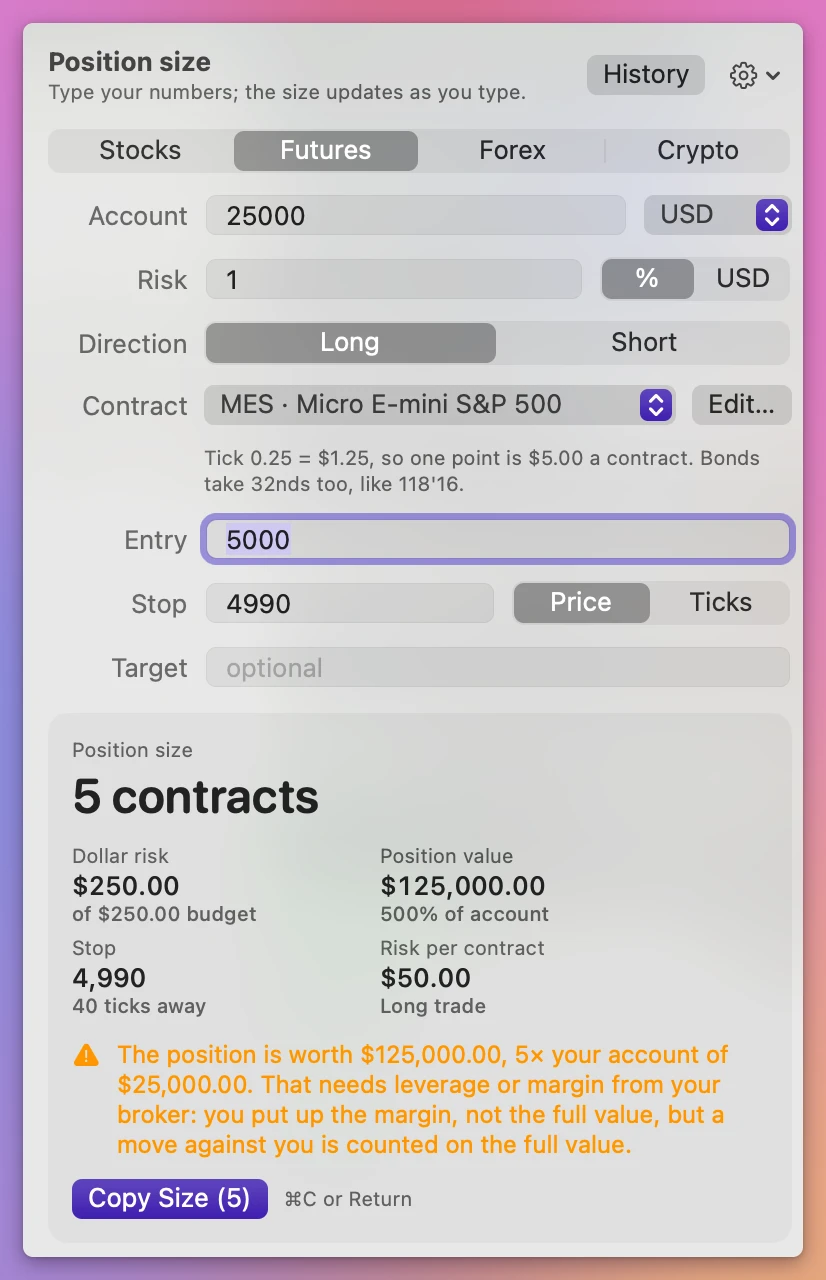
Position Size Calculator does all four. It lives in the menu bar, opens from any app with Option-Command-P, remembers your account, and updates the size as you type. Press Command-C and the bare number is on the clipboard, ready for the order ticket.
A calculator for your own numbers, not financial advice. No market data and no accounts: you type the prices, and your numbers and history stay on your Mac. The trades in the screenshots are examples with made-up prices.
Who it’s for
- Swing traders on stocks. You risk a fixed part of a $25,000 account on each trade and read the entry and stop off the chart. Press Option-Command-P, type two prices, press Command-C, paste 166 into the order.
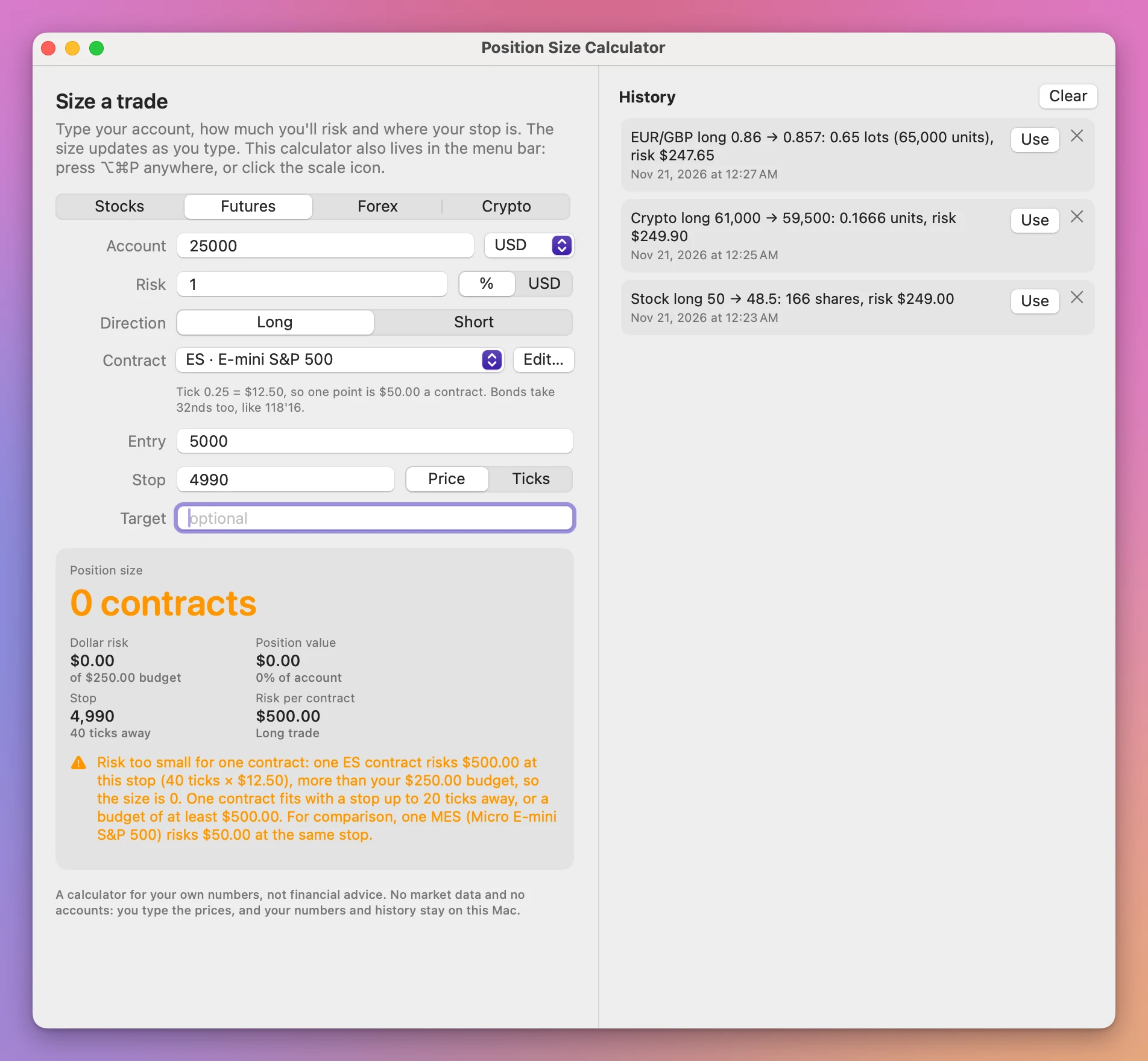
- Futures day traders choosing between ES and MES. With a 10-point stop, one ES contract risks $500 (40 ticks × $12.50). On a $250 budget that’s zero contracts, and the app says so in a sentence, then tells you one MES risks $50 at the same stop. Five MES fit.
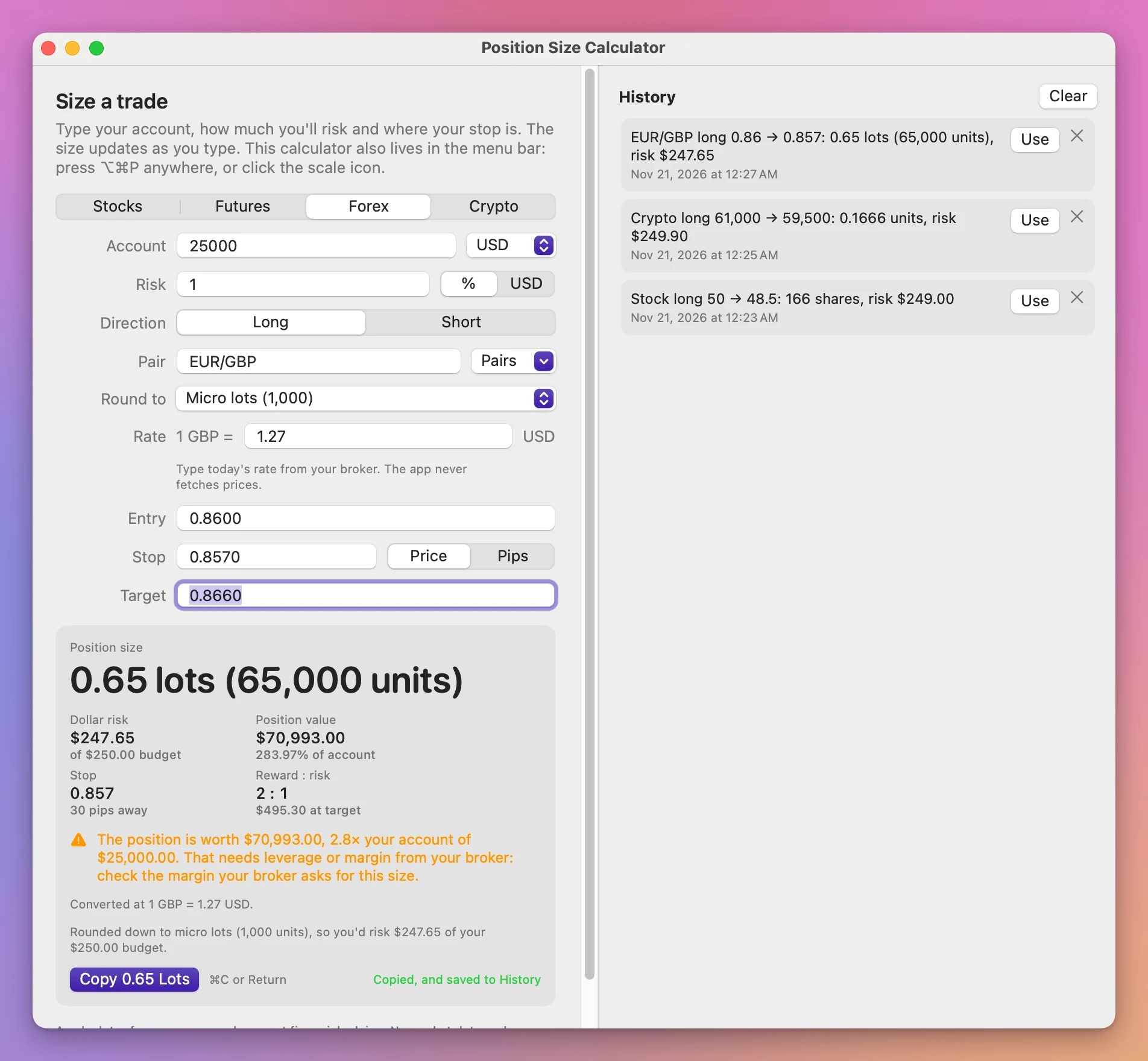
- Forex traders on a dollar account. You trade EUR/GBP or USD/JPY and need lots rounded to micro lots, with the pip value converted to dollars at a rate you type from your broker.
- Crypto traders. Your exchange takes BTC in steps of 0.001. Type the step and the size is rounded down to what the exchange accepts, so the risk stays under your budget.
- Anyone with a fixed dollar risk. You risk $150 a trade, not a percentage. Switch Risk to the amount, and get the size, the reward to risk at your target, and a warning when the position is worth more than the account and needs margin.
From a stop on the chart to a size on the clipboard
- Open it. Press Option-Command-P in any app, or click the scale icon in the menu bar. The calculator opens under the icon with the cursor in Entry. The first time you open the app, it shows its window instead.
- Type your account once. Account and its currency are remembered. Under Risk, type a number and pick % or the amount.
- Pick the market. Stocks, Futures, Forex or Crypto. Futures asks for a Contract, forex for a Pair and how to Round to, crypto for the exchange’s step size.
- Type the entry and the stop. The stop can be a price, or a distance: in Ticks for futures, Pips for forex. Target is optional.
- Read the size. The result card shows the size in big type, the dollar risk “of $250.00 budget”, the position value and its share of the account, how far the stop is, and the reward to risk if you typed a target.
- Copy it. Click Copy Size (166), or press Command-C or Return. The number goes to the clipboard without “shares” after it, and the calculation is added to History.
What you get
Four markets in one form
- Stocks round down to whole shares, or to 0.0001 of a share with Allow fractional shares.
- Futures use the contract’s tick size and tick value. Sixteen CME Group contracts are built in: ES, MES, NQ, MNQ, YM, MYM, RTY, M2K, CL, MCL, GC, MGC, SI, ZB, ZN and 6E. Treasury prices can be typed in 32nds, like
118'16. - Forex uses pips of 0.0001, or 0.01 for yen pairs, and rounds to micro (1,000), mini (10,000) or standard (100,000) lots. A Pairs menu has 14 common pairs, or you type your own.
- Crypto rounds down to the step size you type, 0.0001 to start with.
Sentences when a trade can’t be sized
When the numbers can’t give a size, the result card says what to change. A stop on the wrong side gets “Your stop (52) is above your entry (50), so on a long trade it would never stop a loss. Put the stop below the entry, or switch to Short.” A stop equal to the entry, a missing price or a missing rate each get their own sentence.
When the budget is too small for one contract, you get 0, and an explanation of what would fit.
Conversion at a rate you type
A futures contract or a forex pair priced in another currency needs a rate. The Rate row appears only then, as “1 GBP = [ ] USD”, with the line “Type today’s rate from your broker. The app never fetches prices.” For a pair like USD/JPY on a dollar account, the entry price is the rate, so you don’t type one.
Your own contracts
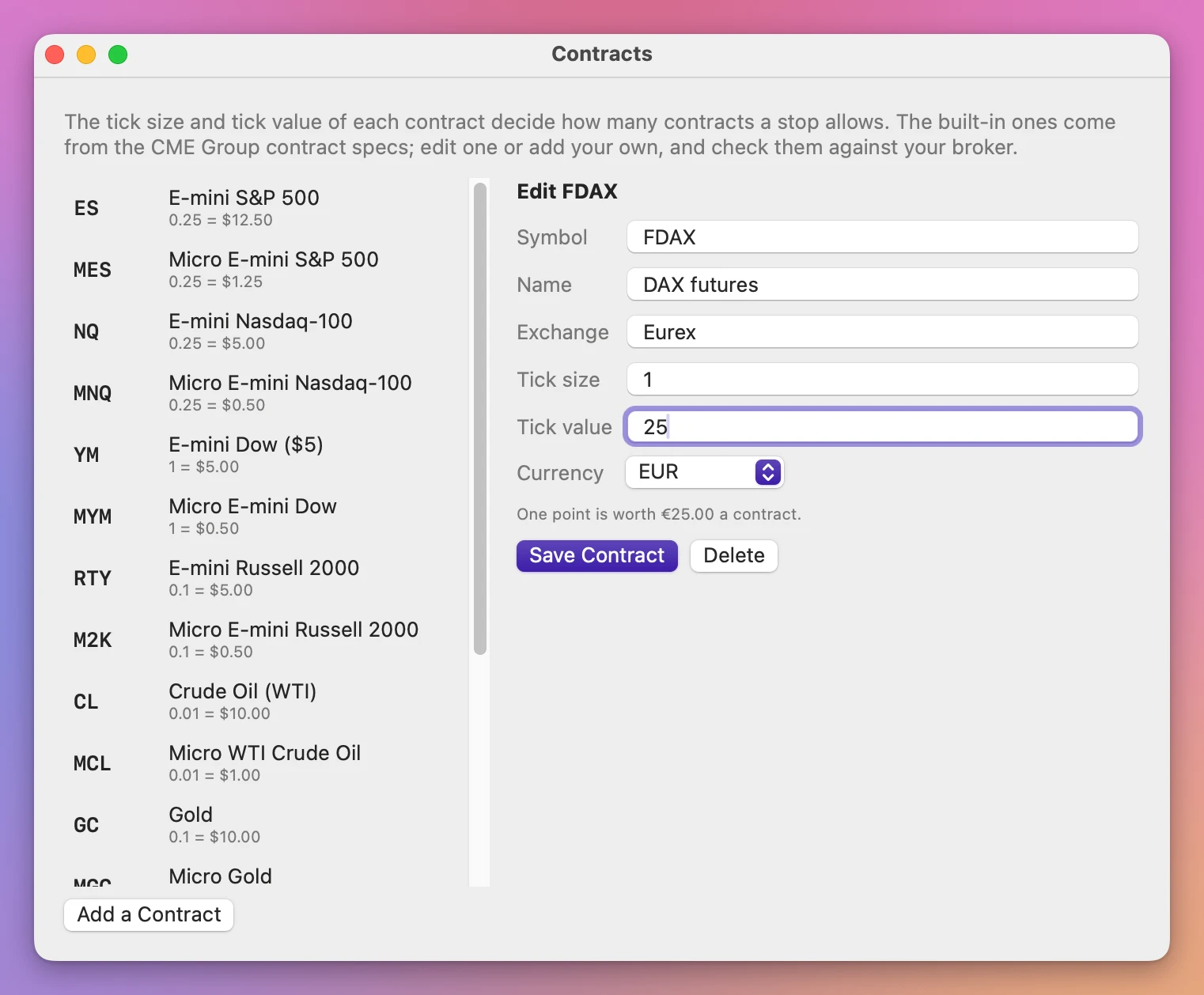
File › Contracts… (Shift-Command-K) lists the built-in contracts with their tick values. Click Add a Contract for one that isn’t there, like a Eurex contract priced in euros, and the editor shows what one point is worth. If you edit a built-in one, Reset to CME Values puts it back.
History and settings
Every size you copy goes into History, the last 20. Click Use to fill the form with one again. In Settings (Command-comma) you can record another shortcut, turn it off, pick the account currency, and turn on Open at login, which starts the app in the menu bar with no window.
Why not use a calculator, a spreadsheet or a website
For one stock trade, the Calculator app is fine: risk divided by the distance to the stop, rounded down. Numbers or Excel can do every case in this app if you build the sheet yourself: tick values per contract, pip values per pair, conversions, rounding to lots and steps. Then you keep it up to date and keep it open.
Free web calculators are good too. Babypips and Myfxbook have position size calculators for forex, and many broker sites have one. Each one is a browser tab you go back to and fill in again, and most cover one market.
Some trading platforms can size an order from a risk amount right in the order ticket. If yours does and you only trade there, use it. Many order tickets only show the order’s value, and you work out the quantity yourself.
| Calculator app | Spreadsheet | Web calculator | Position Size Calculator | |
|---|---|---|---|---|
| Cost | Free | Free | Free, often with ads | $19 once |
| Stocks, futures, forex, crypto | You do the math | If you build it | Usually one market | All four |
| Futures tick values | You look them up | You type them in | Varies | 16 built in, add your own |
| Rounds to contracts, lots, steps | By hand | With formulas | Varies | Yes |
| Says why a size is 0 | No | No | Rarely | In a sentence |
| Opens from any app | No | No | Browser tab | Option-Command-P |
| Live prices | No | If you connect them | Some | No, you type them |
| Works offline | Yes | Yes | No | Yes |
What it doesn’t do
- It doesn’t fetch prices or rates. You type the entry, the stop and any conversion rate.
- It doesn’t include fees, commissions, slippage, spreads or margin. The leverage warning compares the position’s value with your account. It doesn’t know what margin your broker asks for.
- It doesn’t connect to a broker or place orders. It puts a number on the clipboard.
- It assumes stock and crypto prices are in your account currency.
- It uses one pip size per kind of pair. 0.0001, or 0.01 for yen-quoted pairs, with no per-pair overrides.
- It doesn’t tell you how much to risk. You pick the percentage or the amount.
Questions
Is this financial advice?
No. It’s a calculator for your own numbers. The 1% in the examples is an example, not a suggestion.
Where do the futures tick values come from?
From CME Group’s contract specifications, for the 16 contracts in the list. Check them against your broker, and add or edit any contract in File › Contracts….
Can I paste the size straight into my broker?
Command-C copies the bare number, like 166 or 0.65, with no unit after it. Paste it into the quantity field. For forex, check whether your platform takes lots or units.
Does anything get uploaded?
No. Your account, your calculations and your contracts stay on your Mac. The app uses the internet only to check for and download updates.
Do I need the window open?
No. It’s a menu bar app: the scale icon and Option-Command-P are always there, and the Dock icon and the menus appear only while a window is open.
What it needs
Position Size Calculator runs on macOS 14 Sonoma or later, on Apple silicon and Intel Macs.
The Position Size Calculator docs walk through every field.
Buy Position Size Calculator
$19 plus tax where it applies, paid once.
Download the app from the order page or your Creem receipt, unzip it and move it to Applications. I sign the app with my Apple Developer ID, and Apple notarizes the download.
The app checks for updates once a day. When a new version is ready, click Install and Relaunch. To check anytime, choose Check for Updates… in the gear menu of the menu bar calculator, or in Settings.