
An app by Flavio
Image Sequence Checker
Choose a folder of rendered frames and see every missing, empty, broken or doubled frame of each sequence in it, plus frame numbers padded differently and frames that look wrong. Copy the exact frames to render again, like 1101-1125,1187, for your render manager, and save a report. Your frames are never changed.
Buy Image Sequence Checker · $19One-time purchase. Plus tax where it applies.
macOS 14 or later · Apple silicon and Intel
Latest version 1.0.2, released November 22, 2026
You set 2,400 frames rendering before bed. In the morning the folder is full of EXRs and the render manager says it finished. Then you drop the sequence into the comp and it jumps at frame 1,101. The Mac went to sleep for 25 frames, a node crashed and left a half-written frame at 1,187, and frame 1,203 is 0 bytes.
You can find these by hand. Open the folder in the Finder, switch to list view, sort by name and scroll, reading the numbers and the Size column. A gap of 25 is easy to miss in 2,400 rows, and a frame cut in half has a size that looks fine.
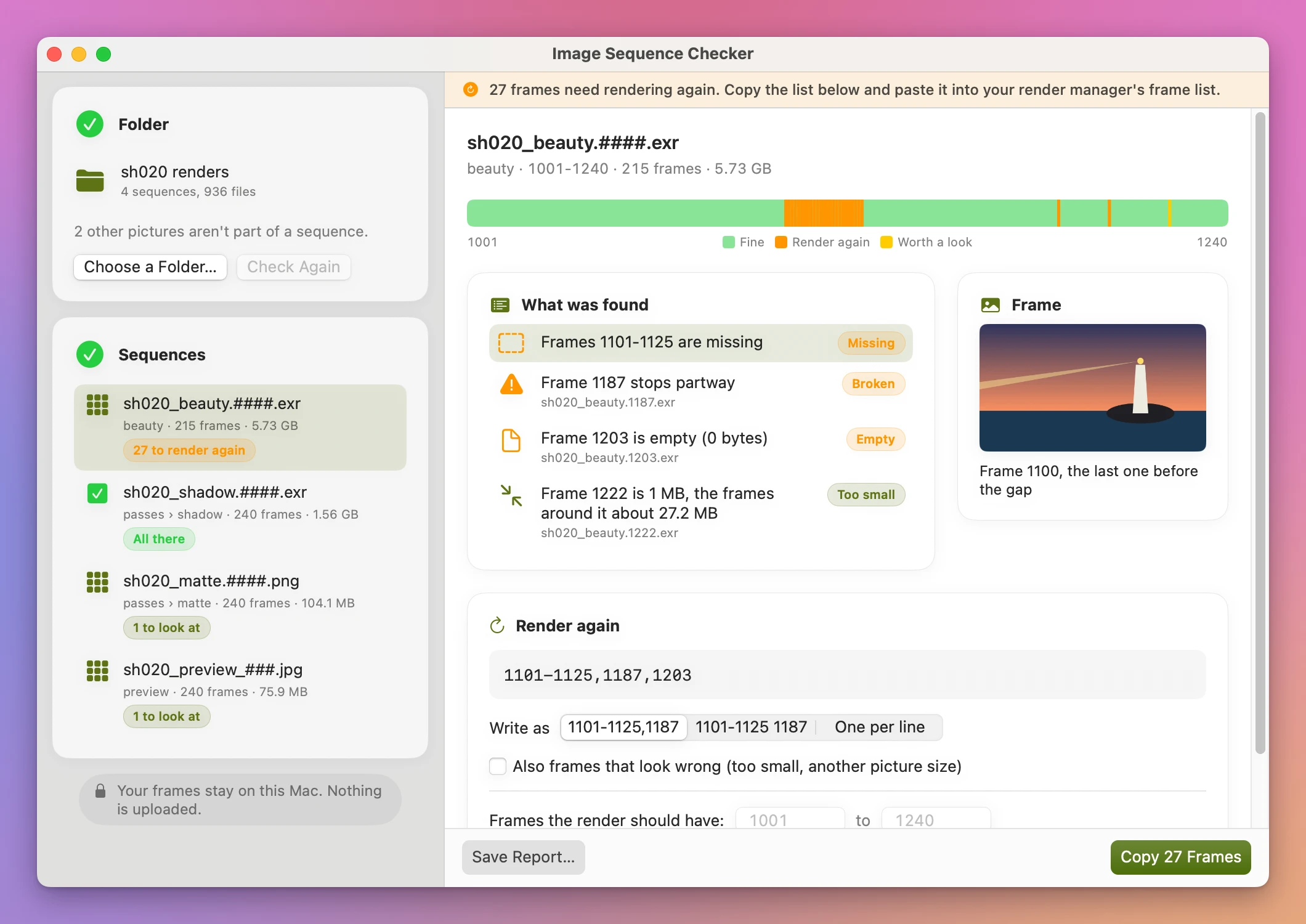
Image Sequence Checker reads the whole folder at once. It finds every numbered sequence in it, opens every frame, and lists what’s missing, empty, broken or there twice. Then it writes the frames to render again, like 1101-1125,1187,1203, ready to paste into your render manager.
Watch a 30-second demo of Image Sequence Checker:
Who it’s for
- 3D artists. You left a Blender or Cinema 4D render running overnight on your own Mac. It slept for half an hour, or ran out of disk at frame 1,900, and you want the exact frames to render again instead of the whole shot.
- Motion designers. You render a sequence to PNG or TIFF for a client who wants frames, not a video. Before you zip the folder, you want to know it’s complete, with no 0-byte frame from a crash in the middle.
- Small studios with a few machines. Three Macs render into one network folder, one of them died halfway, and your render manager wants a frame list like
1201-1250,1873to resubmit. - Animators and stop-motion makers. Your frames are numbered 0001 to 0999 and then 1000, or someone copied a frame in the Finder and now there’s
frame_0450 copy.png. Your editing app won’t take the sequence cleanly and you want to know why. - Assistant editors and compositors. A vendor sends plates as DPX or EXR sequences. You check them before the conform and send back a report of what’s missing, not a vague “some frames are bad”.
How it works
- Click Choose a Folder… and pick the folder your frames were saved to, or drag it onto the window. Folders inside it, like one per pass, are read too.
- The app reads the names, then opens every frame to check it isn’t empty or cut short.
- Pick a sequence on the left. Its pill says All there or how many frames need rendering again.
- Click a row to see its frame. If the render should have more frames than the folder holds, type the range under Frames the render should have.
- Click Copy 27 Frames and paste the list into your render manager. Save Report… writes a spreadsheet of everything.
What you get
Every sequence in the folder
Point it at a shot folder with beauty, shadow and matte folders inside and you get three sequences, each with its pattern (sh020_beauty.####.exr), its range, its frame count and size. It reads EXR, PNG, TIFF, JPEG, DPX, TGA, PSD and more. Pictures that aren’t part of a sequence, like a poster frame, are counted and left alone.
Missing frames as ranges
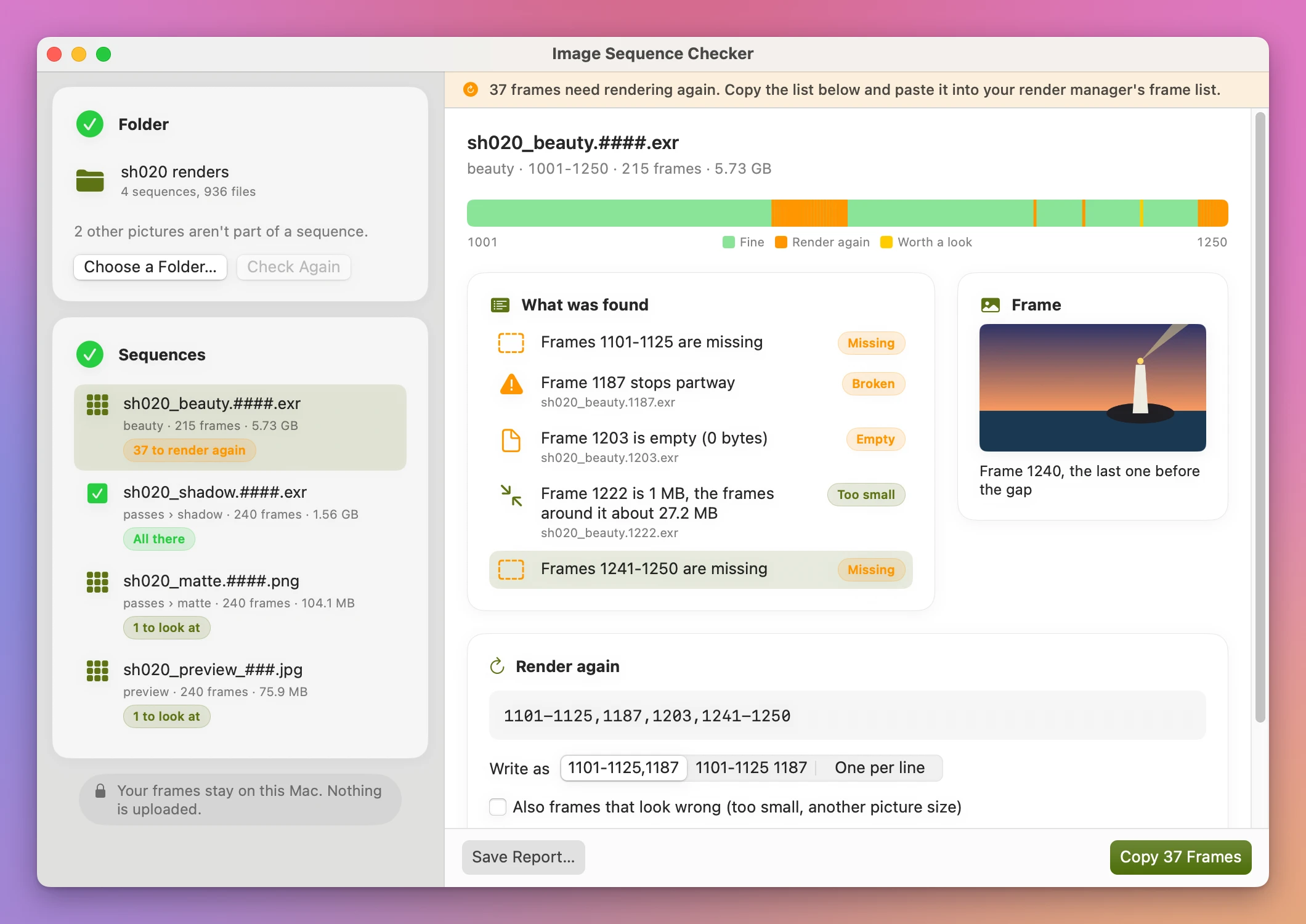
Every number between the first and last file that has no file, written as ranges: “Frames 1101-1125 are missing”. When the render stopped early, the folder looks complete, so you can type the frames it should have, like 1001 to 1250, and the missing 1241-1250 show up too.
Empty and broken frames
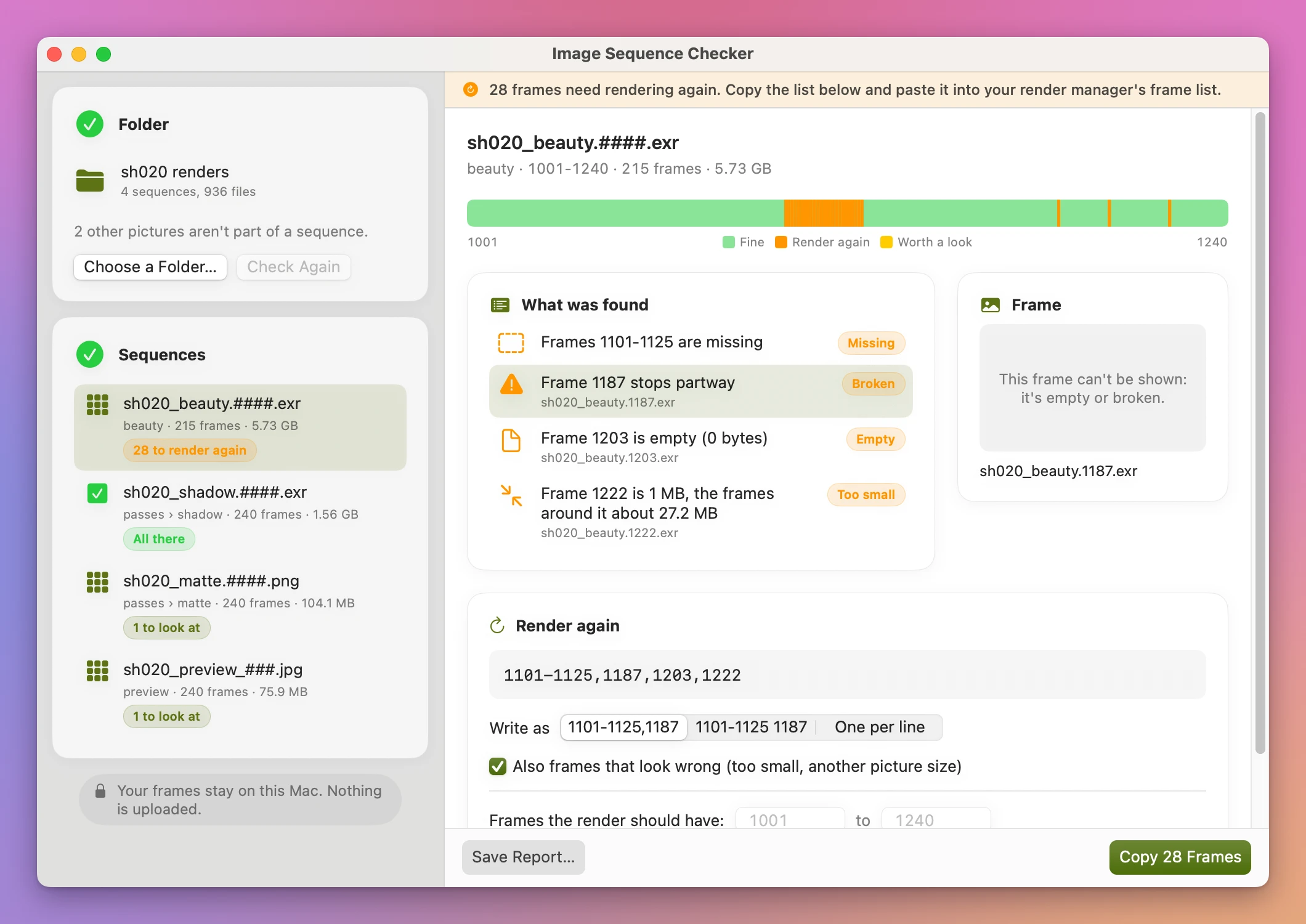
A 0-byte frame is Empty. A frame a crash left half written has a believable size, so the app opens every frame and reads it to the end: a PNG, JPEG, TGA, TIFF or EXR that stops early is Broken, “stops partway”. DPX frames are checked against the size their header says they should be.
Frames that look wrong
A frame under half the size of the frames around it is Too small, and one with a different picture size from the rest, like 1920 × 1080 in a 4K render, is Other size. Either can be a real fade to black or a mistake, so they’re worth a look, and they go in the list only when you tick Also frames that look wrong.
Frames there twice, and padding changes
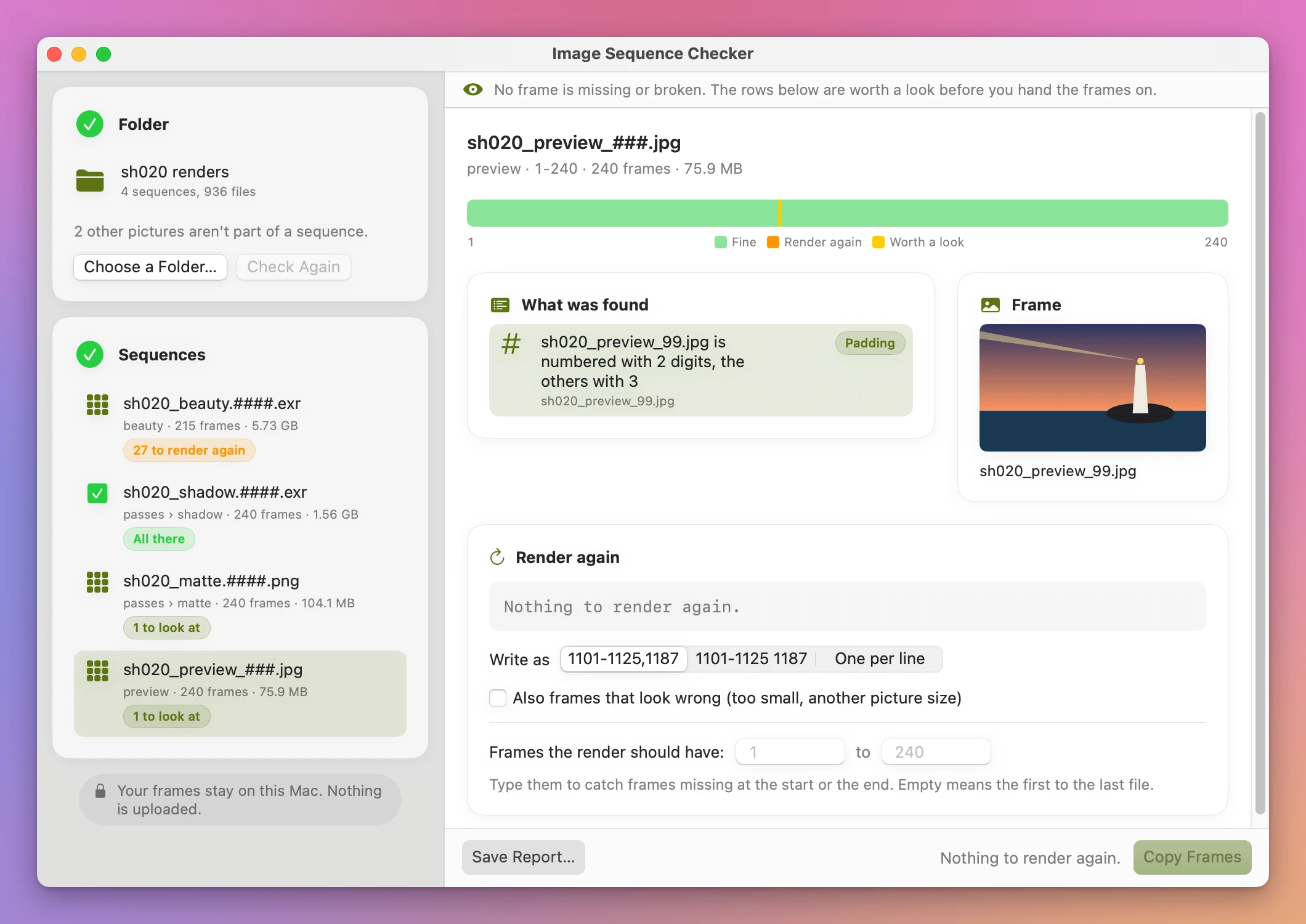
render_0015.png next to render_0015 copy.png is the same frame twice. sh020_preview_99.jpg among sh020_preview_098.jpg and sh020_preview_100.jpg is a padding change, and many editing and compositing apps stop the sequence there. The app names the files so you can fix them in the Finder. It never renames or deletes anything itself.
A list your render manager takes
The frames to render again come as 1101-1125,1187,1203, with commas, the form most render managers take in their frame list. Pick spaces or one range per line if yours wants that. Copy puts it on the clipboard.
A report to keep or send
Save Report… writes a spreadsheet (CSV) with every sequence, every problem with its frames and a sentence, and the list to render again for each one. It opens in Numbers or Excel.
Why not check them by hand
The Finder can show you most of this. In list view, sorted by name, with the Size column, you can scroll a sequence and look for a jump in the numbers or a “Zero bytes”. Quick Look opens one frame at a time. Your compositing or editing app imports the sequence, and some show a placeholder where a frame is missing.
What none of them does is give you the list. You find a gap by reading 2,400 file names or by scrubbing a timeline. A frame cut in half by a crash shows a normal size in the Finder and may only show up as garbage when you play it. A Finder copy sits at the end of the list where nobody looks. And once you’ve found everything, you still type the frame list for the render manager yourself.
| By hand | Image Sequence Checker | |
|---|---|---|
| A gap of 25 frames | Read the file names in the Finder, or scrub the timeline | ”Frames 1101-1125 are missing” |
| Frames missing at the end | Know the last frame and compare | Type the range the render should have |
| A 0-byte frame | Sort by size and look | Empty row |
| A frame cut in half | Play the sequence and spot the glitch | Every frame opened and read to the end |
| A Finder copy or a padding change | Notice it in the list | Twice and Padding rows |
| Several passes | One folder at a time | Every sequence in the folder at once |
| The frame list | Type it yourself | Copied, written for your render manager |
What it doesn’t do
- It doesn’t render. It doesn’t start a render or a render manager job. It gives you the list to paste.
- It doesn’t change your frames. It never deletes, renames, renumbers or moves a frame. For a frame there twice or a padding change, it tells you which file, and you fix it.
- It doesn’t fix a broken frame. Render it again.
- It doesn’t judge the picture. A frame that’s the right size and opens is fine to the app, even if the render is wrong. Small frames and frames of another size are only flagged as worth a look.
- It doesn’t read videos. Only folders of still frames.
- It can’t show DPX frames. macOS can’t draw them, so the app checks their header and size and the preview says so.
Questions
Does it change my frames?
No. The app only reads them. The only file it writes is the report, where you save it.
Does anything get uploaded?
Nothing. The frames are read on your Mac. The app connects to the internet only to check for updates.
How long does it take?
The app opens every frame, so a few thousand 4K EXR frames take a while, and frames on a network drive take longer. The window shows “612 of 936 frames” while it works, and Stop goes back.
Does it work with my render manager and 3D app?
The list is plain text, 1101-1125,1187, the form most render managers take, with spaces or one per line if yours needs that. It works with frames from any app that writes numbered stills. Image Sequence Checker isn’t made by, affiliated with or endorsed by Apple, Adobe, Autodesk, Blackmagic Design, Maxon, the Blender Foundation, Foundry or Thinkbox Software.
What it needs
macOS 14 Sonoma or later, on Apple silicon and Intel Macs. When the folder is on an external or network drive, or in Desktop, Documents or Downloads, macOS may ask once whether the app can read it.
Buy Image Sequence Checker
$19 plus tax where it applies, paid once.
Download the app from the order page or your Creem receipt, unzip it and move it to Applications. I sign the app with my Apple Developer ID, and Apple notarizes the download.
The app checks for updates once a day. When a new version is ready, click Install and Relaunch. To check anytime, choose Image Sequence Checker → Check for Updates….