
An app by Flavio
Contact Export Rescue
When File → Export vCard in Contacts skips people or writes an empty file, export every contact on its own, find the ones Contacts hides, and see who an old export left out.
Buy Contact Export Rescue · $20One-time purchase. Plus tax where it applies.
macOS 14 or later · Apple silicon and Intel
Latest version 1.0.1, released November 20, 2026
You’re moving to a new Mac, or to Google Contacts. You select every card in Contacts, and the window says 420 Cards Selected. You choose File → Export → Export vCard…, import the file on the other side, and it has 406 people in it.
Contacts gave no warning. Nothing tells you which 14 are gone, and the old Mac is about to be wiped.
That’s what happened on a test Mac with a damaged address book. Some records were still in the address book database, but Contacts didn’t show them, and its export left them out. Contact Export Rescue read the same address book and saved all of them, 421 cards, with a report of who was hidden and who the old export was missing.
Who it’s for
- Someone moving to a new Mac, Google or Outlook. The exported
.vcfhas fewer people than Contacts says you have. You want to know exactly who’s missing before you erase the old Mac. - Someone who dragged a contact to the desktop and got a 0 KB file. The
Contact.vcfis empty and won’t import anywhere. You want that person’s card back as a real file. - The family IT helper. Your parent’s address book has been through MobileMe, iCloud and three Macs in fifteen years. You need a list of which records are damaged, not a guess.
- A small business owner moving clients into a CRM. The import came up short, and you only want the missing clients in a separate file, so you don’t import everyone twice.
- Someone switching to Android. You want one
.vcfper person, with notes and photos, and a report you can tick off as you check the new phone.
From Contacts to a folder of vCards
- Add the old export, if you have one. Under Old export to check (optional), drop the
.vcfyou don’t trust, or click Choose…. The app counts its cards, and tells you plainly when the file is empty or isn’t a vCard file. - Leave Also look for contacts that Contacts hides ticked. It’s on by default. It makes the app look for damaged records in a copy of the address book database.
- Click Read Contacts. The first time, macOS asks whether the app can access your contacts. Click Allow. A progress bar reads each contact, one at a time.
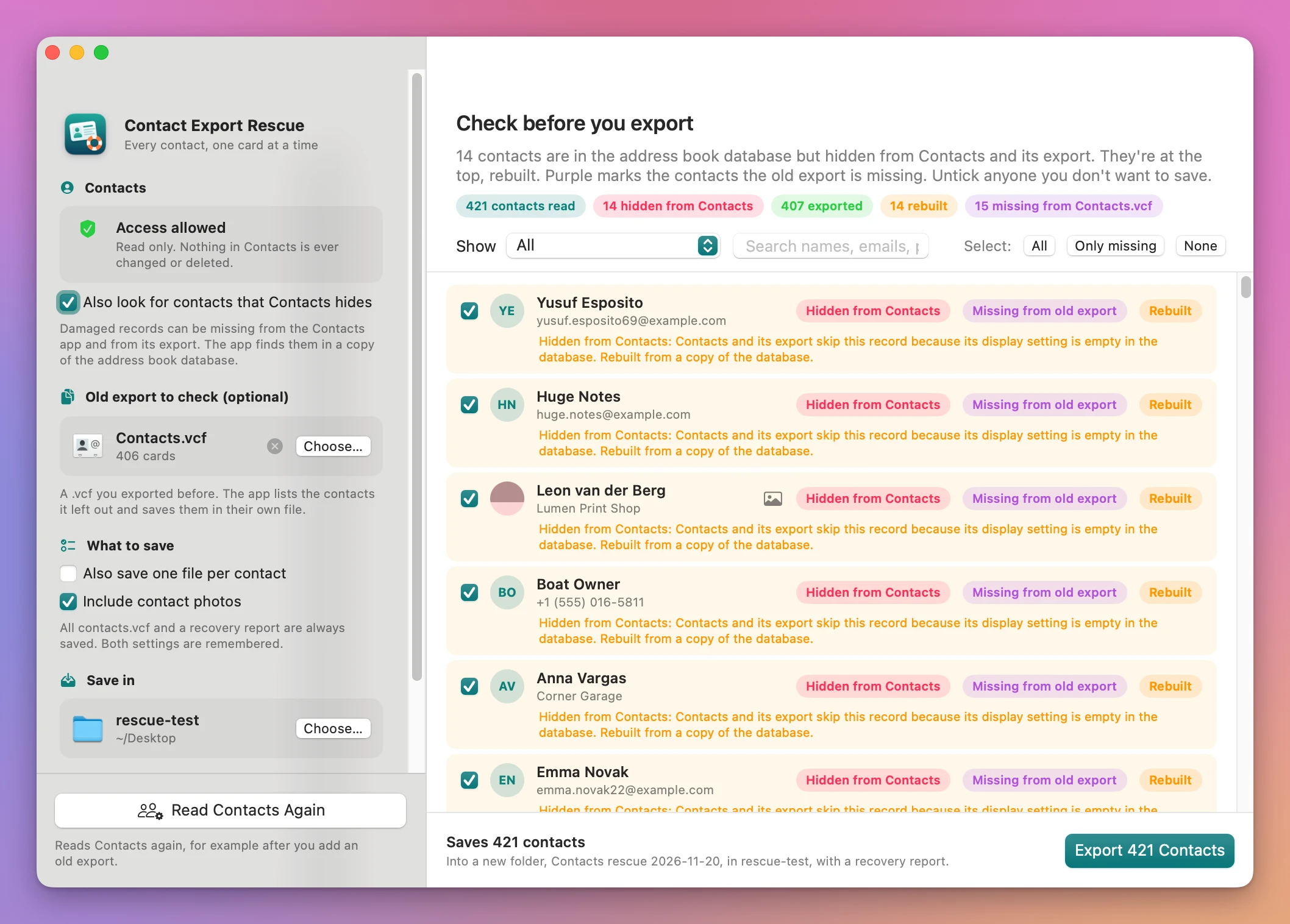
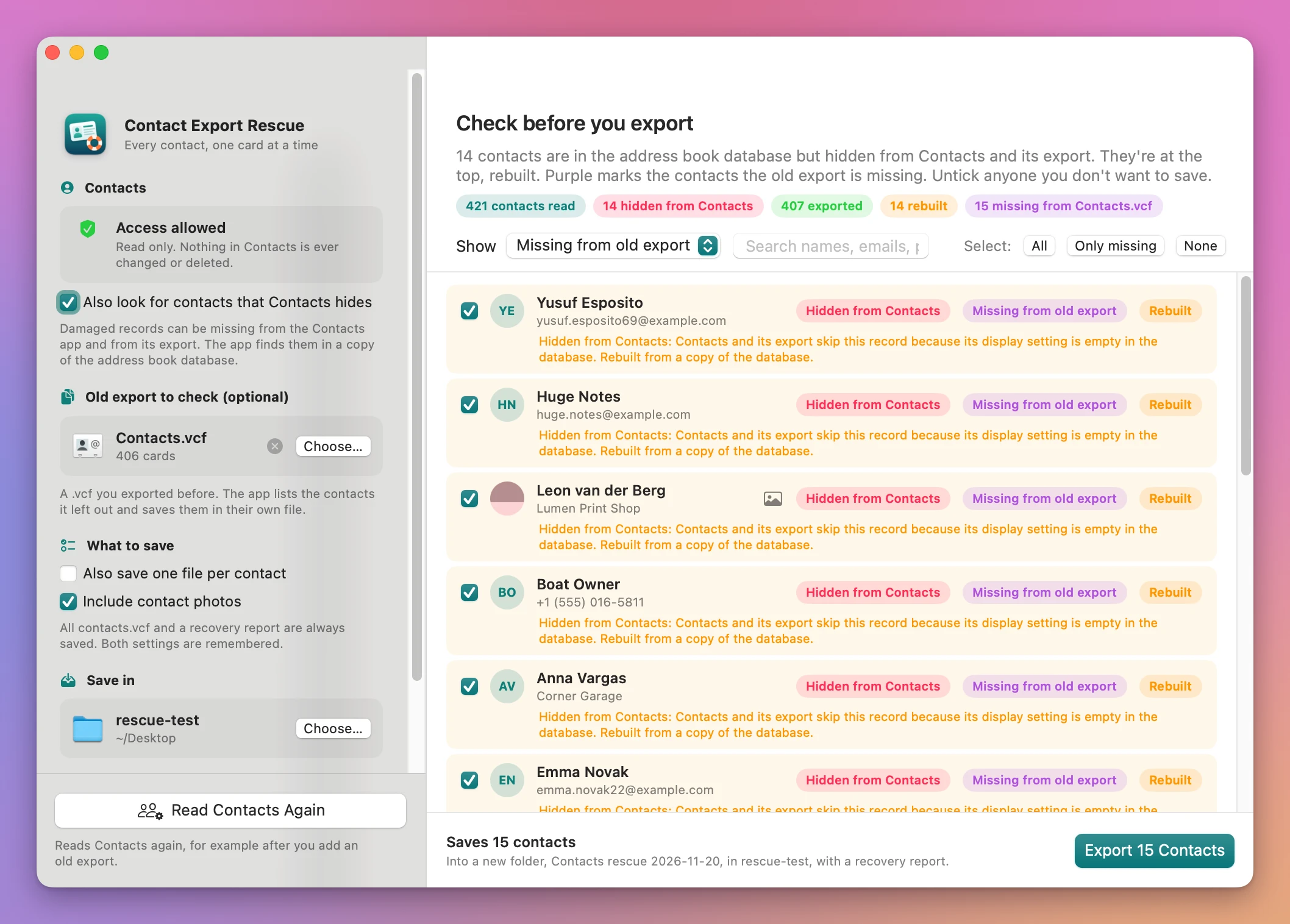
- Check the list. The Check before you export screen puts hidden and problem contacts at the top, each with the reason in plain words. Pills count how many were read, hidden, exported, rebuilt and missing from the old export. Use Show to see only one group, and the search field to find a name, an email or a phone number.
- Pick who to save. Select: All, Only missing or None, or untick anyone by hand. With an old export loaded, Only missing gives you just the people it left out.
- Click Export. The button says how many, like Export 421 Contacts. The app makes a new folder, named
Contacts rescueand the date unless you type another name, inside the folder you chose under Save in.
What you get
A folder with every contact and a report
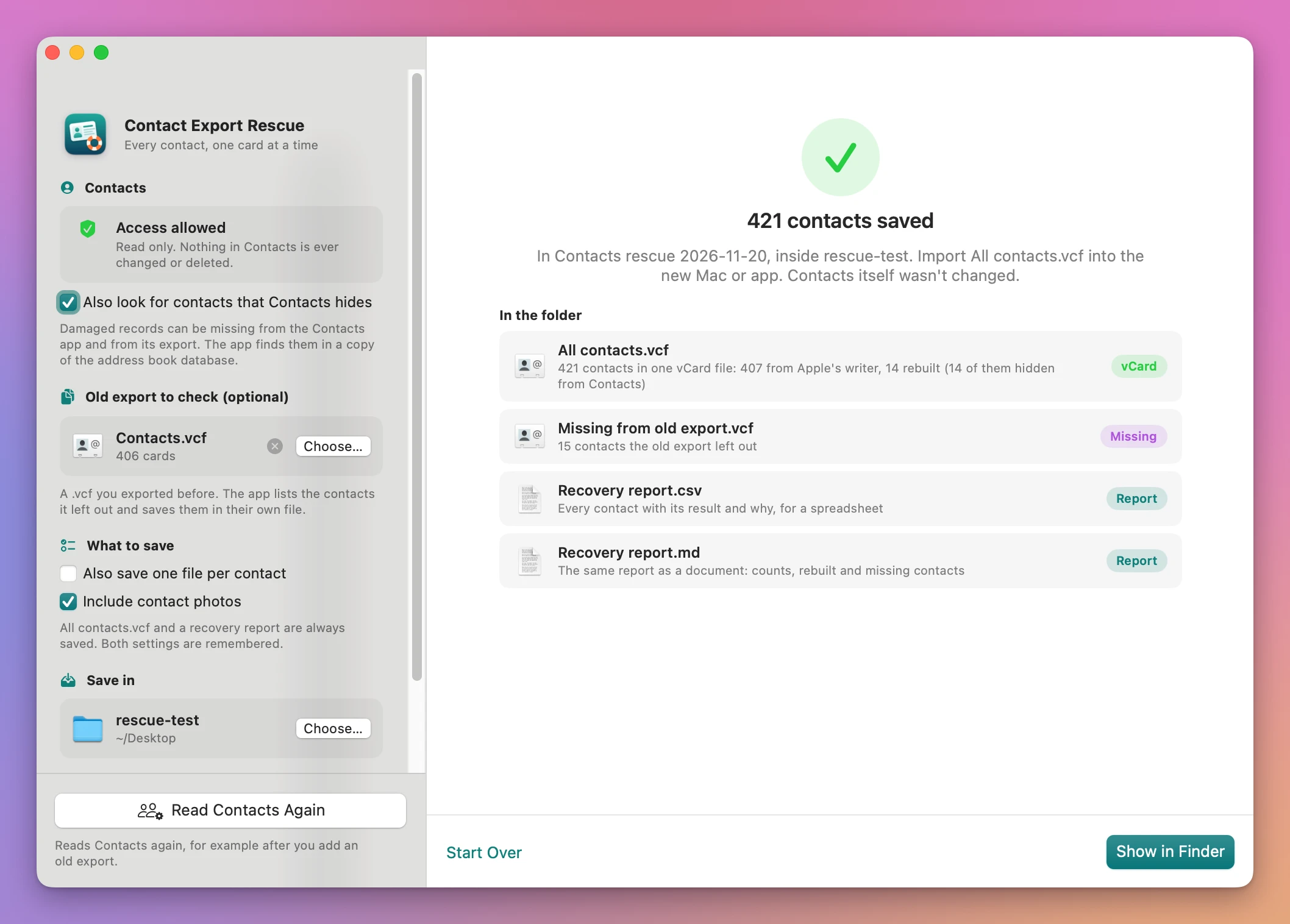
The done screen lists what’s in the folder:
All contacts.vcf, every contact you ticked, in one file you can import anywhere.Missing from old export.vcf, only the people your old export left out, when you added one.One file per contact/, a.vcfper person, when you tick Also save one file per contact.Recovery report.csv, every contact with its result and the reason, for a spreadsheet.Recovery report.md, the same report as a document, with the counts and the names of the rebuilt and missing contacts.
Contacts that Contacts hides
On the test Mac, 14 records were damaged in the way a write-up on tinyapps.org describes: a display setting left empty in the database. Contacts showed 420 Cards Selected, and Export vCard… wrote 406 cards. Contacts counted the 14 damaged records in that selection, but they weren’t in the file.
The app finds records like these in a copy of the address book database, rebuilds a card for each one from what’s stored there, and marks it Hidden from Contacts. It reads the copy, so the database Contacts uses isn’t touched or locked.
On a normal Mac, macOS may require Full Disk Access before the app can read that database. If it says no, the app shows an orange line with Open Full Disk Access…, and still exports everything Contacts lists.
Each contact on its own
The app asks Apple’s own vCard writer for each contact separately. If the writer fails on a card, gives back nothing, or leaves out the name, an email or a phone number, the app writes that card itself from the fields it can read, and marks it Rebuilt with the reason. One bad card doesn’t take the others down with it.
Apple’s writer leaves out notes and photos, so the app adds them back to each card.
Who the old export missed
Add the .vcf you exported before, and the app matches each card against your contacts: by the contact’s ID in Contacts, then email, then phone number, then name. Contacts the old file doesn’t have get a purple Missing from old export pill. Cards in the old file that match nobody show up as Only in old export.
Contacts is only read
The app never writes to Contacts. Nothing is changed, merged or deleted there, and every export goes into a new folder, so an earlier one is never replaced.
Why not use Contacts’ own export
File → Export → Export vCard… in Contacts is free, and for most address books it works. The problem is when it doesn’t: on the test Mac it wrote 406 of 420 selected cards and said nothing. Dragging cards out of Contacts uses the same writer, so it gives the same result, and the tinyapps.org write-up reports a 0 KB Contact.vcf when you drag a damaged card.
The fix that write-up gives is to quit Contacts and edit the live address book database from Terminal. It works, and after that edit the 14 hidden people came back in Contacts on the test Mac. But you’re writing to your only copy of the address book by hand, with no backup step, and nothing tells you who was affected.
The same write-up mentions Automator’s Export vCards action and the free command line tool abcddb2vcard. I haven’t tested either. Automator means building a workflow, and neither one compares the result with your old export.
| Contacts’ Export vCard | Editing the database in Terminal | Contact Export Rescue | |
|---|---|---|---|
| Damaged records Contacts hides | Left out, no warning | Fixed in place, if the command is right | Found in a copy and rebuilt |
| Which people were affected | Not shown | Not shown | Listed, with the reason |
| Changes your address book | No | Yes, by hand | No, read only |
| Compare with an old export | No | No | Yes, with a separate file of the missing |
| One file per contact | No | No | Optional |
What it doesn’t do
- It doesn’t repair your address book. Contacts stays exactly as it was. You import the clean file into the new Mac or app.
- It doesn’t fix every kind of damage. The case it was tested on is records Contacts hides because of an empty display setting. Other kinds of damage, like broken iCloud sync or corrupted rows, weren’t reproduced. Leftover
.abcdpfiles outside the database aren’t read. - It doesn’t merge duplicates or clean up names and numbers. Each contact is saved as it is.
- It doesn’t import anywhere. It gives you
.vcffiles. Importing them into Google, Outlook or a new Mac is a step you do there. - It wasn’t tested with a real iCloud, Google or Exchange account. The test Mac had only On My Mac contacts. Account address books are read by the same code.
Questions
Does it change anything in Contacts?
No. The app only reads Contacts, and the hidden-record search reads a copy of the database. Nothing is changed, merged or deleted.
Will it ask for Full Disk Access?
It may. Reading the hidden records means reading the address book database, and on a normal Mac macOS may want Full Disk Access for that. If the app can’t read it, you get an orange line with Open Full Disk Access…. You can say no: the app still exports every contact Contacts lists, and only the hidden-record search is skipped.
My export is an empty file. Can I still use it?
Yes. Add it as the old export. The app says the file is empty and that every contact will count as missing from it, then exports everyone.
Does anything get uploaded?
No. Your contacts stay on your Mac. The app uses the internet only to check for and download updates.
Do notes come along?
Yes, when the app can read the database. On the test Mac, Contacts gave the app every contact’s notes empty, so they come from the database copy. With the hidden-record search off or refused, notes can be missing.
What it needs
Contact Export Rescue runs on macOS 14 Sonoma or later, on Apple silicon and Intel Macs. It needs access to your contacts, and may ask for Full Disk Access to find the hidden ones.
The Contact Export Rescue docs walk through each step.
Buy Contact Export Rescue
$20 plus tax where it applies, paid once.
Download the app from the order page or your Creem receipt, unzip it and move it to Applications. I sign the app with my Apple Developer ID, and Apple notarizes the download.
The app checks for updates once a day. When a new version is ready, click Install and Relaunch. To check anytime, choose Contact Export Rescue → Check for Updates….