
An app by Flavio
Calendar CSV Importer
Turn a CSV of dates and times into Calendar events. Check every row first, catch wrong dates and duplicates, and undo the whole import with one click.
Buy Calendar CSV Importer · $20One-time purchase. Plus tax where it applies.
macOS 14 or later · Apple silicon and Intel
Latest version 1.0.1, released November 20, 2026
The school sent the term calendar as a spreadsheet. Date, Start, End, Event, Location, sixty rows of it. You want it in Calendar on your Mac, where your phone will pick it up too.
Calendar’s File → Import takes calendar files (.ics), not spreadsheets. So the choices are typing sixty events by hand, or finding a converter and hoping it read 03/09/2026 as the 3rd of September and not March 9.
Calendar CSV Importer reads the CSV, shows every row as the event Calendar will get, and tells you in plain words which rows have a problem. Then it puts the events in a new calendar of their own, and Undo Import takes the whole thing back out if something looks wrong.
Who it’s for
- School offices. The trust sends the term calendar as an Excel sheet with Date, Start, End, Event and Location. You want it in the staff calendars on the office Macs without retyping 60 rows.
- Club secretaries. The league site gives you the season’s fixtures as a CSV, with American dates like
9/12/2026. You want them in a “U12 Fixtures” calendar to share with parents, without doubling the matches you already added by hand. - Shift managers. The rota is a spreadsheet, and the night shift runs from 22:00 to 06:00. Those shifts have to end the next morning, not sixteen hours before they start.
- Event organizers. The conference schedule was written in London time and you’re in Rome. The sessions need to land at the right local times.
- Parents and teachers. The after-school club timetable came as a spreadsheet. You want to try it in Calendar and take it back out in one click if it isn’t what you expected.
From a spreadsheet to Calendar events
Say the school sent school-term-schedule.csv.
- Save the spreadsheet as CSV. In Excel, Numbers or Google Sheets, export or save the sheet as a CSV file. The app reads CSV files, not
.xlsxor.numbers. - Choose the file. Click Choose CSV File…, or drop the file on the window. The first time, click Allow Calendar Access… and allow full access, so the app can create the calendar and check for duplicates.
- Check the columns. Under Columns, the app has already matched Title, Start date, Start time, End time, Location and Notes to the spreadsheet’s column names. Change any that are wrong. Only Title and Start date are required.
- Check dates and times. Date order is Automatic by default: the app looks at every date in the file to decide between day/month and month/day. Pick a Time zone if the schedule isn’t in your Mac’s, and set how long an event lasts when it has no end time (1 hour by default).
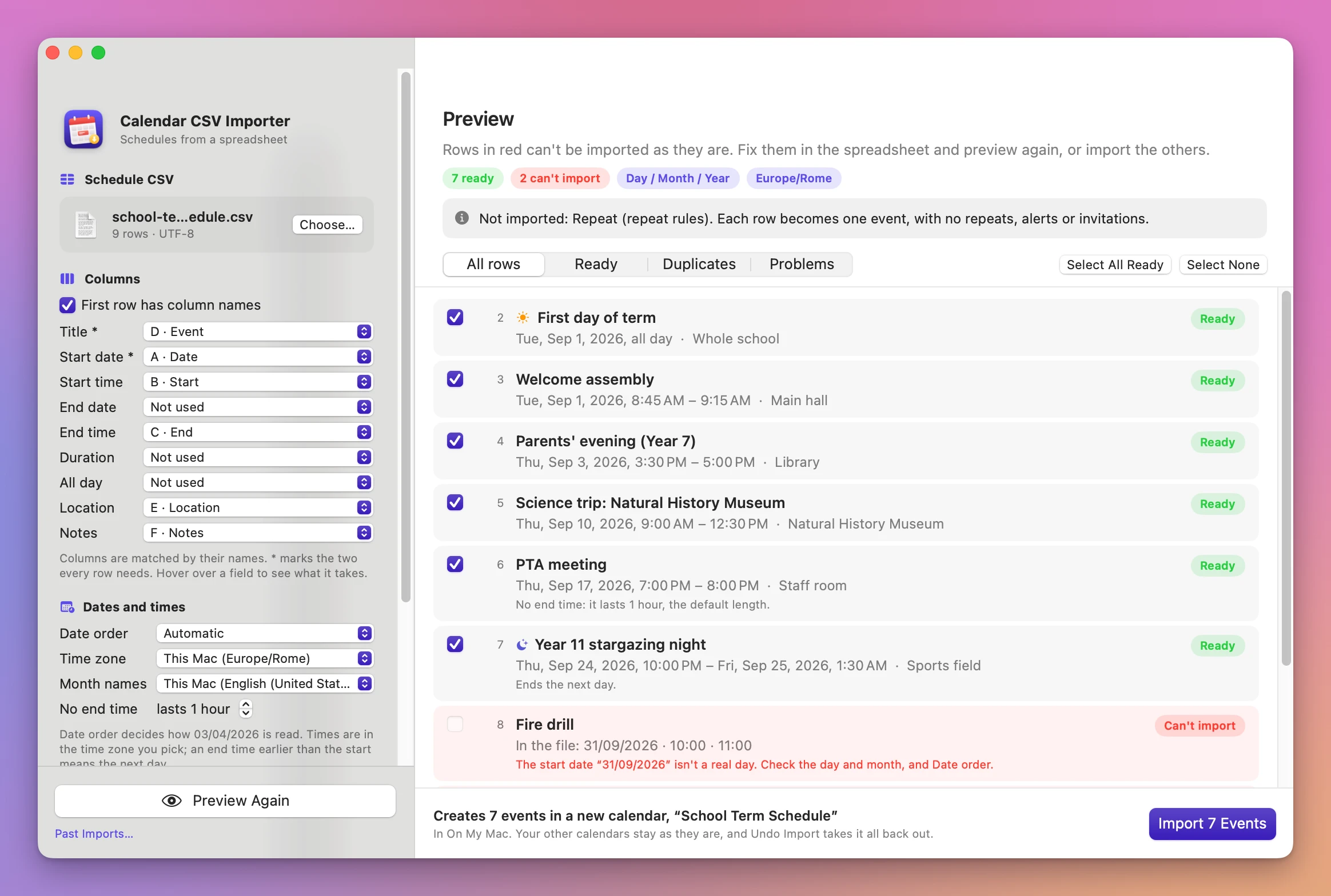
- Click Preview. Every row shows up with its spreadsheet row number, the date and time as Calendar will have it, and a Ready, Duplicate or Can’t import pill. Rows with a problem show what’s wrong in red.
- Name the calendar and import. The calendar is named after the file, so
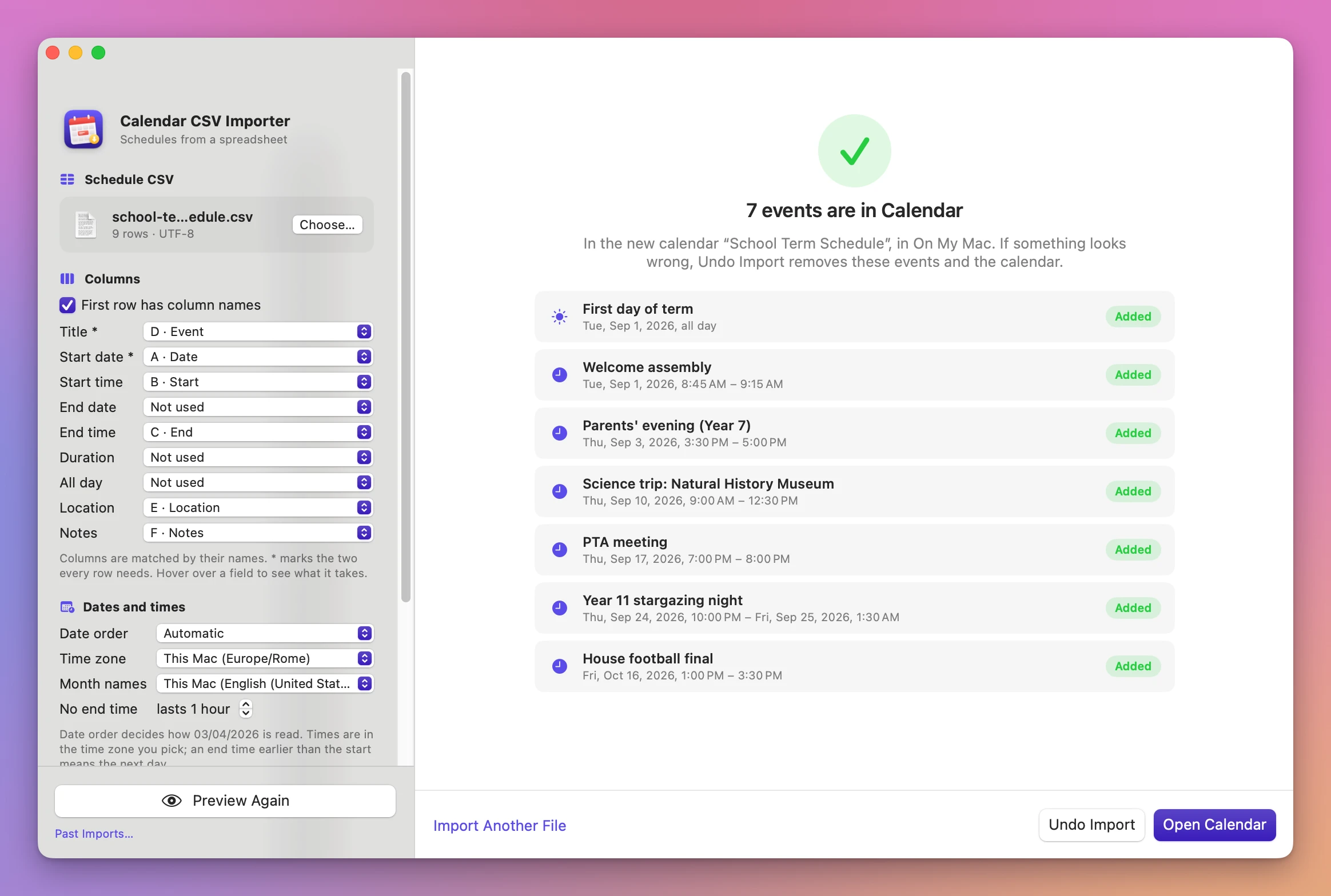
school-term-schedule.csvbecomes “School Term Schedule”. Change it if you like, then click Import 7 Events. Click Open Calendar to see them.
If the result isn’t right, click Undo Import. The events and the calendar go away, and your other calendars stay as they were.
What you get
A preview of every row
Each row reads like a Calendar event: “Thu, Sep 24, 2026, 10:00 PM – Fri, Sep 25, 2026, 1:30 AM”. The bottom bar tells you exactly what Import will do, like “Creates 7 events in a new calendar, “School Term Schedule””, or why the button is off. Filter the list with All rows, Ready, Duplicates and Problems.
Problems in plain words
A row the app can’t import says why:
- “The start date “31/09/2026” isn’t a real day. Check the day and month, and Date order.”
- “The title is empty.”
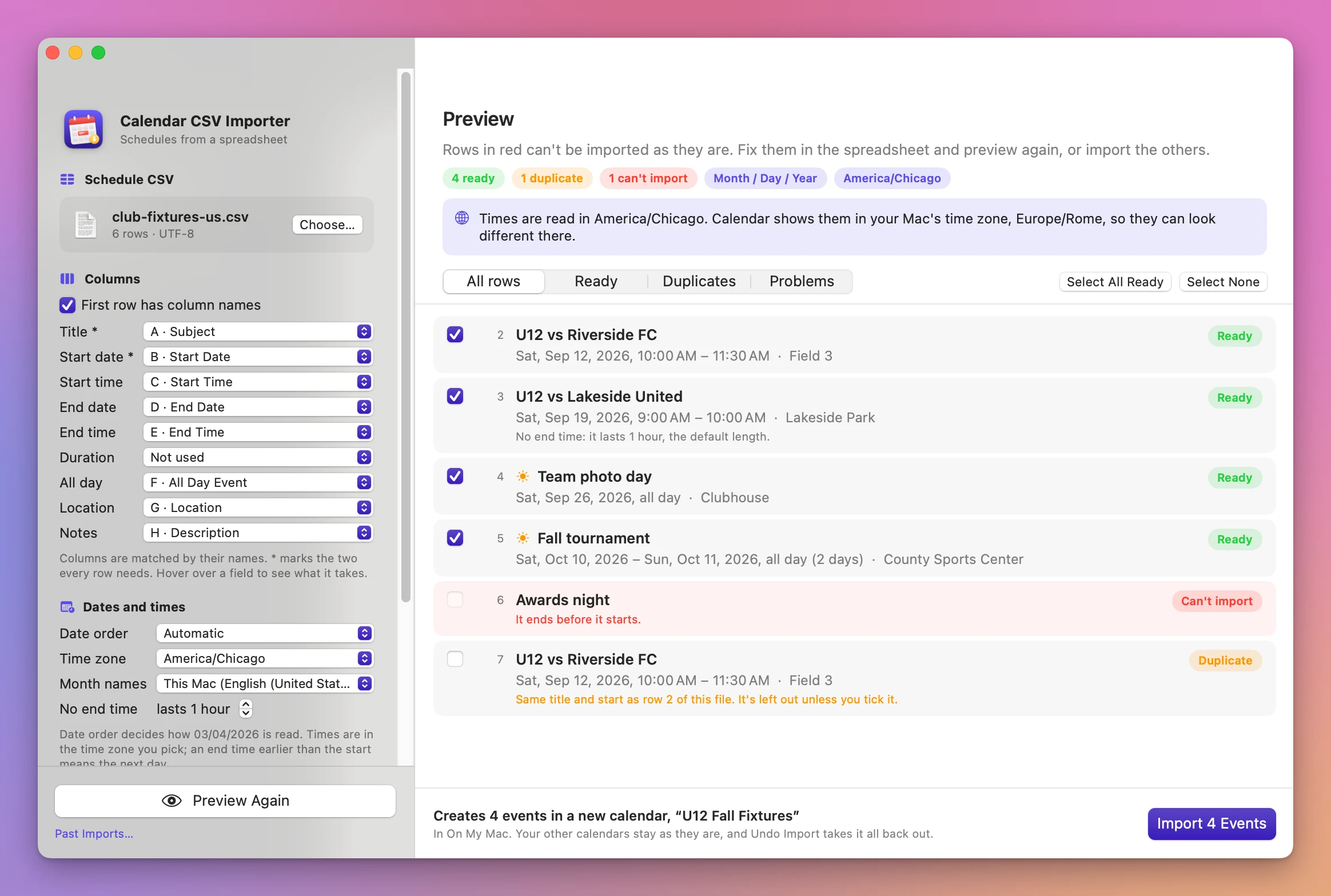
- “It ends before it starts.”
When a date couldn’t be read at all, the row shows what was in the file. Fix those rows in the spreadsheet and click Preview Again, or import the others and leave them out.
Dates and times read the way people write them
Times like 9:00, 09.30, 9am, 9:30 PM, 21h30, noon, or a range in one cell like 9-11am. Dates like 01/09/2026, 2026-09-01, 1 Sep 2026 or Tuesday, September 1st, 2026, with month names in English, French, German, Italian, Spanish, Portuguese, Dutch, Swedish, Danish, Norwegian, Finnish or Polish. Durations like 90, 1h 30m or 1.5 hours.
Some rules you’ll see in the preview:
- A row with no time becomes an all-day event.
- An end time earlier than the start, with no end date, ends the next day. The row says “Ends the next day.”
- A row with no end time lasts the default length, and says so.
- A time that doesn’t exist because the clocks go forward is a problem. A time that happens twice when the clocks go back gets a note, and uses the first one.
Duplicates checked before they happen
The app compares each row’s title and start with what’s already in Calendar, in all your calendars or just one, and with the other rows in the file. A duplicate says where it found the match, like “Already in Calendar, in “School”.” or “Same title and start as row 2 of this file.” Duplicates start unticked, so they’re left out unless you tick them.
A calendar of its own, and one-click undo
Every import goes into a new calendar, in the account you pick (On My Mac or another account you have in Calendar). Nothing is added to the calendars you already have, and no invitations go out.
Undo Import removes the events and the calendar. If you added something else to that calendar in the meantime, the calendar stays and only the imported events go. File → Past Imports… (Shift-Command-I) lists every import with its calendar, the number of events, the file it came from and the date, with an Undo button for each.
If Calendar refuses even one event during the import, the app removes the new calendar, so you never end up with half a schedule.
Why not do it by hand
Calendar on the Mac has File → Import, but it imports calendar files like .ics, not CSV. A spreadsheet has to be turned into one of those first.
Google Calendar can import a CSV. You need a Google account and that calendar synced to your Mac, the columns need Google’s names, and there’s no row-by-row preview. Undoing a wrong import means deleting the events one by one, or the whole calendar if you thought to make a new one first.
Online CSV-to-ICS converters work, but you upload a schedule full of names and places to a site you don’t know. They don’t check your calendar for duplicates.
Typing the events in is fine for five. A term calendar or a season of fixtures is 40 to 200 rows, and a day/month mix-up is easy to miss on row 37.
| By hand or with a converter | Calendar CSV Importer | |
|---|---|---|
| Getting a CSV into Calendar | Convert to .ics, or go through Google Calendar | Choose the CSV, click Import |
| Day/month order | You hope the converter guessed right | Checked across the whole file, shown in the preview |
| A date like 31/09 | Goes in wrong, or the import fails | ”isn’t a real day”, the row is left out |
| Night shifts | End before they start | End the next day, with a note |
| Duplicates | You find them later in Calendar | Checked against Calendar and the file before importing |
| Undoing it | Delete events one by one | Undo Import, one click |
| Privacy | Converters upload the file | Everything stays on your Mac |
What it doesn’t do
- No repeating events. Each row becomes one event. A Repeat column is listed as not imported.
- No alerts or invitations. It never adds attendees, so nobody gets an invitation.
- No adding to an existing calendar. Every import makes a new calendar. You can merge or move events in Calendar afterwards.
- One time zone per import. There’s no time zone column. Timestamps with their own offset, like
2026-09-01T09:00:00+02:00, are converted. - No Excel or Numbers files. Save the sheet as CSV first.
- Duplicates match on title and start only. Two events with the same title and start but a different place count as duplicates.
Questions
Is my spreadsheet changed?
The app only reads the CSV. Even the undo screen says so: “The CSV file wasn’t touched.”
Does anything get uploaded?
The file is read on your Mac and the events go straight into Calendar. The app uses the internet only to check for updates.
Why does it ask for Calendar access?
To create the new calendar and its events, and to check for duplicates in your calendars. Without access you can still preview a file, and duplicates are checked within the file only.
Which spreadsheet layouts work?
Any CSV with a column for the title and one for the date. The app matches columns by their names, including the Google Calendar and Outlook CSV layouts, and a schedule with Date, Start and End columns where Start and End hold only times. You can change any match by hand.
Will the events show up on my iPhone?
The new calendar goes in the account you pick under Account. A calendar in On My Mac stays on this Mac. Pick an account that syncs to your phone, like iCloud, to see the events there too.
What it needs
Calendar CSV Importer runs on macOS 14 Sonoma or later, on Apple silicon and Intel Macs. The Calendar CSV Importer docs walk through each setting.
Buy Calendar CSV Importer
$20 plus tax where it applies, paid once.
Download the app from the order page or your Creem receipt, unzip it and move it to Applications. I sign the app with my Apple Developer ID, and Apple notarizes the download.
The app checks for updates once a day. When a new version is ready, click Install and Relaunch. To check anytime, choose Calendar CSV Importer → Check for Updates….