# React app example: fetch GitHub users from the API
> Build a small React app where a form takes a GitHub username, fetches that user from the GitHub API with Axios, and shows the result in a Card component.
Author: [Flavio Copes](https://flaviocopes.com/about/) | Published: 2017-08-19 | Topics: [React](https://flaviocopes.com/tags/react/) | Canonical: https://flaviocopes.com/react-example-githubusers/
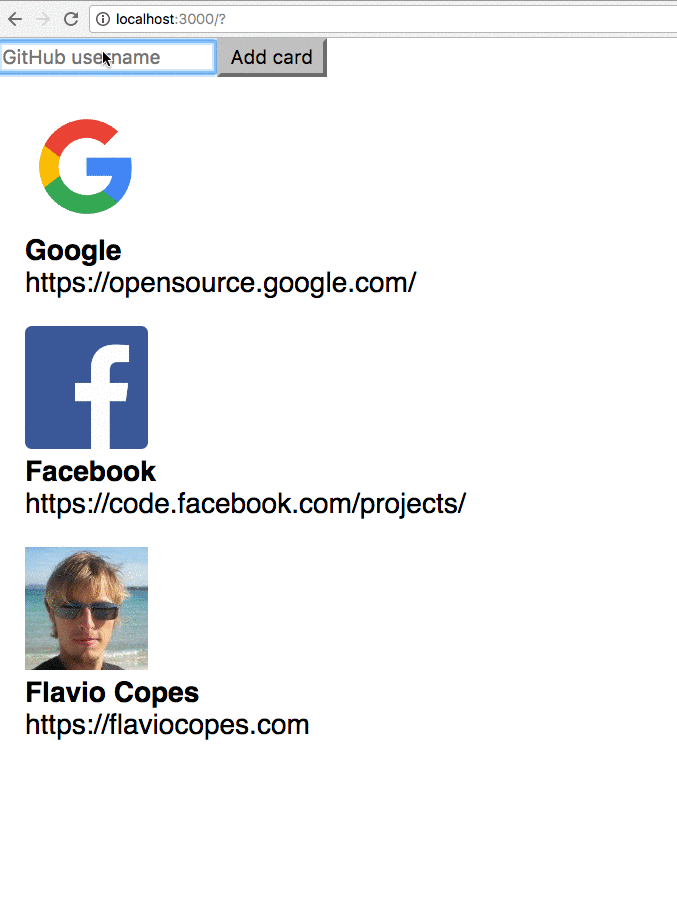
Very simple example of a form that accepts a [GitHub](https://flaviocopes.com/github/) username and once it receives a `submit` event, it asks the GitHub API for the user information, and prints them.
This code creates a reusable **Card** component. When you enter a name in the `input` field managed by the **Form** component, this name is _bound to its state_.
When _Add card_ is pressed, the input form is cleared by clearing the `userName` state of the **Form** component.
The example uses, in addition to [React](https://flaviocopes.com/react/), the Axios library. It's a nice useful and lightweight library to handle network requests. Add it to the Pen settings in Codepen, or install it locally using `npm install axios`.
## Output
## Code
We start by creating the `Card` component, the one that will display our image and details as gathered from GitHub. It gets its data via props, using
- `props.avatar_url` the user avatar
- `props.name` the user name
- `props.blog` the user website URL
```js
const Card = props => {
return (

{props.name}
{props.blog}
)
}
```
We create a list of those components, which will be passed by a parent component in the `cards` prop to `CardList`, which iterates on it using `map()` and outputs a list of cards:
```js
const CardList = props => (
{props.cards.map(card => (
))}
)
```
The parent component is App, which stores the `cards` array in its own state, managed using the `useState()` Hook:
```js
const App = () => {
const [cards, setCards] = useState([])
return (
)
}
```
Cool! We must have a way now to ask GitHub for the details of a single username. We'll do so using a `Form` component, where we manage our own state (`username`), and we ask GitHub for information about a user using their public APIs, via [Axios](https://flaviocopes.com/axios/):
```js
const Form = props => {
const [username, setUsername] = useState('')
handleSubmit = event => {
event.preventDefault()
axios.get(`https://api.github.com/users/${username}`).then(resp => {
props.onSubmit(resp.data)
setUsername('')
})
}
return (
)
}
```
When the form is submitted we call the `handleSubmit` event, and after the network call we call `props.onSubmit` passing the parent (`App`) the data we got from GitHub.
We add it to `App`, passing a method to add a new card to the list of cards, `addNewCard`, as its `onSubmit` prop:
```js
const App = () => {
const [cards, setCards] = useState([])
addNewCard = cardInfo => {
setCards(cards.concat(cardInfo))
}
return (
)
}
```
Finally we render the app:
```js
ReactDOM.render(, document.getElementById('app'))
```
Here is the full source code of our little React app:
```js
const { useState } = React
const Card = props => {
return (
{props.name}
{props.blog}
)
}
const CardList = props => {props.cards.map(card => )}
const Form = props => {
const [username, setUsername] = useState('')
handleSubmit = event => {
event.preventDefault()
axios
.get(`https://api.github.com/users/${username}`)
.then(resp => {
props.onSubmit(resp.data)
setUsername('')
})
}
return (
)
}
const App = () => {
const [cards, setCards] = useState([])
addNewCard = cardInfo => {
setCards(cards.concat(cardInfo))
}
return (
)
}
ReactDOM.render(, document.getElementById('app'))
```
Check it out on Codepen at