Cloudflare Zero Wire: what it is and how to use it
By Flavio
Tagged: Security
Zero Wire is Cloudflare's public vulnerability feed on Radar. What a briefing gives you, the agent prompt inside it, and what it changes for a small server.
A critical vulnerability goes public at 7am. Someone has to read the vendor advisory, work out which machines run the affected software, and answer two questions before lunch. Are we affected, and what are we doing about it?
On 3 November 2026 Cloudflare announced Zero Wire, a public feed of vulnerability briefings inside Cloudflare Radar. The announcement post puts it as “bringing the clarity of a news wire service to critical security developments”.
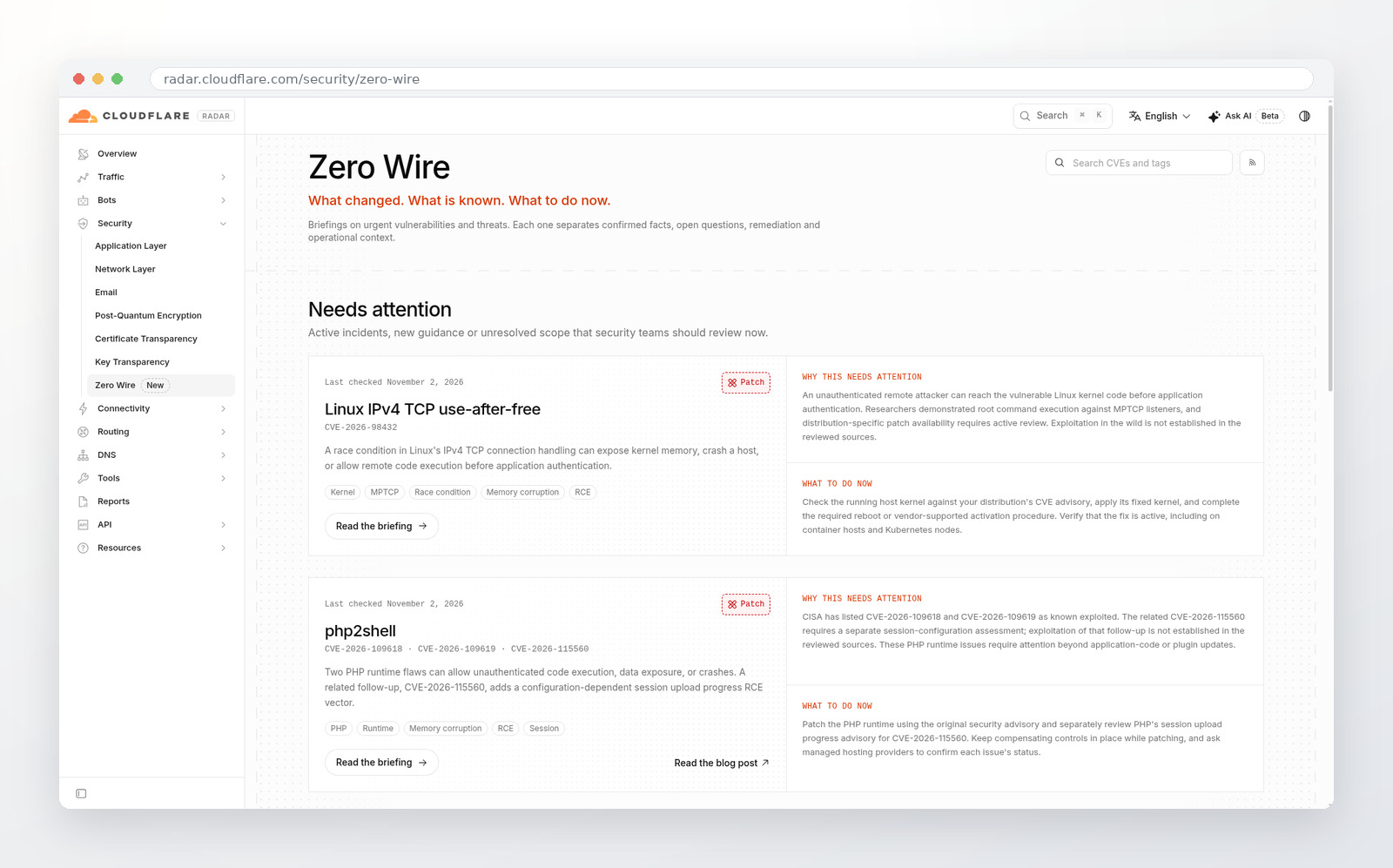
Both screenshots are from Cloudflare Radar, captured on 4 November 2026.
What Zero Wire is
Zero Wire lives in the security section of Cloudflare Radar, and the pages are readable without an account.
Each briefing is an index card. It explains the vulnerability in plain language, says who should investigate it, lists what to do now, and links to the evidence and the vendor guidance. The same card has to work for the person running security and for the engineer who has to fix the box, so the writing stays short and the links do the technical work.
The focus is critical CVEs in software exposed to the internet: web applications, the runtimes and libraries under them, and services listening on a port. Cloudflare says this is not a catalog of every CVE, and that it complements vendor advisories and vulnerability databases instead of replacing them.
Why it exists
The stated reason is AI. Cloudflare writes that AI can analyze large codebases at scale and surface deeply nested flaws that may have existed for years without human review finding them, and that this will keep increasing the number and speed of disclosures.
A small team feels that as a queue. If a second critical advisory lands before the first one is assessed, the second one waits. A page that says which deployments to check and what to do next is the part you can act on.
What a briefing contains
Briefings are split into Needs attention and Reference. Needs attention holds issues that need active assessment: known exploitation, new guidance, or an unresolved scope. Reference holds briefings where the guidance has settled. Cloudflare is explicit that Reference does not mean every affected system is patched, only that the advice stopped changing.
Each card carries a status, a last-checked date, and an update chronology, so a second visit shows what changed since the first.
On 4 November 2026 the feed listed six briefings. Five needed attention: the Linux IPv4 TCP use-after-free, php2shell in the PHP runtime, a certificate compromise at eMudhra, a Brotli decoder flaw that shows up in Node.js and other runtimes, and command execution in Citrix NetScaler. The sixth, a WordPress SQL injection and remote code execution pair, sat in Reference.
Every briefing links out to the CVE records, the research, and CISA’s Known Exploited Vulnerabilities Catalog where it applies. It also separates what the sources establish from what is still unknown.
Where Cloudflare has network data, it adds context. The php2shell briefing charts requests matching Cloudflare’s WAF rules for that exploit over time. The page says plainly that those requests are not a count of compromised systems.
The agent prompt
Each briefing has an “Assess your exposure with an agent” section with a prompt you copy. The prompt asks for a read-only assessment: which software is deployed, which vendor fixes apply, where the exposure is, which compensating controls are in place, and, for each asset, the evidence, the unknowns, and the next action.
Copying the prompt doesn’t scan or change anything on its own.
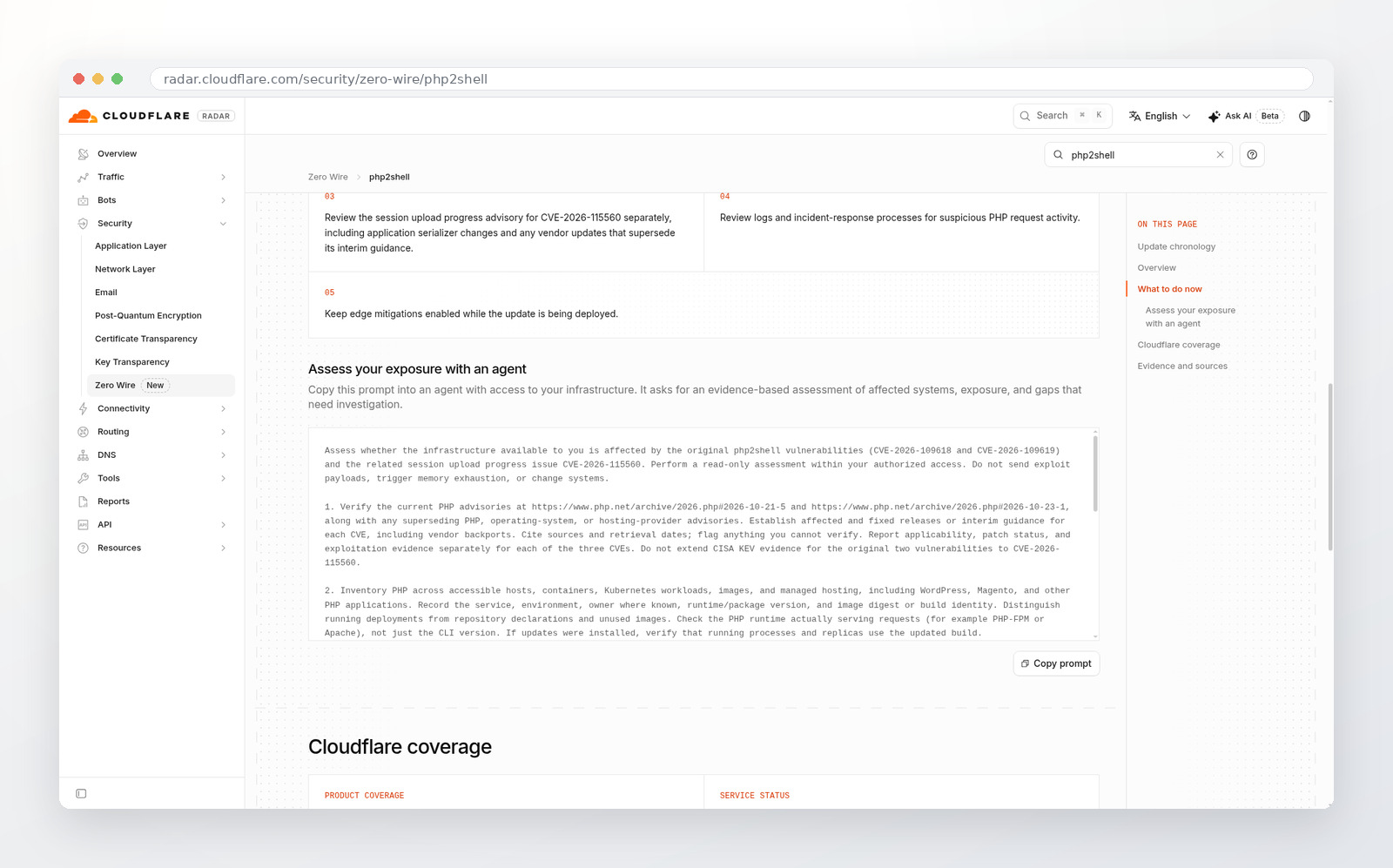
The prompt only works with an agent that can see the infrastructure. Give it to the coding agent you already use, in the repo that deploys the service, or to an agent with read access to the servers. If it cannot see your hosts, the honest output is a table of unknowns, which is still a list of what nobody has checked.
The answer it asks for is a table with one row per asset: the deployed version, the assessment, the controls, the evidence, and the next step. That is a shape you can review, and the affected rows become a task list.
An example: php2shell
Two PHP runtime flaws, CVE-2026-109618 and CVE-2026-109619, were disclosed on 21 October 2026. A related follow-up, CVE-2026-115560, needs session upload progress enabled and an application that switches the session serializer at runtime. Updating a plugin or a theme does not repair the runtime underneath, which is the trap for WordPress and Magento sites.
The briefing lists five steps: identify internet-facing PHP and its runtime version, apply the PHP security update including through your host, review the session upload progress advisory on its own, check logs for suspicious request activity, and keep edge mitigations on while the update rolls out.
Its prompt asks the agent to check the runtime actually serving requests (PHP-FPM or Apache), not the php on the command line, because the CLI version on a server can differ from the one answering HTTP.
What it changes for a VPS
On one small server, the value is the checklist. You open one page, get the affected versions, the vendor link, and the order of work, instead of assembling that from three tabs.
A Cloudflare WAF rule only sees traffic that goes through Cloudflare, which means a proxied DNS record or a service behind a Cloudflare Tunnel. A VPS that answers on its public IP gets none of that coverage. The briefing says that in its own section, with links to the paid and free plan pages and a line asking you to review your WAF configuration. Following the link doesn’t enable anything.
Cloudflare also states that a WAF rule is a compensating control and doesn’t replace patching. It can block requests, but it can’t undo what already happened at the origin.
For the Linux CVE in the feed, the fix is a kernel update, and the check plus the closed-port layout are in their own post. If you want SSH on a tailnet and nothing new reachable on the public address, that walkthrough is the long version, and the Tailscale alternatives cover the network you would put SSH on.
The commercial interest
Cloudflare sells WAF, Zero Trust, and everything around them. A feed that names the critical CVE being exploited and then shows the rule that blocks it is a genuinely useful thing to publish, and it is also a good reason to put Cloudflare in front of a site.
The parts that make it useful anyway: the briefings are public, Cloudflare says a WAF rule is not a prerequisite for inclusion, and the patch advice comes before the coverage advice. Some issues, the post says, need vendor updates or changes beyond the traffic Cloudflare can inspect.
Use it as a triage feed. Read the patching section first, then the Cloudflare coverage section, and decide whether proxying that service is worth it for the next one.
A routine you can keep
- Check the feed when a CVE lands in your inbox, and once a week otherwise. Needs attention is the top of the page.
- For anything you might run, copy the agent prompt into your coding agent with access to the repo or the hosts, and ask for the table.
- Patch from the vendor advisory the briefing links, and read the last-checked date before you trust the page.
- If your traffic goes through Cloudflare and a rule exists, enable it for the rollout window and keep it until the origin is patched.
The feed is at radar.cloudflare.com/security/zero-wire. If you want the longer version of the patch-and-close-ports work it points at, the Linux server security course is the step-by-step one.
Want me to talk about your product? You can sponsor this site.
Related posts about security: