How to check if a font supports your text's characters on a Mac
By Flavio
Text looks fine on screen and prints with empty boxes or the wrong letters. Here's how to see which characters a font is missing on a Mac, with Font Book and the Character Viewer, and how to check a whole multilingual text at once.
You set a sign in your brand font, in six languages, and it looks perfect on screen. Then it’s printed, or opened on another computer, and some letters come out as empty boxes (people call them “tofu”) or in a different typeface.
The font doesn’t have those characters. To know before it’s printed, you check the text against the font itself, character by character. A Mac can do that one character at a time for free, and Font Coverage Checker does it for a whole text at once.
Why does the text look fine on screen?
When a font has no glyph for a character (a glyph is the drawing of a letter in that font), macOS borrows the character from another font that has it. Pages, TextEdit and most other apps do this without telling you. The Vietnamese ừ in your Futura heading is really drawn in some other font, and on screen it’s hard to notice.
That’s why pasting the text into a document isn’t a test. It shows up when the text is set in the font alone: on a print run, in a PDF that embeds only that font, in a design app that marks missing glyphs, or on a sign maker’s machine.
How to check a font for free
macOS has two tools for this, and each covers part of the job.
Font Book shows every character a font has, as a grid. Open it from the Applications folder, select the font and look through the grid for the letters your text uses. It works for a short word. It can’t take your text and tell you which of its characters are missing, so for a paragraph in Greek or Vietnamese you’re comparing by eye, letter by letter.
The Character Viewer goes the other way. Press Control-Command-Space in any app where you can type, search for a character, and the Font Variation section shows which fonts have it. It’s one character at a time, so it’s good for checking a single letter you’re unsure of, like the Ukrainian ґ.
Neither one reads the files the text is in, tells you which line a missing letter is on, or suggests a font that covers everything that’s missing.
How to check a whole text at once
Font Coverage Checker is a Mac app I built for this. It costs $19, paid once.
The example here is made up: a harbor festival with welcome signs, a café menu in a CSV file, a program translated to Greek, and the strings of the festival app in Arabic, Hindi, Thai, Japanese, Chinese and Korean, with a few emoji. The brand font is Futura.
- Pick the font in the list on the left. Each family is drawn in its own letters, and Style switches between its weights. A font file you haven’t installed works too: click Font File….
- Paste the text in Text to check, or click Add Files… and pick the files. The app reads plain text, CSV, Markdown, and the
.strings, JSON and XLIFF files that app translations come in, and takes only the text out of them. - Click Check Coverage.
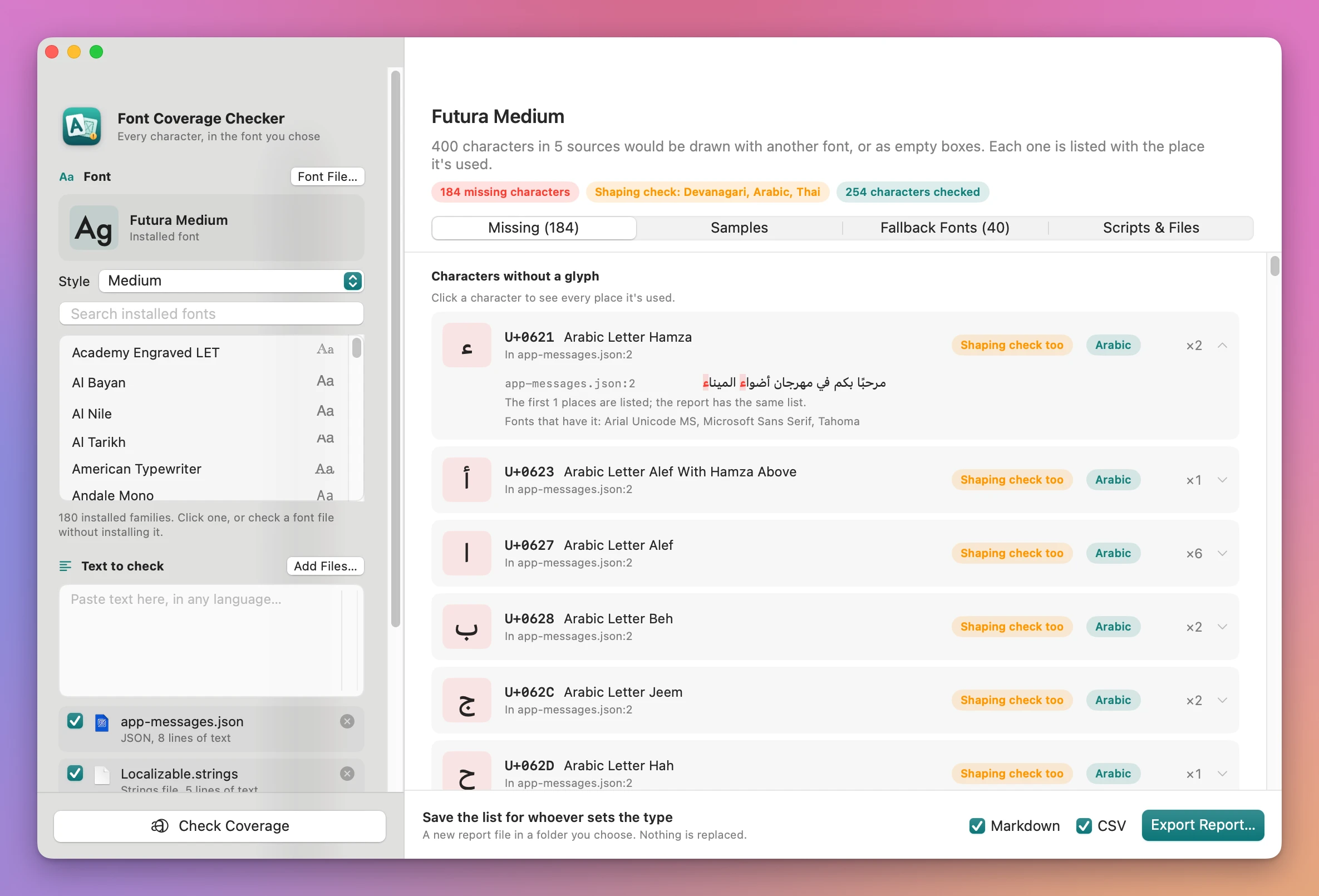
With all five files, the app checked 254 different characters and found 184 that Futura doesn’t have. Here’s how it split by script:
| Script in the text | Different characters | Missing in Futura |
|---|---|---|
| Latin (English, French, Polish, Czech, Turkish, Vietnamese) | 61 | 7 |
| Greek | 36 | 35 |
| Cyrillic (Russian, Ukrainian) | 29 | 29 |
| Thai | 25 | 25 |
| Devanagari (Hindi) | 23 | 23 |
| Arabic | 18 | 18 |
| Japanese, Chinese and Korean | 35 | 35 |
| Emoji | 11 | 11 |
The Polish, Czech, Turkish and French lines are fine. The seven missing Latin letters are all Vietnamese, like ạ, ế and ừ, so the Vietnamese sign is the one that would break, even though it looks like “just Latin with accents”.
The Missing tab lists each character with its name and where it’s used. Click one to see the lines it’s in, with the character highlighted, and the fonts on your Mac that have it.
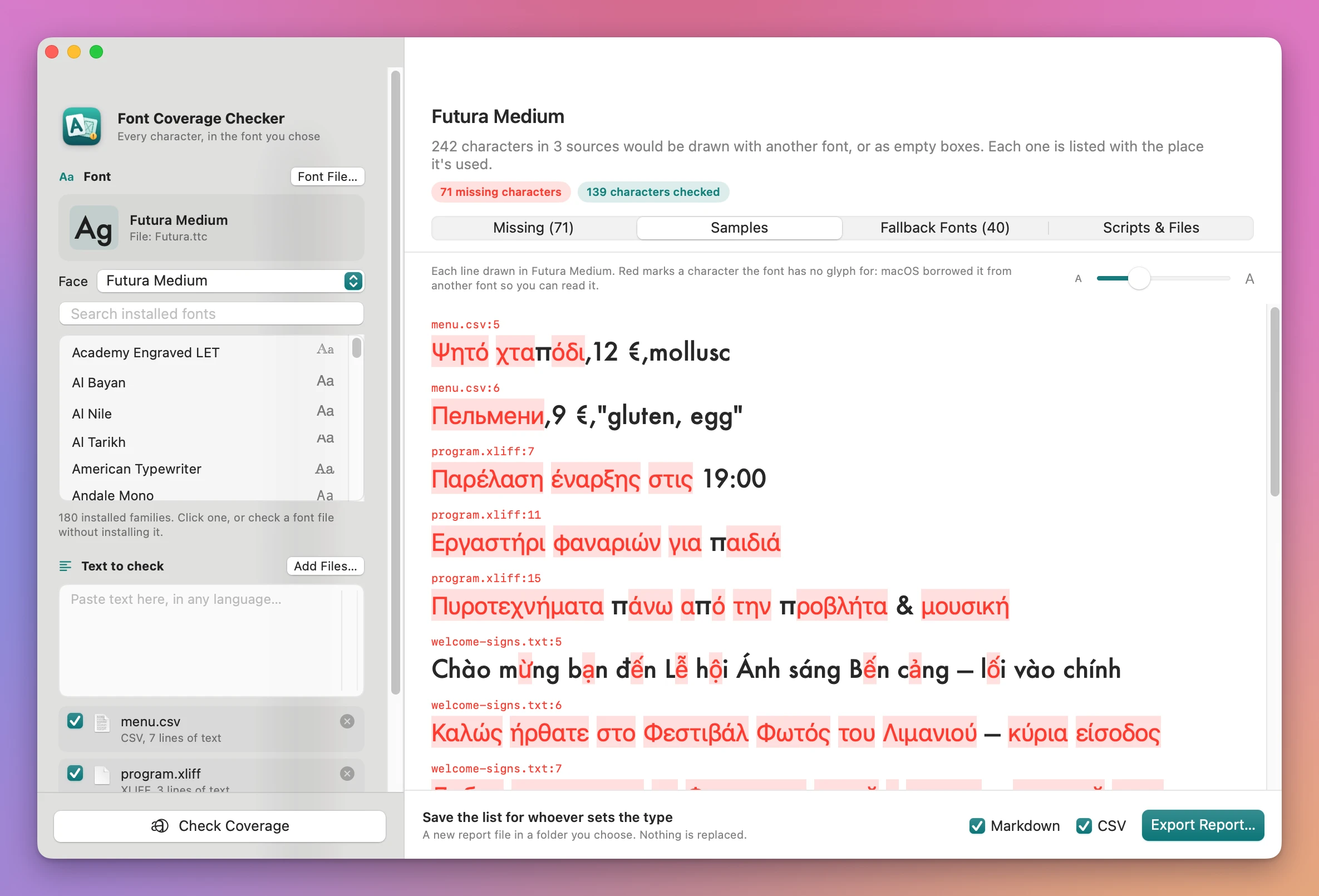
The Samples tab draws your lines in the font and puts the missing characters in red boxes. This is what the sign maker would get.
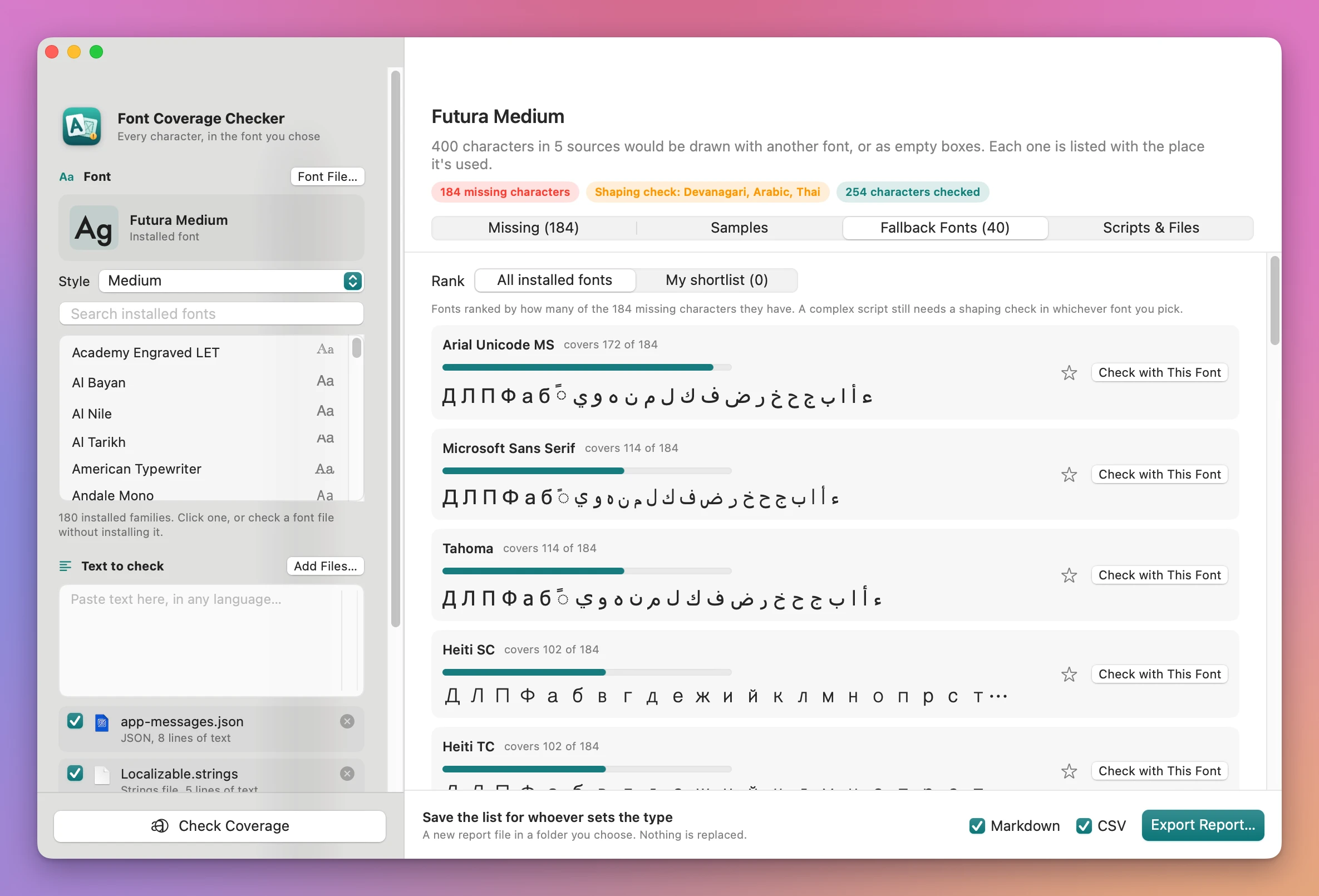
Which font has the missing characters?
The Fallback Fonts tab ranks the installed fonts by how many of the missing characters they have. For the festival text, Arial Unicode MS covered 172 of the 184, and Tahoma and Microsoft Sans Serif 114. If only some fonts are allowed by your brand guidelines, star them and switch to My shortlist. Check with This Font runs the same text against a candidate.
Export Report… saves a Markdown report and a CSV with one row per missing character and the file and line it’s in, to send to whoever sets the type.
What a character check can’t tell you
Arabic, Hindi, Thai and similar scripts need more than the right letters. The letters join, change shape and reorder, and the marks above and below have to land in the right place. That depends on rules inside the font, and having every character doesn’t prove the rules are there or right.
So the app doesn’t call that text covered. It lists Arabic, Devanagari and Thai under Needs a shaping check, even in a font that has all their characters. For those lines, ask someone who reads the language to look at a proof set in the font.
| Font Book | Character Viewer | Font Coverage Checker | |
|---|---|---|---|
| Checks | One font’s characters, as a grid | One character, across fonts | Your whole text against one font |
| Reads your files | No | No | Text, CSV, .strings, JSON, XLIFF |
| Shows where a missing letter is | No | No | File and line |
| Suggests other fonts | No | For one character | Ranked by how many they cover |
| Complex scripts | Not flagged | Not flagged | Flagged for a shaping check |
| Price | Comes with the Mac | Comes with the Mac | $19, paid once |
Get Font Coverage Checker
Check a font against your text, find every missing character with its file and line, and rank the fonts that have them.
See Font Coverage Checker → · Read the docs · $19. See the app page for tax details.
Want me to talk about your product? You can sponsor this site.