
An app by Flavio
Page Saver
Save web pages on your Mac as single HTML files, compare snapshots, and get an alert when a page you watch changes, dies or gets taken over. Full MIT source included.
Buy Page Saver · $20One-time purchase. Tax included. Full source code.
macOS 14 or later · Apple silicon and Intel
Page Saver is a Mac app that keeps web pages for offline reading. Every page is saved as one HTML file, with its CSS, images and fonts inside it and its scripts removed, so it opens the same way years from now, even if the site is gone.
Save the same URL again and you get a new snapshot of it. Page Saver compares the snapshots word by word, so you see exactly what a page changed: a price, a limit in the docs, a line in the terms.
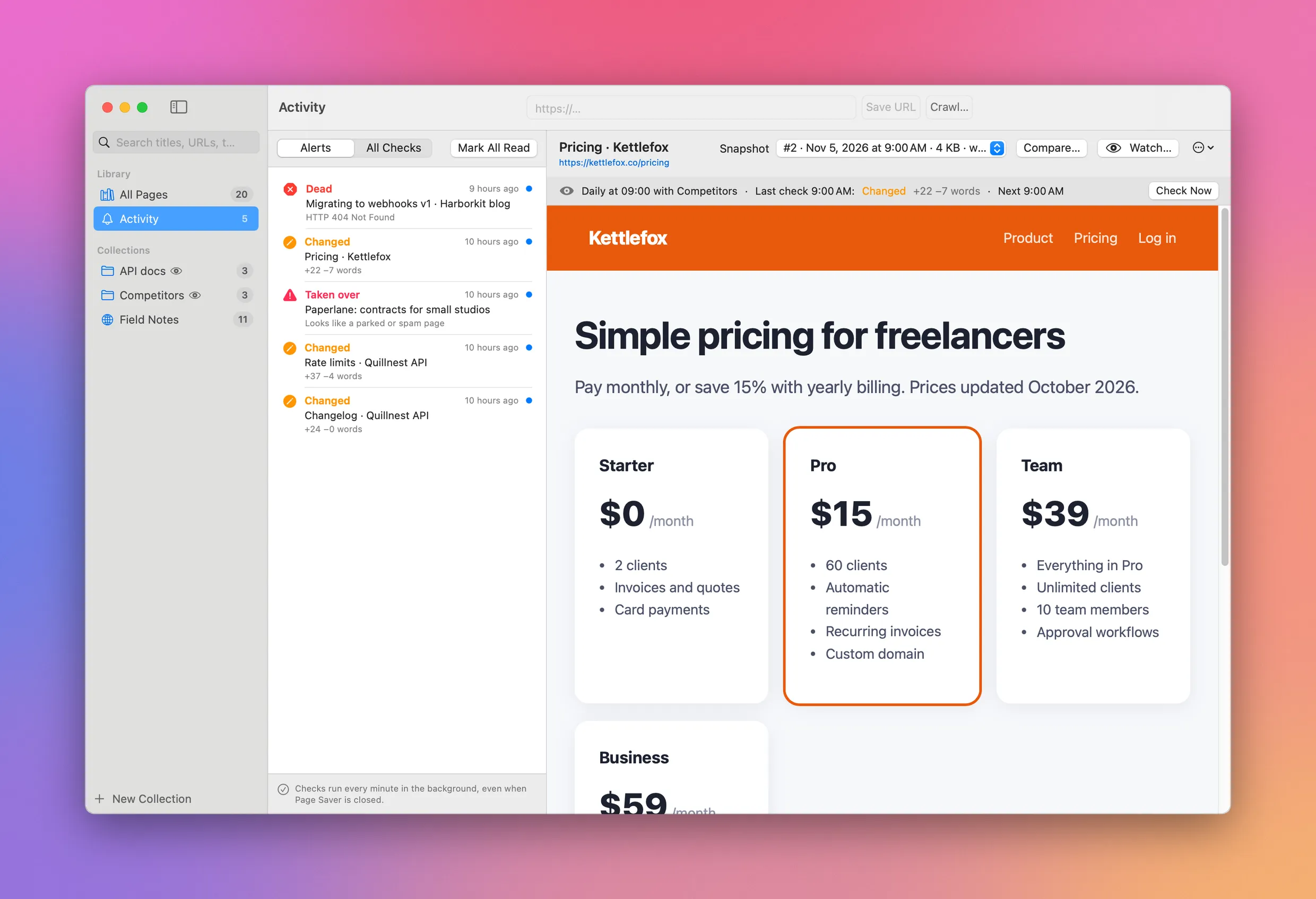
It can also do the saving for you. Watch a page, or a whole collection of pages, and Page Saver checks them on a schedule, even while the app is closed. You get an alert when a page changes, when it dies, or when its domain lapses and turns into a parked page.
Here’s the app at work:
The pages, sites and companies in the video and the screenshots are made up.
What you can use it for
Keep an eye on competitors
Put their pricing pages, feature pages and changelogs in a collection and watch it daily. When a plan goes from $12 to $15, or a feature moves to a higher tier, you get an alert with the exact words that changed, and the old page is still there to look at.
Know when the docs you depend on change
API docs change quietly. A rate limit drops from 100 to 60 requests a minute, an endpoint gets deprecated, a field gets renamed. Watch the pages your code relies on, and you find out from an alert instead of from a failing deploy.
Catch dead links before your readers do
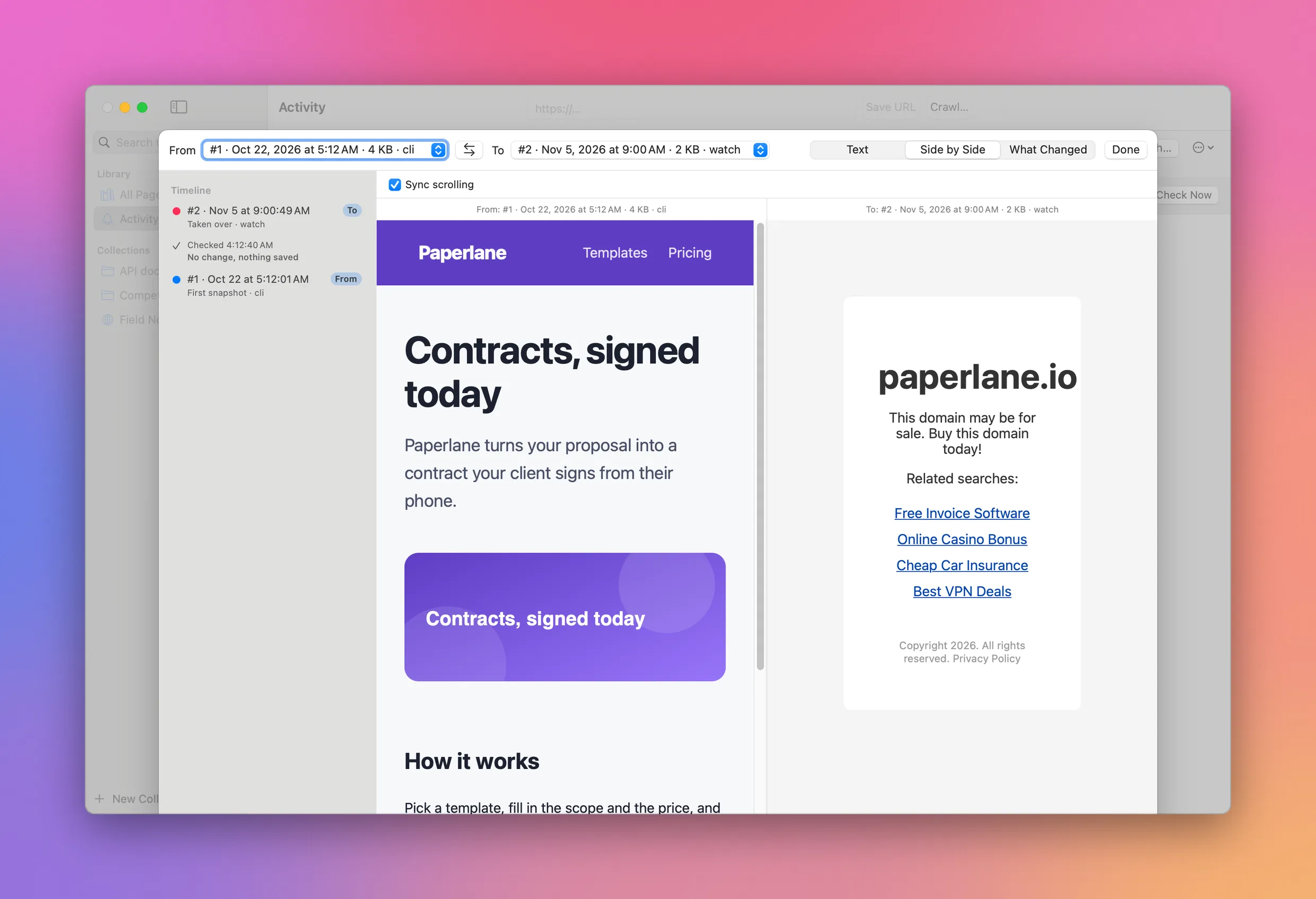
If you write a blog, docs or a newsletter, the pages you link to don’t stay the same. Some return 404 after a redesign. Some domains expire and come back as a parked page full of casino ads, and now your post links to spam. Watch the pages you link to, with notifications only for problems, and you get an alert when one dies, moves to another site or gets taken over.
Keep a copy of what a page said, and when
Terms of service, privacy policies, refund policies, a job post, an offer you accepted. Each snapshot records the date, the HTTP status and a hash of the text, so later you can show what the page said on a given day, even if it changed or disappeared since.
Read a whole site offline
Crawl the docs of a library before a flight, or a small blog or forum that might not be online next year. Links between saved pages open the saved copies, so you can browse it like the real site, without a connection.
Build a searchable library of your sources
Save the articles, references and threads you read while researching something. Search looks through the full text of every page, so you find the one with the number you need without remembering where you saw it. A coding agent can do the saving too, with pagesaver save.
Save a page
Paste a URL in the address field and click Save URL. Page Saver loads the page in an off-screen browser, scrolls it so lazy images load, and saves it. Links still point at the live site.
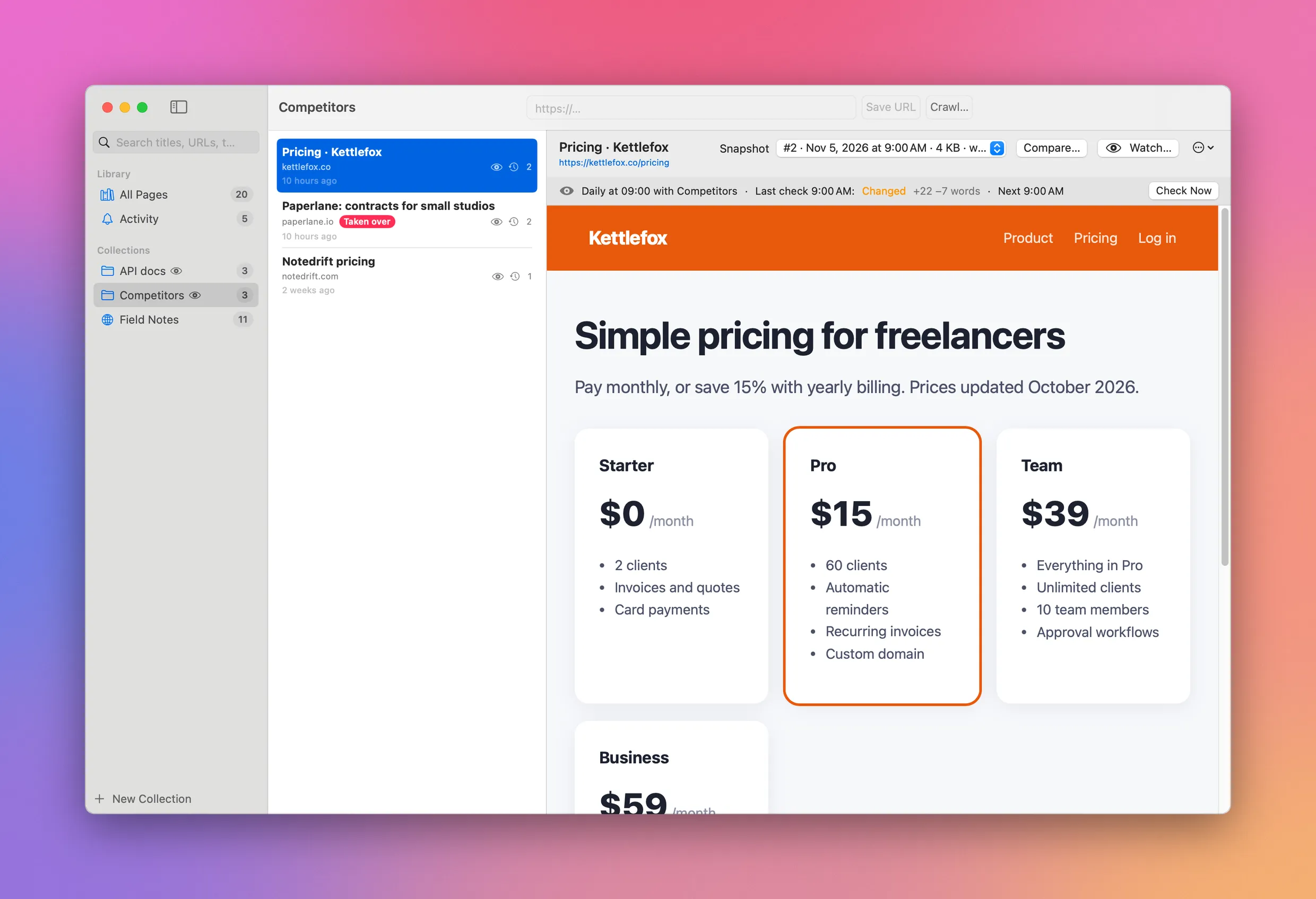
You can also save from the browser, which is the way to keep pages behind a login, or content you scrolled into view:
- Safari. The Safari extension ships inside the app. Click the Page Saver button in the toolbar, or right-click the page.
- Chrome. Click the button, press
Option+Shift+S, or right-click the page. The button shows a green check once the page is in your library. - The terminal.
pagesaver save <url>does the same from a script, or from a coding agent.
The search field looks through titles, URLs and the full text of every page you saved.
See what changed
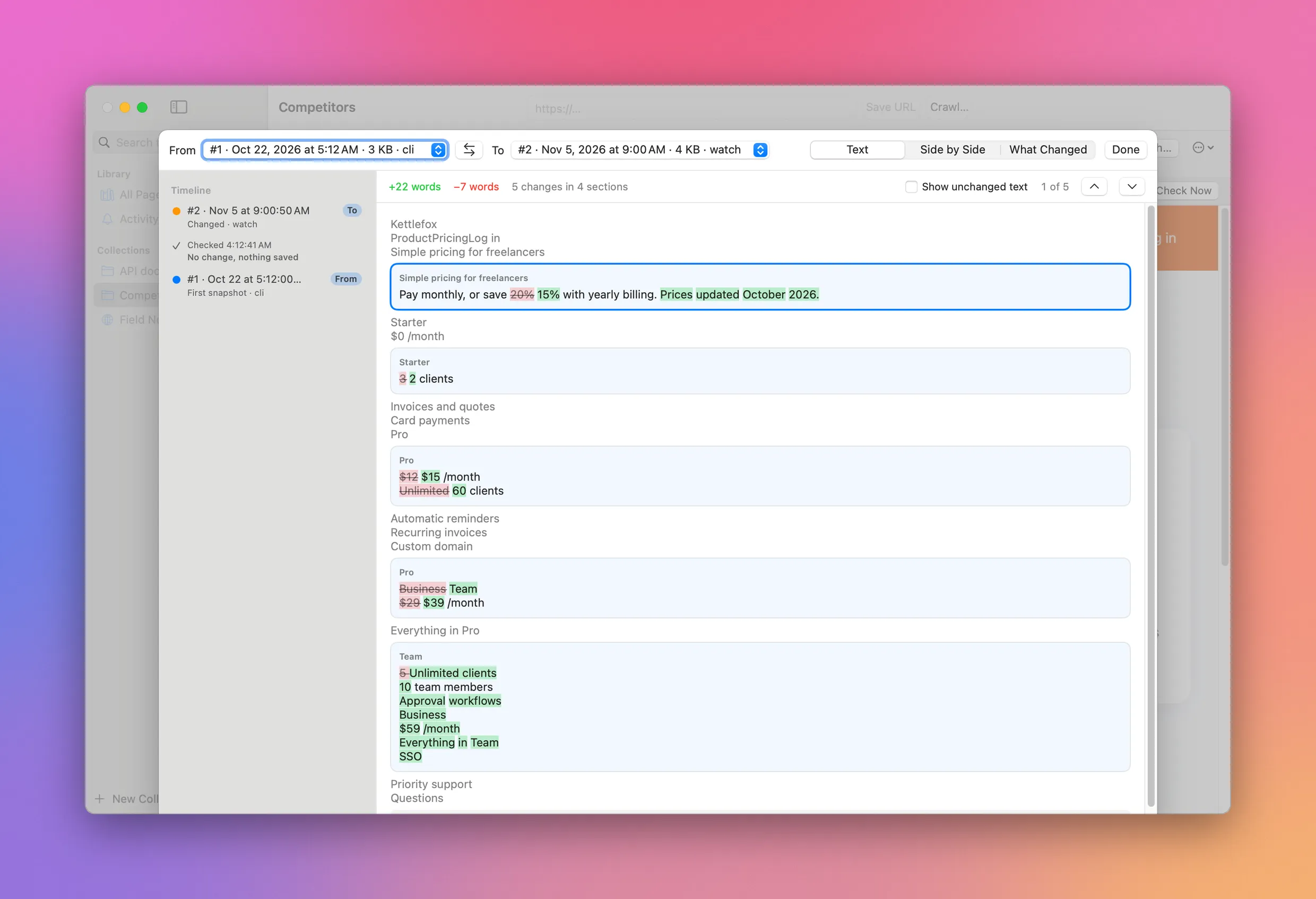
Open a page with two or more snapshots and click Compare…. The timeline on the left lists every snapshot, and every check that found nothing new. Pick any two to compare.
Text shows the page text with removed words in red and added words in green, grouped under the heading they belong to. Here the Pro plan went from $12 to $15, and “Unlimited clients” became 60:
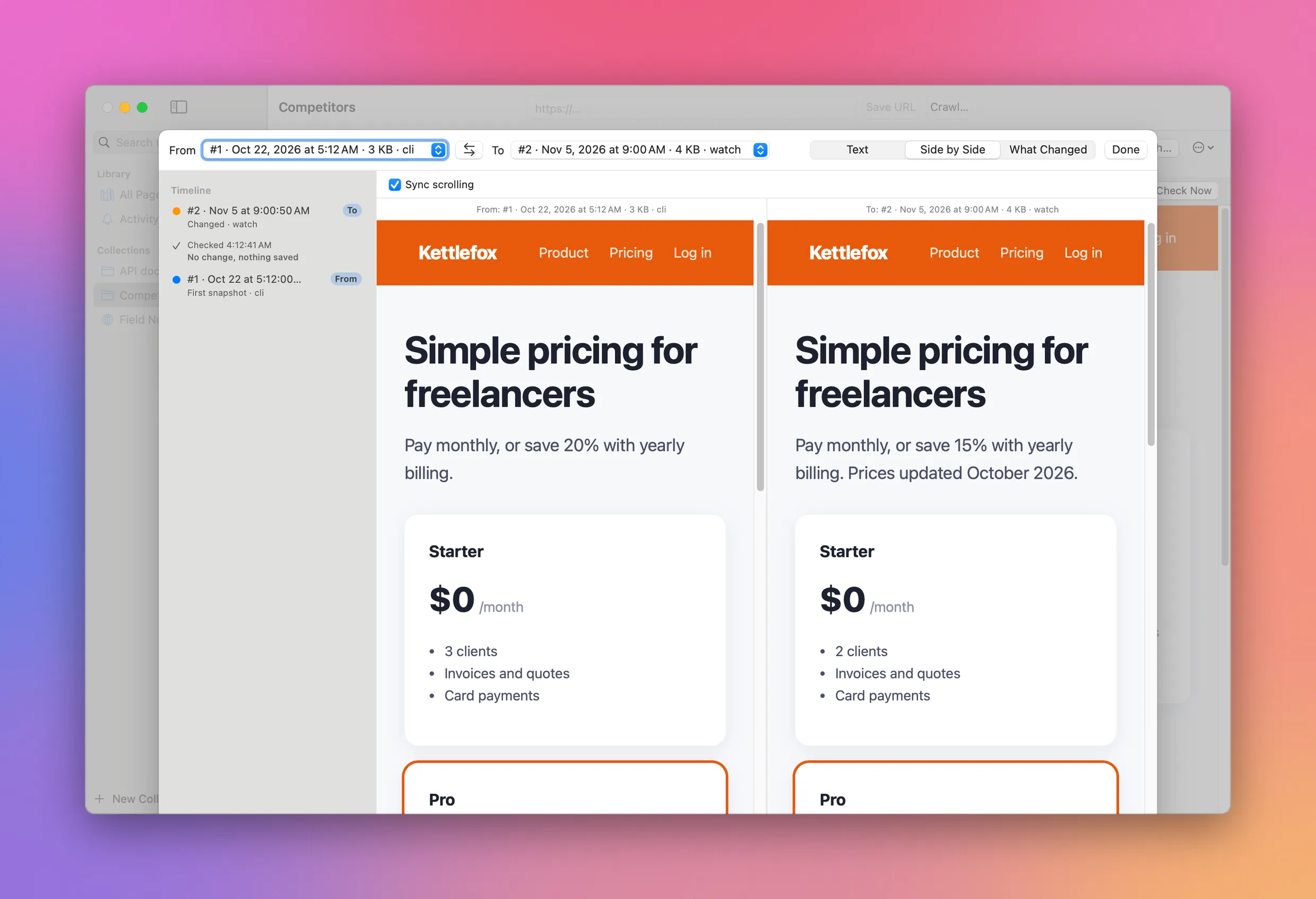
Side by Side shows the two saved pages next to each other, and scrolls them together:
What Changed lists the headings, links and images that were added or removed.
Watch pages for changes
Click Watch… on a page, or right-click a collection, to save it again on a schedule: every few minutes, every few hours, every day at a time, or every week. You choose whether to get a notification for any change, or only when something is wrong.
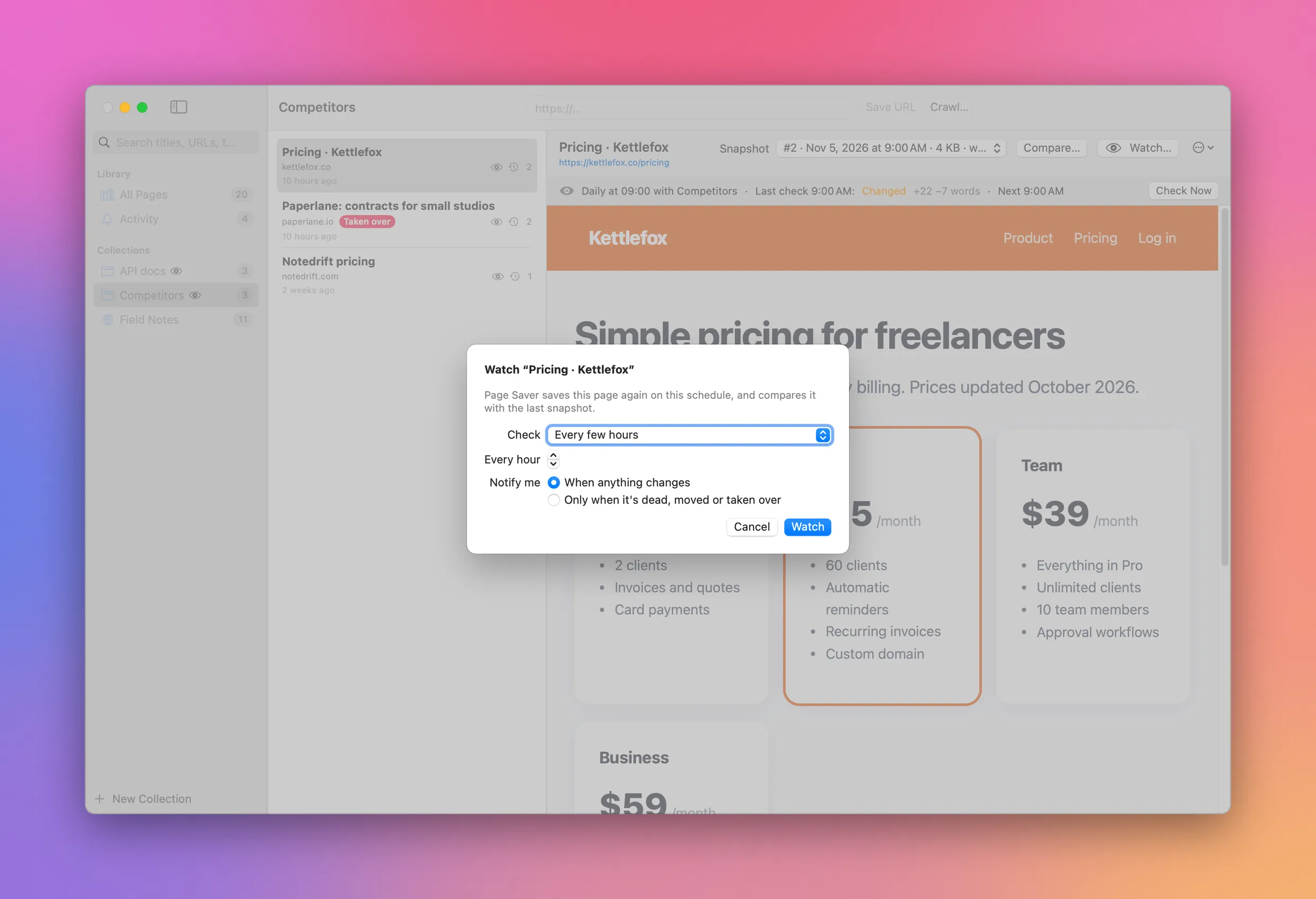
Each check ends up as one of these:
| Result | When | Saves a snapshot |
|---|---|---|
| No change | The text is the same as the last snapshot | No |
| Changed | The text is different. The alert counts the words added and removed | Yes |
| Dead | An HTTP error, a DNS failure, or no answer in 30 seconds | Yes, when the server sent a page |
| Moved | It redirects to a different site, with similar content | Yes |
| Taken over | It looks like a parked domain or a spam page, or almost all of its text was replaced | Yes |
The alerts land in Activity, newest first, and as macOS notifications. Click one and Page Saver opens Compare with the two snapshots of that check already picked.
Here the domain of a (made-up) competitor expired, and the page that used to sell contracts now sells casino bonuses:
The checks keep running while Page Saver is closed. The first time you watch something, the app installs a small background agent that wakes up every minute, sees whether a check is due, and quits right away when nothing is. You can turn it off in System Settings › General › Login Items & Extensions. The Mac has to be awake for the checks to run.
Save a whole site
Click Crawl… to save every page of a site into a collection. You can save the whole site, only the pages under a path like /docs/, or one page and the pages it links to, and cap how deep to go and how many pages to save.
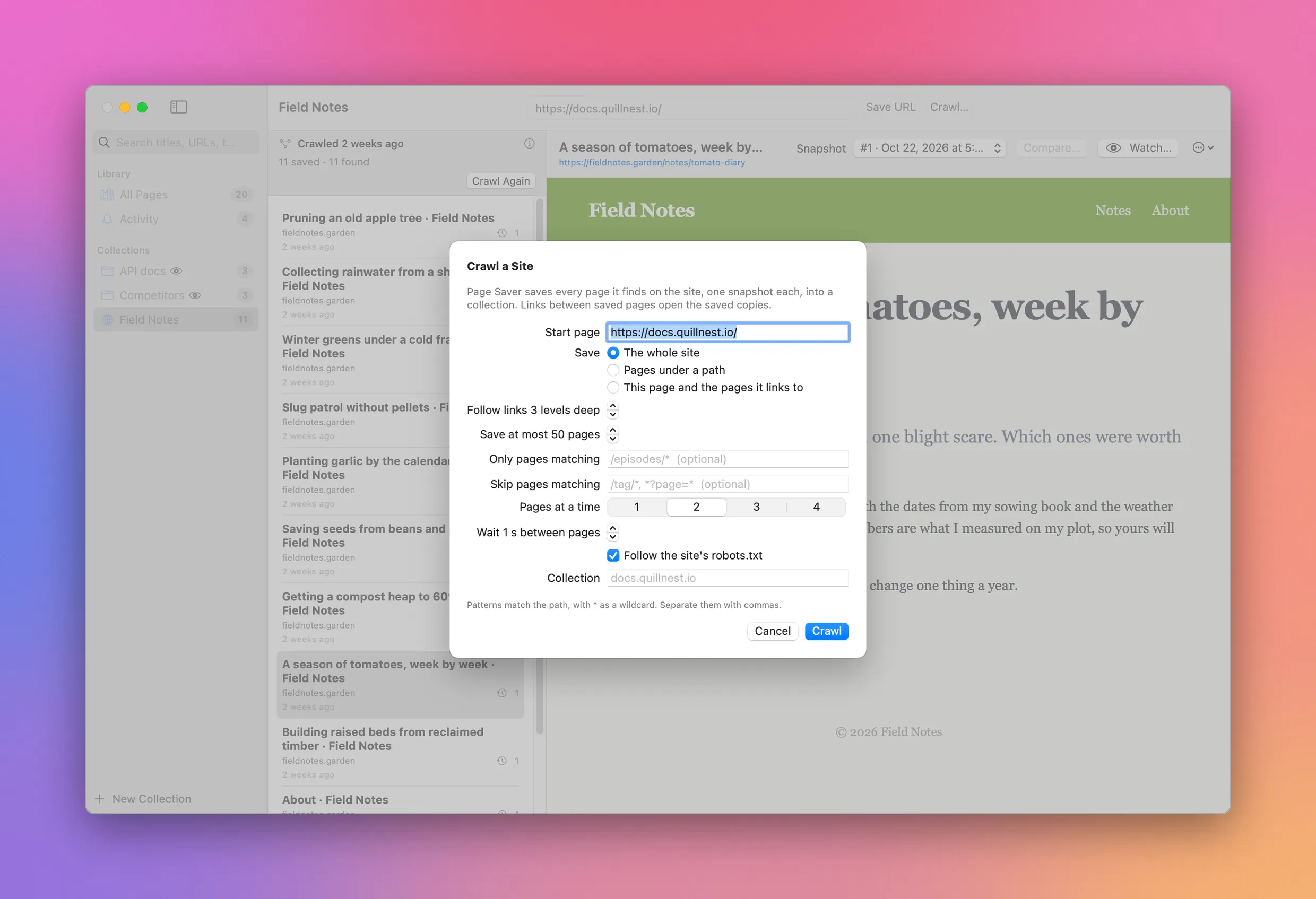
The crawler is polite by default: two pages at a time, a second between pages, and it follows the site’s robots.txt. A crawl you stop picks up where it left off.
Then you read the site offline. When you click a link to a page you saved, Page Saver opens the saved copy instead of going online.
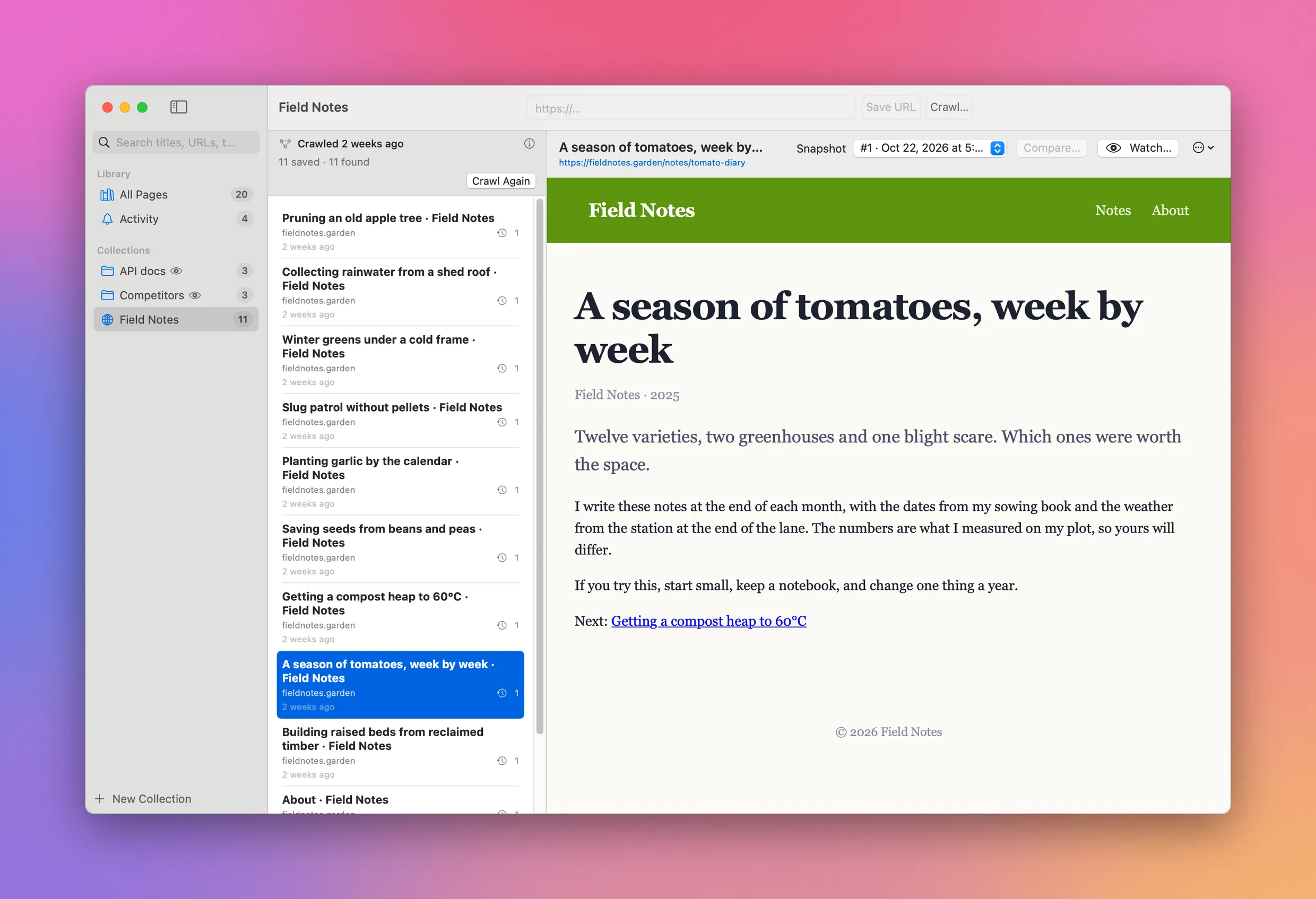
Crawl Again saves a new snapshot of every page, and picks up pages added to the site since. Watch the collection with Crawl the site again each time turned on and it happens on a schedule.
The command line
The pagesaver command lives inside the app and works on the same library, so the app picks up what it saves right away. Link it into your PATH:
ln -s "/Applications/Page Saver.app/Contents/MacOS/pagesaver" ~/.local/bin/pagesaverpagesaver save https://kettlefox.co/pricing --collection Competitors
pagesaver snapshots https://kettlefox.co/pricing
pagesaver watch add --collection Competitors --daily 09:00
pagesaver crawl https://docs.quillnest.io/ --scope path --path /api/ --max 50
pagesaver search "rate limit"Run pagesaver to see every command. pagesaver capabilities describes them for an agent.
How a page is saved
Page Saver downloads every stylesheet, image, font and icon on the page and puts it inside the HTML file as a data URI. Scripts and event handlers are removed, and a content security policy blocks any network request left in the file, so opening a saved page never calls home. Web components keep their content.
Each snapshot also records the HTTP status, the URL after redirects and a hash of the page text. That’s how a check tells “no change” from “changed” without saving a copy every time.
Everything stays on your Mac, in ~/Library/Application Support/PageSaver: a SQLite index with full-text search, and one HTML file per snapshot. There’s no account and no server.
What to know before you buy
Page Saver needs macOS 14 Sonoma or later, and runs on Apple silicon and Intel Macs.
The Safari extension is off until you turn it on in Safari › Settings › Extensions. The first time you save a page, Safari asks for permission: pick Always Allow on Every Website, because the extension downloads images and fonts from other domains.
The Chrome extension isn’t in the Chrome Web Store. You load it from the extension/chrome folder of the source zip, with Load unpacked in chrome://extensions, and run pagesaver install-chrome-host once so Chrome can hand pages to the app.
“A different site”, for the moved and taken-over checks, means a different registrable domain. Page Saver knows the common multi-part suffixes like co.uk and github.io, but not the full Public Suffix List.
Page Saver isn’t sandboxed, so it can share its library with the command line tool. That’s also why it isn’t on the Mac App Store.
What you get
$20 once, tax included. You get the notarized Mac app with its Safari extension, the Chrome extension, the pagesaver command and the full source under the MIT license.
After you pay, your Polar receipt has a license key and two downloads: the app zip and the source zip. Unzip the app and drag it to your Applications folder. It’s signed with my Apple Developer ID and notarized by Apple, so it opens like any other app you download.
Enter the license key in Page Saver › License… to turn on automatic updates. A key works on 3 Macs. Once a day, Page Saver checks for a new version, shows what’s new, and installs it with Install and Relaunch. Your receipt always has the latest app and source too. There’s no subscription.